On this page
A customer support funnel is the structured path a customer takes from the moment they need help until their issue is resolved and beyond. For support team leads, SaaS founders and operations managers, it's the operational blueprint that determines whether tickets get solved quickly or customers get frustrated and leave.
Who is this for? Support managers who want to reduce ticket volume, founders building their first support system and teams scaling past 500 tickets per month.
When to use it? When you're designing a new support workflow, fixing a leaky system where tickets fall through the cracks, or evaluating software to automate parts of your support.
When NOT to use it? If your team handles fewer than 50 tickets per month, a simple shared inbox with manual routing is sufficient. Overcomplicating a funnel too early can create more friction than it solves.
Quick Answer
- Definition: A customer support funnel is a structured path from problem to resolution that includes self-service, AI triage and human escalation.
- Core stages: Awareness, Self-Service, Intent, Interaction and Outcome.
- Where AI fits: Best at the top for high-volume, low-complexity tickets (password resets, order status, FAQs).
- Where humans are essential: Emotional, complex, or context-heavy issues where empathy matters.
- Key metric: First-contact resolution rate. If it drops below 70%, your funnel has a bottleneck.
Customer Support Funnel Meaning: Why It's Not Just a Pretty Diagram
A customer support funnel is the structured path a customer follows from the moment they need help until their issue is resolved (and beyond). It's more than a flowchart; it's your system for triaging, escalating and closing tickets efficiently, ideally while keeping customers happy and retention high. Without one, you're just reacting to emails one at a time, which is a recipe for burnout and leaky buckets.
- Maps every touchpoint a customer hits when they have a problem, a question, or a complaint.
- Distinguishes between self-serve, AI-assisted and human-resolved tiers.
- Prevents tickets from falling through the cracks and ensures consistent follow-up.
- Connects directly to churn rate: a leaky funnel means frustrated customers who leave.
- The best funnels are proactive; they catch frequent issues before they reach support.
A customer support funnel is not a diagram you hang on the wall. It's the operational system that determines whether a customer gets help in 30 seconds or 30 minutes and whether they stay or leave.
The 5 Core Stages of a Customer Support Funnel With Real Examples
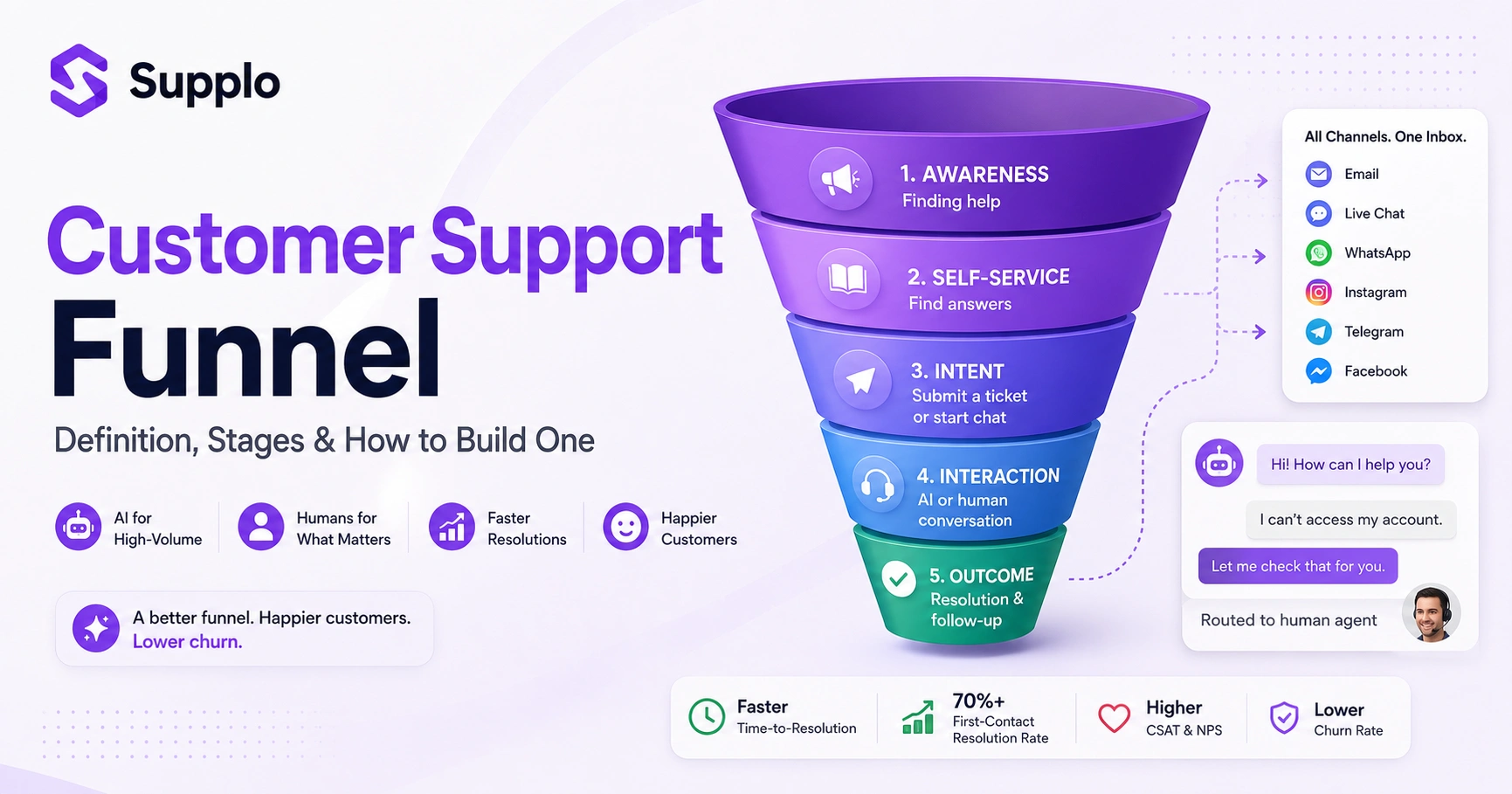
Every customer support funnel has roughly five stages: Awareness (finding help), Self-Service (trying to fix it themselves), Intent (submitting a ticket or chat), Interaction (the actual conversation) and Outcome (resolution or escalation). The magic is in the handoffs, moving from an AI chatbot to a human agent without making the customer repeat their life story makes or breaks the experience.
- Awareness: Customer lands on your help center, FAQ page, or WhatsApp number. Example: A user opens your support widget from your website.
- Self-Service: They search your knowledge base or trigger an automated reply. Example: They find an article titled "How to reset your password."
- Intent: They decide to fill out a contact form or start a live chat. Example: The article didn't solve their problem, so they clicked Chat with us.
- Interaction: An agent (human or AI) begins troubleshooting. Example: AI agent asks for their account email and verifies the issue.
- Outcome: Ticket closed, satisfaction survey sent, or escalation to level-2 support. Example: Issue resolved, CSAT survey arrives 1 hour later.
The handoff from AI to human is the make-or-break moment in a customer support funnel. If the customer has to repeat themselves, you've lost the trust you built in the first three stages.
If your team handles WhatsApp or Telegram inquiries, a unified inbox like Supplo's Telegram support integration ensures every stage is covered in one place.
How to Build a Customer Support Funnel: From First Contact to Resolution and Beyond
Building a customer support funnel starts with mapping your most common ticket types, then designing a flow for each. You need to decide which issues a knowledge base article can solve. Which ones need a chatbot? Which ones require a human? Once your tiers are defined, you automate the easy stuff, route the hard stuff to the right team member and set up triggers that catch repeat issues before they snowball.
Checklist:
Identify your top 5 ticket categories (e.g., billing, login issues, feature questions, account setup, bug reports).
Build a knowledge base first; every funnel needs a self-serve layer. Use Supplo's knowledge base to get started.
Place your chatbot or AI agent at the most common drop-off points (e.g., before the contact form).
Set up escalation rules: If AI can't solve it in 2–3 turns, route to a human.
Measure time-to-resolution for each stage and optimize bottlenecks.
Troubleshooting tip: If your first-contact resolution rate is below 60%, your self-service layer isn't sufficient. Add more articles to your knowledge base before adding more agents.
Try building your first funnel today. Supplo's free 14-day trial gives you the shared inbox, AI agent and multichannel tools you need to design a real customer support funnel in one afternoon, no credit card required. Test with your team and see if your top ticket types actually route correctly. Start free at Supplo.
WhatsApp customer support integration is a great starting point for many teams, since most customers are already there.
Designing a Support Funnel That Doesn't Frustrate Your Customers
The best support funnels are invisible; customers shouldn't feel like they're being processed. Design decisions like reducing form fields, enabling chat history visibility and offering a talk to a human button without a maze of menus keep frustration low. A funnel designed for speed but without empathy will achieve high CSAT scores solely on speed, yet customers still leave.
- Limit intake forms to 3–4 fields; ask for the rest during the conversation.
- Always show an estimated wait time (or, better yet, a callback option).
- Let customers switch channels mid-conversation without having to restart.
- Avoid making customers repeat information when transitioning from AI to a human.
- Test your funnel yourself monthly: try to get support as a first-time user.
Pitfall to avoid: Don't hide the Talk to a Human button. If customers can't find it within two clicks, your funnel will tank CSAT scores.
Customer Support Funnel Best Practices for Fast-Growing Teams
As your team scales, your support funnel needs to adapt; what worked for 100 tickets a month will break at 1,000. Best practices include setting clear SLA rules for each stage, using macros and saved replies for common answers and letting AI handle the triage so humans handle the hard stuff. Also, resist the urge to build a complex funnel if you're still a small team; simplicity wins early.
- Create tiered SLAs: urgent tickets (billing issues) vs. general questions.
- Use a shared team inbox to prevent duplicate responses.
- Automate tagging and routing by keywords in the ticket subject.
- Reassess your funnel every 3 months; as your product grows, ticket types change.
- Don't over-automate too early; your early customers might want actual conversations.
Automating Your Customer Support Funnel Without Losing the Human Touch
Automation in a support funnel isn't about replacing people; it's about removing grunt work, so your team can focus on conversations that matter. Automated triggers can tag tickets, send pre-written answers for known issues and route messages to the right department. The key is to build escape hatches that let customers reach a human fast when they need it, without jumping through endless bot hoops.
- Use automation for tier-0 answers: password resets, holiday hours and known bugs.
- Set up triggers for when to escalate automatically (e.g., negative sentiment detected).
- Never let an AI chatbot block a human request more than once.
- Automate follow-up surveys after ticket closure, but keep them short.
- Review automated replies monthly for accuracy and tone drift.
Automation should remove friction, not add it. If your customer has to talk to a bot for three minutes before they can type 'talk to a human,' you've built a wall, not a funnel.
A shared team inbox is critical here; it ensures no automated ticket gets lost in a silo and that humans can step in instantly.
AI in the Support Funnel: Where Chatbots Fit and Where They Don't
AI chatbots work best at the top of the funnel, handling FAQs, ticket triage and simple troubleshooting, but they struggle with emotional, complex, or context-heavy issues. A good support funnel places AI as the front door that opens automatically to a human when needed. The danger is treating AI as a cost-saver that closes doors rather than a router that opens the right ones.
- AI is excellent for high-volume, low-complexity tickets (e.g., order status, common errors).
- Don't force AI to solve every problem; know its limits and set fallback rules.
- Train your AI on your actual knowledge base, not generic internet data.
- Use sentiment analysis to detect anger or frustration and reroute those to a human immediately.
- Measure deflection rate honestly: not all resolved tickets are actually solved.
Self-Learning AI for Support: How It Keeps Your Funnel Running Without Constant Manual Updates
Self-learning AI improves automatically by analyzing past conversations and knowledge base updates, so your funnel doesn't degrade as you get new products, seasonal changes, or common customer questions. Instead of manually coding every answer, the AI learns from resolved tickets and evolves. This makes it especially valuable for fast-moving startups and e-commerce brands where ticket types shift quarterly.
- Learn from closed tickets: if a solution worked, it remembers that path.
- Updates its responses when you edit your knowledge base or FAQ.
- Reduces the time your team spends training and retraining a chatbot.
- Doesn't require a data science team to maintain.
- Avoids hallucinations when properly grounded in your actual content.
A self-learning AI agent is like having a support agent who never forgets a solution. It gets better every time a human closes a ticket, without needing a manual update.
This is exactly what Supplo's self-learning AI agent does: it learns from your knowledge base and past conversations to provide accurate answers.
Support Funnel Software: What to Look for When You're Ready to Buy
When choosing support funnel software, prioritize platforms that unify channels (email, chat, WhatsApp, social DMs), offer AI with real fallback routing and have transparent pricing without per-seat traps. The best software lets you build a funnel in one view, not stitch together five different tools. Evaluate based on: channel coverage, AI accuracy, ease of setup and whether the pricing scales fairly with your team.
Checklist for evaluation:
- Unifies public channels (WhatsApp, Instagram DMs, Telegram, Facebook Messenger) into a single inbox.
- AI can hand off cleanly to a human without losing context.
- Offers a free trial or demo to test the funnel design before buying.
- Avoids per-seat pricing models that punish you for growing your support team.
- Handles all your payment methods (including crypto and region-specific wallets).
For a practical example, Supplo's email ticketing system integrates seamlessly with live chat and social channels and our pricing page shows flat per-workspace pricing, no per-seat traps.
Customer Support Journey Map vs. Support Funnel: What's the Difference?
A customer support journey map is a broad narrative of every emotional and practical touchpoint a customer experiences; a support funnel is the tactical system used to triage and resolve issues. Think of the journey map as what happens and how it feels and the funnel as how we make it happen efficiently. Both are essential, but they serve different purposes: one for empathy, one for operations.
- Journey maps capture feelings, context and moments of friction.
- Funnels focus on routing, automation and resolution metrics.
- You should build a journey map first to understand what customers actually need.
- Then translate those insights into a funnel that fixes the pain points you found.
- Most teams skip the journey map and end up with a funnel that doesn't match reality.
A Simple Customer Support Funnel Template You Can Steal and Customize
A basic customer support funnel template has four layers: Inbound (where tickets come in), Triage (AI or auto-routing), Resolution (human or AI) and Follow-Up (survey or feedback loop). For most teams, start with a 3-tier system: Tier 0 (self-serve knowledge base), Tier 1 (AI agent handles 80% of incoming tickets) and Tier 2 (human escalations). From there, you refine based on your data.
Template structure:
- Layer 1 (Inbound): email widget, live chat, WhatsApp, Instagram DMs, Telegram, all in one inbox.
- Layer 2 (Triage): AI tags by intent, priority and language; routes automatically.
- Layer 3 (Resolution): AI resolves known issues; humans handle complex tickets.
- Layer 4 (Follow-Up): automated CSAT survey sent 1 hour after closing.
Review weekly. Check what Tier 1 tickets are actually Tier 2 in disguise; those are product improvement opportunities.
Customer Support Funnel Strategy: Turning Support from a Cost Center into a Growth Driver
A smart support funnel strategy treats every resolved ticket as a retention opportunity and every escalation as a product improvement signal. By analyzing funnel drop-off points and common ticket themes, you can spot product bugs, documentation gaps, or onboarding friction before they spiral out of control. Good support isn't just reactive triage; it's product research, marketing intelligence and customer insight rolled into one.
- Use support data to identify the top 3 causes of tickets: product or UI problems.
- Measure time-to-resolution and first-contact resolution as leading retention metrics.
- Route VIP customers (high lifetime value) to dedicated agents automatically.
- Turn common answers into public knowledge-based articles and reduce ticket volume in the long term.
- Align support metrics with business goals: faster support = higher NPS = lower churn.
The best customer support funnel isn't the one that closes tickets fastest. It's the one that tells you why those tickets were opened in the first place.
Key Takeaways
- A customer support funnel is a structured system for triaging, resolving and following up on tickets.
- The five core stages, Awareness, Self-Service, Intent, Interaction and Outcome, define the path from problem to resolution.
- AI excels at the top of the funnel for high-volume, low-complexity tickets; humans handle emotional and complex issues.
- Effective funnels include escape hatches so customers can reach a human without frustration.
- Measuring first-contact resolution rate and time-to-resolution is essential for optimization.
- Self-learning AI reduces the need for constant manual updates, keeping your funnel efficient as your product evolves.
FAQ
What is a customer support funnel?
A customer support funnel is the structured path a customer follows from initially seeking help to having their issue resolved. It typically includes self-serve options, automated triage, human escalation and post-resolution follow-up. The goal is to solve issues quickly while keeping customers happy and your team efficient.
What are the stages of a customer support funnel?
The five core stages are: Awareness (finding help), Self-Service (using a knowledge base or FAQ), Intent (submitting a ticket or starting a chat), Interaction (the actual support conversation) and Outcome (resolution or escalation). Some funnels add a Follow-Up stage for surveys and feedback.
How is a support funnel different from a journey map?
A support funnel is a tactical system for triaging and resolving tickets, while a journey map captures the broader emotional experience of a customer. Funnels are about efficiency and routing; journey maps are about empathy and context. Both are useful, but they answer different questions.
Can AI really handle customer support without human backup?
AI works best for high-volume, low-complexity tickets, such as password resets, order status, or common FAQs. For emotionally charged or context-heavy issues, human backup is essential. The best approach is an AI agent that handles the easy stuff and hands off cleanly when it can't solve the problem.
How many stages should my support funnel have?
Start with three to four stages: Self-Service, AI Triage, Human Escalation and Follow-Up. More stages can slow things down, especially for small teams. As you grow, refine the funnel with additional tiers for VIP customers or specialized teams.
What software do I need to build a customer support funnel?
You need a platform that unifies all your support channels (email, live chat, WhatsApp, social DMs), has AI automation with fallback routing and doesn't charge per seat. Supplo is one option that brings all channels into one shared inbox and offers self-learning AI at a flat workspace price.
How is my support funnel working?
Track three key metrics: time-to-resolution, first-contact resolution rate and customer satisfaction score (CSAT). A well-functioning funnel will see fewer escalations over time, faster average response times and stable or improving CSAT. If any metric worsens, review your routing rules or AI training.
Compliance: Supplo is not affiliated with any app or website. Please follow each app's terms and local regulations.