On this page
A support ticket reopens when a customer brings the same issue back to your team because they felt the initial resolution was incomplete or incorrect. This common challenge signals underlying issues in your support process, leading to increased costs, frustrated customers, and lower agent morale.
Here's the thing: a reopened ticket isn't just a nuisance. It's a flashing red warning light that something in your support system needs attention. And honestly? Most reopens are preventable if you know what to look for.
This guide is for customer support managers, team leads, and anyone responsible for customer satisfaction and operational efficiency in a support organization. It will help you identify the root causes of reopens and provide actionable strategies to minimize them, leveraging data, process improvements, and AI automation.
You should implement these strategies when your support team is consistently facing a high volume of reopened tickets, your customer satisfaction scores are dipping, or agent burnout is a concern due to repetitive work. These methods are less critical if your reopen rate is already below 5% and your customers consistently report full resolution.
Quick Answer
- Audit closed tickets: Regularly review reopened tickets to identify recurring incomplete resolutions or communication gaps.
- Prioritize First-Contact Resolution (FCR): Equip agents with the tools and authority to resolve issues completely on the first interaction.
- Utilize AI: Deploy AI agents to quickly and accurately handle common inquiries, ensuring consistent, self-service resolutions.
- Maintain a dynamic knowledge base: Ensure it stays current and learns from customer interactions to provide up-to-date answers.
- Track specific metrics: Monitor reopen rate, reopen time, and the distribution of reopen reasons to pinpoint and address issues effectively.
Why Are Support Tickets Reopened? Understanding Ticket Reopen Patterns
A ticket reopens when a customer returns with the same issue because it wasn't fully resolved the first time. Understanding ticket reopen patterns means spotting whether the root cause is a rushed response, an incomplete fix, or a lack of follow-through on your end.
One common trap is the quick-close mentality, where tickets are closed prematurely to meet speed metrics, leaving customers unsatisfied. Another is the wrong channel pattern: a customer provides additional context via a different channel (e.g., email after a chat), but that context is never merged into the original ticket. This lack of conversation context frequently leads to frustration and reopens.
The knowledge gap loop occurs when an agent lacks the information needed to solve the problem, leading to a workaround that ultimately fails. Finally, the escalation shadow pattern emerges when an issue that should have been escalated is closed by a junior agent, only to return as a higher-severity ticket. Recognizing these patterns is the first step toward effective prevention.
The True Cost of a High Ticket Reopen Rate
A high ticket reopen rate doesn't just annoy customers, it bleeds money. Every reopened ticket costs you the time to the initial resolution plus the time to handle it again, often with a more frustrated customer on the line.
Research shows that higher effort directly correlates with churn, which explains why the customer effort score drops as reopen rates climb. Beyond customer churn, agent morale suffers as they feel like they're running in place, solving the same problems twice. Escalation costs spike because reopened tickets often require senior staff, who cost more per hour. Ultimately, your reputation can suffer as customers publicly talk about being passed around or never being helped. You can find pricing that scales with your team to manage these costs effectively.
How to Analyze Support Ticket Reopen Reasons with Your Data
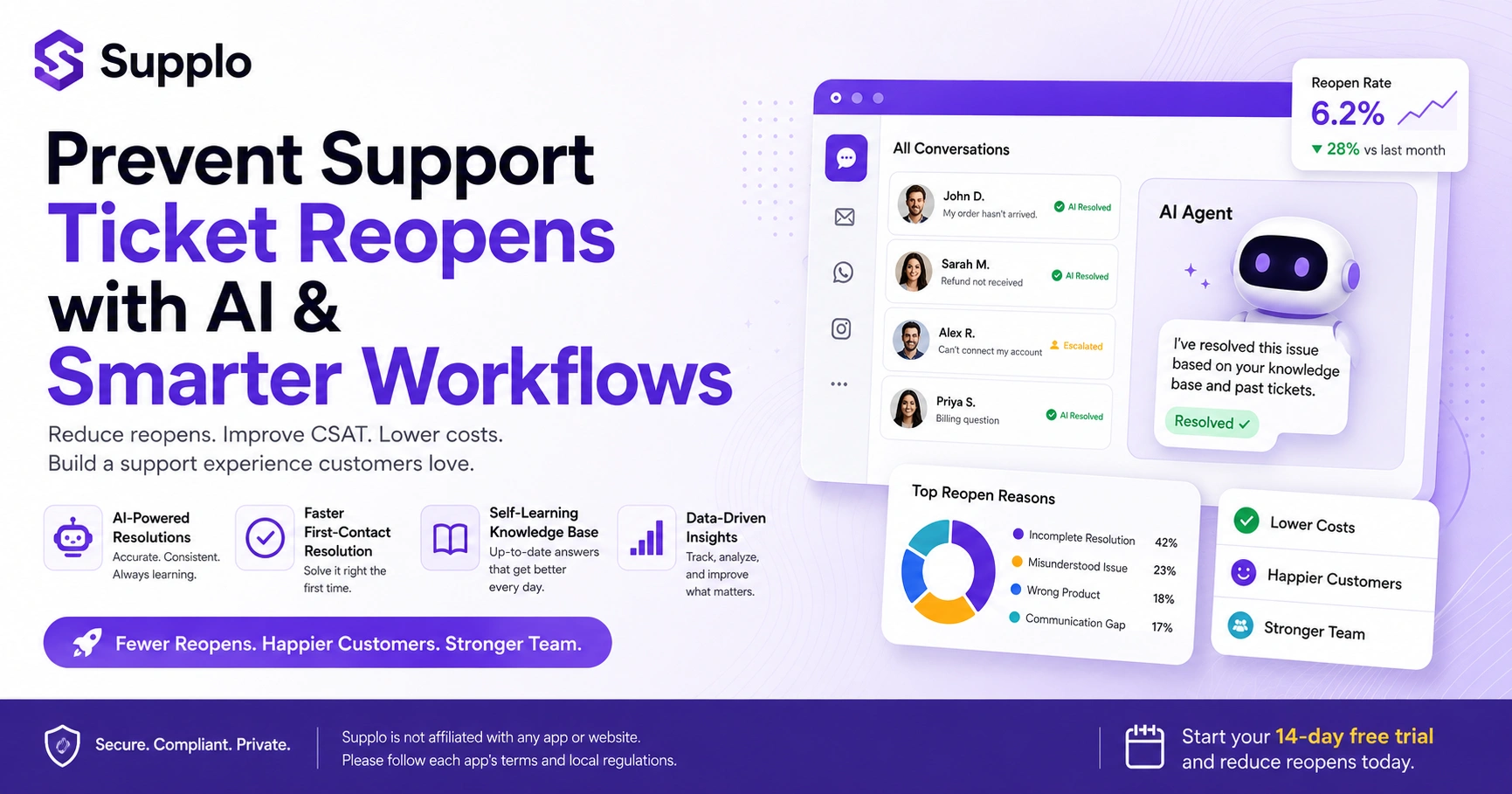
Analyzing support ticket reopen reasons starts with tagging: apply a reopen reason tag every time a ticket is reopened. Common reasons include incomplete resolution, misunderstood issue, wrong product, and timeout after fix. Run a monthly report to see which tag appears most often.
To get started, tag your closed tickets with a reason code your team agrees on. Next, build a simple dashboard that tracks reopen rate by agent, product area, and time of day. Look for clusters: is one product category seeing higher reopens? That's a strong indicator of a knowledge base or training gap. Consider surveying the customer upon closure with a simple Did we fully solve your issue? for 1-click feedback that catches potential reopens before they happen.
Common Causes of Ticket Reopening and How to Fix Them
The most common causes of ticket reopening are incomplete fixes, poor communication, and a mismatch between the issue described and the solution provided. Once you identify which cause is driving your numbers, you can implement a targeted fix, as a checklist agents must complete before closing or a mandatory verify-with-customer step.
- Incomplete fixes: An agent only addresses the symptom, not the root cause. Fix: Require a field for a root cause identified before closing.
- Poor communication: The customer doesn't understand the resolution. Fix: Use a summary template at the end of every ticket to ensure clear closure confirmation.
- Mismatch: The customer described a complex issue, but the agent took a shortcut. Fix: Mandate a full problem statement readback or a closure confirmation process.
- Lack of ownership: The customer is told to wait for level 2, but hears nothing back. Fix: Assign ownership during handoffs to ensure a clear escalation path.
How to Prevent Ticket Reopening with Better First-Contact Resolution
First-contact resolution (FCR) is the single biggest lever for reducing reopens. If the customer's issue is fully resolved in one interaction, they have no reason to come back. FCR doesn't mean rushing; it means having the right information and authority at the first touchpoint.
Equip your agents with an AI agent that can pull context from past conversations so they don't ask repetitive questions. Additionally, give agents the authority to go beyond a script, including offering discounts or credits, if needed to close the issue. Train agents to actively listen for the real problem behind the ticket; often, a customer describes a symptom rather than the cause. Finally, set a no close without confirmation rule: always ask Does this solve everything for you? before marking a ticket as resolved. Utilize a shared team inbox for full context across all channels.
Using AI to Reduce Ticket Reopens: AI-Powered Ticket Handling and Automation
Using AI to reduce ticket reopens means deploying an AI agent that learns from your knowledge base and past resolved tickets to answer accurately the first time. It doesn't guess; it resolves a high percentage of incoming tickets automatically and hands off cleanly to a human when it can't. That consistency reduces the guessing game that causes reopens.
An AI agent that analyzes intent rather than just keyword matching understands what the customer actually needs. With automated resolution and clear escalation rules, if the AI cannot resolve an issue, it hands it off with full context, ensuring the human agent doesn't start from scratch. The self-learning capability means the more conversations it processes, the better it becomes at predicting the right answer. Built-in language translation also supports customers in any language, significantly reducing miscommunication-related reopens. The flat $0.04 per resolution pricing means you're not penalized for automating more tickets.
How to Minimize Reopened Tickets with a Self-Learning Knowledge Base
A self-learning knowledge base keeps your answers relevant and up to date without manual rewriting. When a customer asks a question, the AI agent pulls from your most current knowledge base articles. If the AI's answer is repeatedly rejected or the ticket reopens, the knowledge base learns and updates itself.
Do not treat your knowledge base as static; update it based on ticket reopen patterns. Allow your AI agent to surface articles directly in chat, so the customer can self-resolve before a ticket is even opened. Use analytics to see which articles are most often cited in reopened tickets (those need rewriting). Moreover, enable your team to flag and edit articles in real time, directly from resolved tickets, so your knowledge base learns from conversations.
Tracking the Right Support Ticket Reopen Metrics
The most important support ticket reopen metrics are the reopen rate (the percentage of closed tickets reopened), the reopen time (how quickly tickets are reopened after closure), and the reopen reason distribution. Track these weekly, not just monthly, and compare them across channels, agents, and product areas.
Tracking reopen rate by agent can reveal training gaps, while comparing reopen rates by channel (e.g., WhatsApp tickets vs. email) might suggest a need for better handoff practices. Reopening time is crucial: if tickets reopen within 24 hours, you have a first-contact resolution problem; if after 7 days, it's more likely a product stability issue. Comparing your rate to industry benchmarks, such as those in an industry benchmark report, is useful, but focus primarily on your own trend over time.
A Complete Plan to Prevent Ticket Reopens and Reduce Support Ticket Escalations
A concrete plan to prevent ticket reopens involves five steps: (1) audit your last 100 reopened tickets for patterns, (2) implement a mandatory verification step before any ticket closure, (3) deploy an AI agent to handle common issues with high accuracy, (4) update your knowledge base based on reopen data, and (5) train your team on complex handoffs.
- Week 1: Audit, tag, and categorize the last 100 reopened tickets.
- Week 2: Process Change. Implement a verify-and-close checklist for every agent, focusing on confirming closure.
- Week 3: Tooling , Set up AI automation for the top 5 most common reopen causes to improve response consistency.
- Week 4: Knowledge Base Refresh, Rewrite top articles that correlate with reopens, ensuring they reflect current solutions.
- Week 5: Training, run a workshop on handoff best practices using real examples, and improve your team's escalation path. You can start a free 14-day trial to implement these changes.
Key Takeaways
- Reopens are preventable: Most ticket reopens stem from identifiable root causes within your support process.
- Data is your guide: Use tagging and analytics to understand why tickets reopen, not just that they reopen.
- First-Contact Resolution (FCR) is key: Equip your team with the knowledge and authority to resolve issues completely on the first interaction.
- AI provides consistency: An AI agent can handle high-volume, repetitive queries accurately, freeing human agents for complex issues.
- Continuous improvement: Your knowledge base, processes, and agent training should evolve based on reopen patterns.
- Cost savings are real: Reducing reopens lowers operational costs and increases customer retention.
Take Control of Your Ticket Resolution Process
The best way to prevent support ticket reopens is to stop guessing and start using data. Whether you improve your internal processes, deploy an AI agent for consistent resolution, or rebuild your knowledge base, the key is consistency. Tools like Supplo give you a single workspace for email, chat, WhatsApp, Instagram DMs, and more, so your team has full context every time.
You don't need to overhaul everything at once. Pick one cause of reopens and fix it this week. Measure the impact, then move to the next cause—small steps compound. When you're ready for an AI agent that learns from your team and resolves tickets at a flat $0.04 per resolution, Supplo is here. See how Supplo compares to Zendesk for a transparent approach to AI customer support, or see how Supplo compares to Intercom.
FAQ
Is it legal to use AI to close support tickets automatically?
Yes, it is legal as long as you comply with data privacy regulations (such as GDPR or CCPA) and clearly inform customers when they interact with an AI agent. Supplo is not affiliated with any app or website. Please follow each app's terms and local regulations.
Why do customers reopen tickets even when I provide a complete solution?
Often, the solution is complete from your perspective but incomplete from the customer's. They may have applied the fix incorrectly, or they may have had a secondary problem they didn't mention. A quick follow-up survey or verification step can catch this before closure.
What is a good ticket reopen rate?
Industry benchmarks vary, but a reopen rate of 5–10% is considered healthy. A rate above 15% indicates a systemic problem with your resolution process. Your goal should be to trend downward month over month, not just hit a number.
How can I tell if a reopened ticket is the customer's fault or my team's?
Tag the reason clearly during the reopen. If the customer ignored instructions or didn't apply the fix, it's a communication gap. If the fix itself was wrong or incomplete, it's a resolution gap. Both are your team's responsibility to improve, since the customer shouldn't need to be an expert.
Does an AI agent guarantee zero ticket reopens?
No. AI reduces reopens by providing accurate, consistent answers, but no system can prevent every reopen, especially when the issue involves a product bug or a customer's unique environment. The goal is to minimize reopens, not eliminate them.
What should I do if a customer reopens the same ticket more than twice?
Escalate the ticket immediately to a senior agent or a subject matter expert. Assign a single point of contact, schedule a direct follow-up, and document the root cause so your team can prevent it from happening to another customer.
Can I use a free AI tool to reduce ticket reopens without paying?
You can start with a free trial to test the impact. Supplo offers a 14-day free trial so you can measure reopen reduction before committing. There's no forever-free tier that offers meaningful automation.
Compliance line: Supplo is not affiliated with any app or website. Please follow each app's terms and local regulations.