On this page
Let's be real for a second. "Cheap" in the customer support world usually carries some baggage. Either you're paying per seat (which quietly balloons as you hire), stuck on a free plan that's been stripped of anything useful like AI, or locked into a contract that magically doubles after year one.
The real catch? It's not the price tag itself; it's what you sacrifice. Reliability. Automation. Clean team workflows.
When you're hunting for customer support tools under $50 per month, you need predictable pricing, not missing features.
Here's what often trips people up:
- Per-seat pricing is the silent budget killer; it punishes you for scaling your team. Add three agents? That's $150 more a month.
- Free plans look tempting until you realize they've stripped out the shared inbox, AI agent, or multichannel support you actually need.
- Unlimited cheap plans aren't always unlimited; some cap messages, active contacts, or resolution volume.
- Low-cost tools without a shared inbox create silos. Your email team doesn't see what chat answered. Customers repeat themselves. Resolution times crawl.
Cheap shouldn't mean chaotic.
The Number 1 Budget Help Desk Software for Startups Under $50
If you're a startup watching every dollar (and honestly, who isn't?), the best help desk for startups under $50 isn't some stripped-down freebie. It's a tool that offers a flat workspace rate with zero per-seat surprises.
That's exactly what Supplo does.
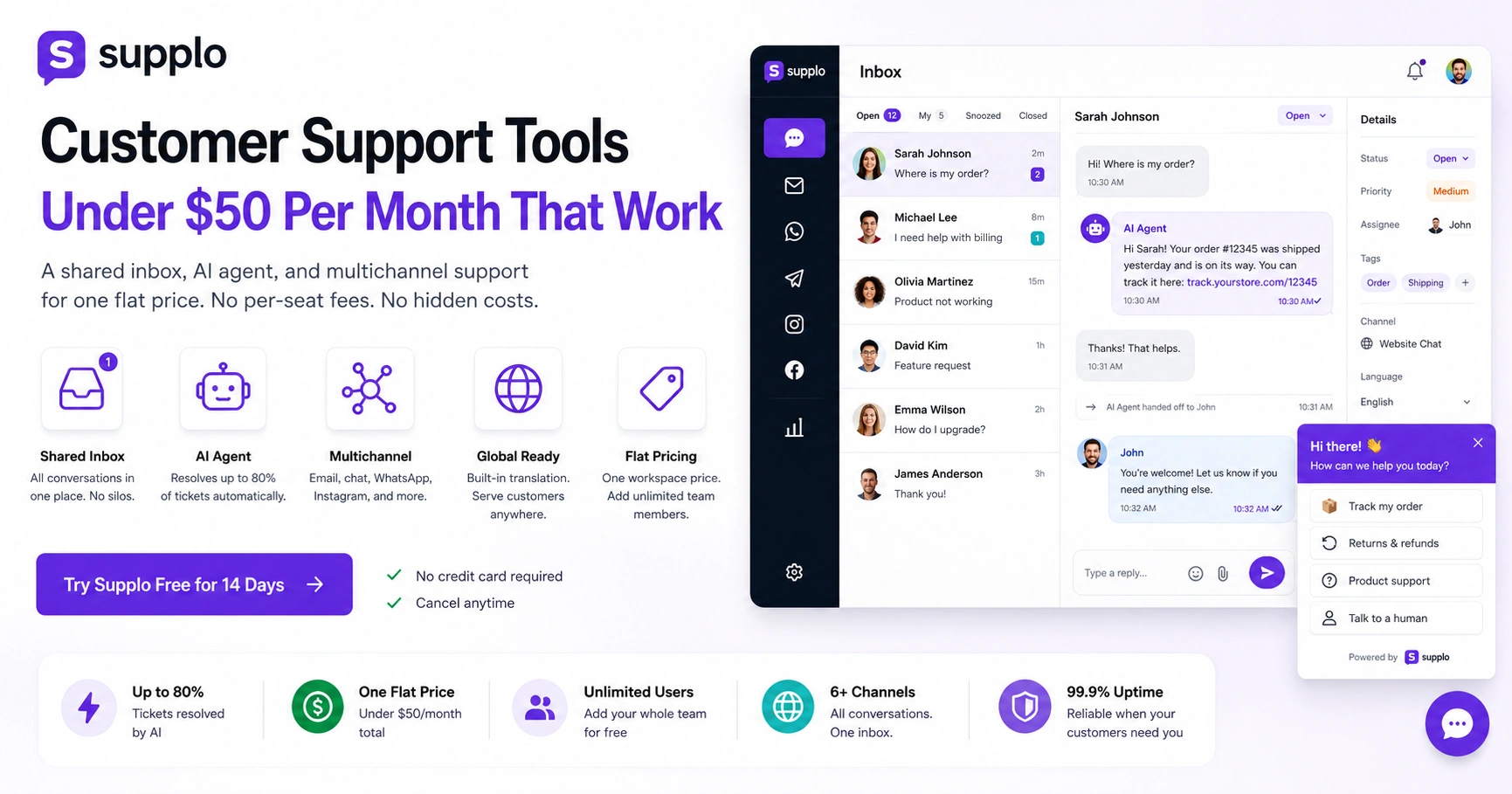
You get a shared team inbox, a self-learning AI agent and multichannel automation across email, chat, WhatsApp, Telegram, Instagram and Facebook, all for one flat price. Your bill stays under $50 even as your team expands. And the AI handles tickets without adding more agents to the cost.
Here's why that matters:
- A flat workspace price means you add your whole team without a price hike. No "oh, you hired someone? That'll be extra."
- The AI agent learns from your knowledge base and past conversations. It gets smarter over time, not dumber.
- Multichannel support unifies email, website live chat and social DMs into a single, clean, thread-based view- no tab-hopping.
- Built-in translation lets you support global customers without hiring multilingual staff. Pretty handy when your customer base spans 10+ countries.
Low-Cost Live Chat Software That Feels Premium
Here's the thing about most low-cost live chat software under $50: it forces you to choose between a decent chat widget and an AI that actually helps. Pick one, sacrifice the other.
Supplo doesn't make you choose.
You get a fully customizable website chat widget plus an AI agent that resolves up to 80% of tickets automatically. And when the AI can't handle something? It hands off cleanly to a human. No lost context. No angry customers repeating themselves.
The shared inbox keeps everything in one place, so nothing falls through the cracks.
Here's what that looks like in practice:
- The chat widget embeds on any page and matches your brand: colors, position, greeting messages- all customizable without touching code.
- AI handles common questions before they ever reach your team. That cuts response times from minutes to seconds.
- The inbox threads together conversations from your website, email and social channels: one view, multiple sources.
- You're in control; set exactly when the AI handles a ticket and when it escalates to a human.
The Best Affordable Ticketing System for Lean Teams
Let's be honest, an affordable ticketing system shouldn't mean losing visibility or drowning in email threads. You need structure, not complexity.
Supplo's inbox acts as a full ticketing system. Every customer message becomes a thread you can assign, tag, prioritize and resolve. It's built for teams that need organization without the overhead (or cost) of enterprise tools.
Here's how it works:
- Turnkey email-to-ticket conversion so you never miss a customer query. Emails become tickets automatically.
- Assign tags like billing, bug, or feature request for easy filtering. Know exactly what's coming in.
- Internal notes let your team communicate within a ticket. No more "what did you discuss in Slack about this customer?"
- SLA rules and collision detection prevent double replies or dropped tickets. Your customers won't get two different answers from two different agents.
Affordable CRM for Small Business vs. Help Desk: Do You Need Both?
Probably not. For most small businesses, what you actually need is a help desk that tracks conversations, not a full CRM that tracks sales pipelines. Affordable CRM platforms for small businesses are great for managing leads, but they can't handle high-volume support tickets or real-time chat.
Think about it this way:
- Help desks store conversation history, so you know what a customer already tried. No repeating.
- CRMs are optimized for sales tracking, not support ticket resolution. They're designed for deals, not conversations.
- Many teams add a CRM later and keep a dedicated help desk for actual support. They serve different purposes.
- A help desk with an AI agent resolves repetitive tickets without taking up agent time. A CRM can't do that.
If your focus is on resolving customer issues quickly and cheaply, a help desk with a shared inbox and AI automation is more important than a CRM with built-in support.
What to Look for in Live Chat Software Under $50 Per Month
Shopping for live chat software under $50 per month? Here's your non-negotiable checklist:
- A fully functional chat widget, not a stripped-down version that looks ugly on mobile.
- A shared team inbox, so everyone sees the same conversations, no silos.
- Multiple channel support, not just website chat. Email, WhatsApp, Instagram, Facebook, Telegram.
- No hidden per-agent costs; your $50 should buy full capability, not a trial.
Something like Supplo gives you all that at a flat rate. Your $50 buys the whole package.
Before you commit, ask these questions:
- Is there a per-agent fee? Your bill should stay flat as you add teammates.
- Does the chat widget work across mobile and desktop? No lag, no resizing issues.
- Is AI automation included? Or is it an upsell for an extra fee?
- Are multichannel features native? Or do you need third-party integrations that cost extra?
The Trap: Cheap Real-Time Chat Support
Teams pick the cheapest real-time chat support tool, only to discover it sacrifices uptime, response speed, or message delivery.
If your chat widget lags or misses messages, you're losing customers, not saving money.
Reliability in cheap real-time chat support means:
- Consistent message delivery, no dropped chats or delayed notifications.
- AI that works when you need it, not just during business hours.
- Clean handoffs to humans, context preserved, no repeats.
- No dedicated IT team required; it should just work.
A few practical tips:
- Test the widget on mobile and desktop before committing to a subscription. Walk through the full flow.
- Check for historical uptime SLA language; if they don't promise 99.5%+, move on.
- Real-time means sub-second delivery, not buffering or delayed notifications.
- A reliable platform lets customers see when an agent is typing, builds trust during chat.
Affordable Website Chat Widget Options That Scale With You
An affordable website chat widget needs to be embeddable within minutes, match your brand and scale with your traffic, without requiring a price upgrade during your first traffic spike.
Supplo's widget is lightweight, customizable and connects directly to the AI agent and shared inbox. Scaling from 10 to 10,000 conversations doesn't mean re-platforming or paying more.
Here's what that setup looks like:
- Embed via a JavaScript snippet; it works with any site builder or CMS. Shopify, WordPress, Squarespace, custom HTML.
- Customize colors, position and greeting messages without touching code. Drag, drop, done.
- The widget triggers the AI agent automatically for common questions. Customers get answers instantly.
- Customer conversations flow from the widget into the same inbox as email and social DMs. One unified view.
How to Avoid Hidden Fees in Budget Customer Service Chat Tools
Hidden fees are everywhere in budget customer service chat tools. Here's where they usually hide:
- Per-agent pricing, the most common hidden cost. You add one person, your bill jumps.
- Support tiers: the basic plan doesn't include live chat or AI. That's extra.
- AI add-ons, the AI is available but costs $30/month more.
- Message limits: unlimited until you hit 1,000 chats a month.
Always read the pricing page for these line items:
- Additional user fees
- Additional contact charges
- AI resolution upsells
- Premium support tiers
Supplo keeps it simple: flat workspace pricing. One price. No per-seat costs. No hidden AI charges. No surprise upgrades.
Some specifics:
- Watch for starter plans that charge extra for live chat or AI automation. That's not a starter plan; that's a tease.
- Check whether ticket history or conversation storage counts against a limit. Some tools delete old conversations after 30 days on the cheap plan.
- Some tools charge per resolution, $0.99 each. That adds up fast if you're busy.
- Supplo charges a flat $0.04 per AI resolution, not per seat or per chat. Volume pricing that actually makes sense.
Quick Setup: Getting Going With Low-Cost Live Chat for Websites Today
Getting started with low-cost live chat for websites doesn't have to take weeks. Most modern tools, including Supplo, let you add the chat widget to your site in under 10 minutes.
Here's your quick-start checklist:
- Sign up and add your website URL to generate a chat widget snippet.
- Paste the snippet into your site's HTML, or use a plugin if you're on Shopify or WordPress.
- Import your FAQ or help articles into the knowledge base so the AI has answers to work with.
- Connect your support email, WhatsApp, Telegram, Instagram and Messenger, all in under 30 minutes.
- Test the flow: ask a question via the widget, confirm the AI answers, then check the inbox for handoffs.
That's it. No coding required. No weeks of setup. You live by lunch.
The One Cheap Tool We’d Bet On and Why
If you're looking for customer support tools under $50 per month that don't trade functionality for price, Supplo is the practical choice.
You get:
- A shared inbox
- An AI agent
- Multichannel support
- Transparent pricing
All under $50. No per-seat creep. No missing features. No hidden costs.
You can start for free for 14 days, see if the AI actually resolves your tickets and cancel anytime if it doesn't work for you.
Here's the bottom line:
- Flat workspace pricing fits teams of any size without surprise bills.
- AI resolves tickets from your knowledge base and past conversations- no setup required.
- Unifies email, web chat, WhatsApp, Telegram, Instagram and Facebook into one inbox.
- No contracts, no commitment beyond the month you use it.
Key Takeaways
- Cheap customer service software doesn't have to mean missing features. Look for flat workspace pricing, AI automation and multichannel support without per-agent fees.
- The best help desk for startups under $50 includes a shared inbox, an embeddable chat widget and an AI agent that resolves tickets using your knowledge base.
- Avoid hidden costs from per-seat pricing, AI upsells and resolution fees that spike with volume; choose a tool with transparent flat rates.
- Supplo offers all this starting at a flat workspace rate under $50, with a 14-day free trial.
FAQ
Is cheap customer service software reliable, or will it break when traffic spikes?
Reliable budget tools use cloud infrastructure that scales automatically. Before committing, verify the uptime SLAs and ensure the tool doesn't limit concurrent chats or slow down during peak hours. Supplo runs on a reliable cloud stack and doesn't cap conversations.
Can I use affordable live chat software for my eCommerce store?
Yes. Affordable live chat tools with embeddable widgets work with Shopify, WooCommerce, Squarespace and custom HTML sites. The best options, like Supplo, also integrate your store's order and FAQ data into the AI agent so it can answer shipping and returns questions.
Do I need a separate CRM if I use a budget help desk?
Not for support. Help desks handle tickets, AI automation and chat; that's what you need for customer service. If you also need sales pipeline tracking, consider adding a CRM later, but don't force one tool to do both badly.
How do I keep costs low if my team grows from 2 to 10 people?
Choose software with flat workspace pricing instead of per-agent pricing. Supplo charges per workspace, not per person, so adding teammates doesn't increase your monthly bill, making it one of the best help desks for startups under $50.
Will cheap live chat software support WhatsApp and Instagram?
Some budget tools do. Supplo natively supports WhatsApp, Telegram, Instagram DMs, Facebook Messenger and email, all in one inbox, so you're not paying extra per channel.
What's the catch with the $0.04 AI resolution pricing?
It's not a catch; it's simple volume pricing. You pay only for AI-resolved tickets at $0.04 each. Tickets handled by humans cost nothing extra beyond your flat workspace fee. This keeps AI affordable even if your volume spikes.
Can I try cheap customer service software before paying?
Yes. Supplo offers a 14-day free trial with no credit card required. You can test the full inbox, AI agent and multichannel setup before committing to any plan.
Compliance line: Supplo is not affiliated with any app or website. Please follow each app's terms and local regulations.