On this page
Customer support triage is the process of sorting incoming tickets by urgency, complexity, and topic so the right person (or AI agent) handles the right issue at the right time. For support teams of all sizes, it's the critical strategy to maintain efficiency, prevent agent burnout, and deliver consistent customer service as ticket volumes grow.
This guide is for customer support managers, team leads, and operations professionals looking to optimise their support workflows. You'll learn how to implement effective triage systems that reduce chaos, improve response times, and scale your operations without increasing headcount.
Quick Answer
- Customer support triage is sorting incoming support requests by urgency, complexity, and theme.
- It protects your support team from being overwhelmed and ensures critical issues are addressed first.
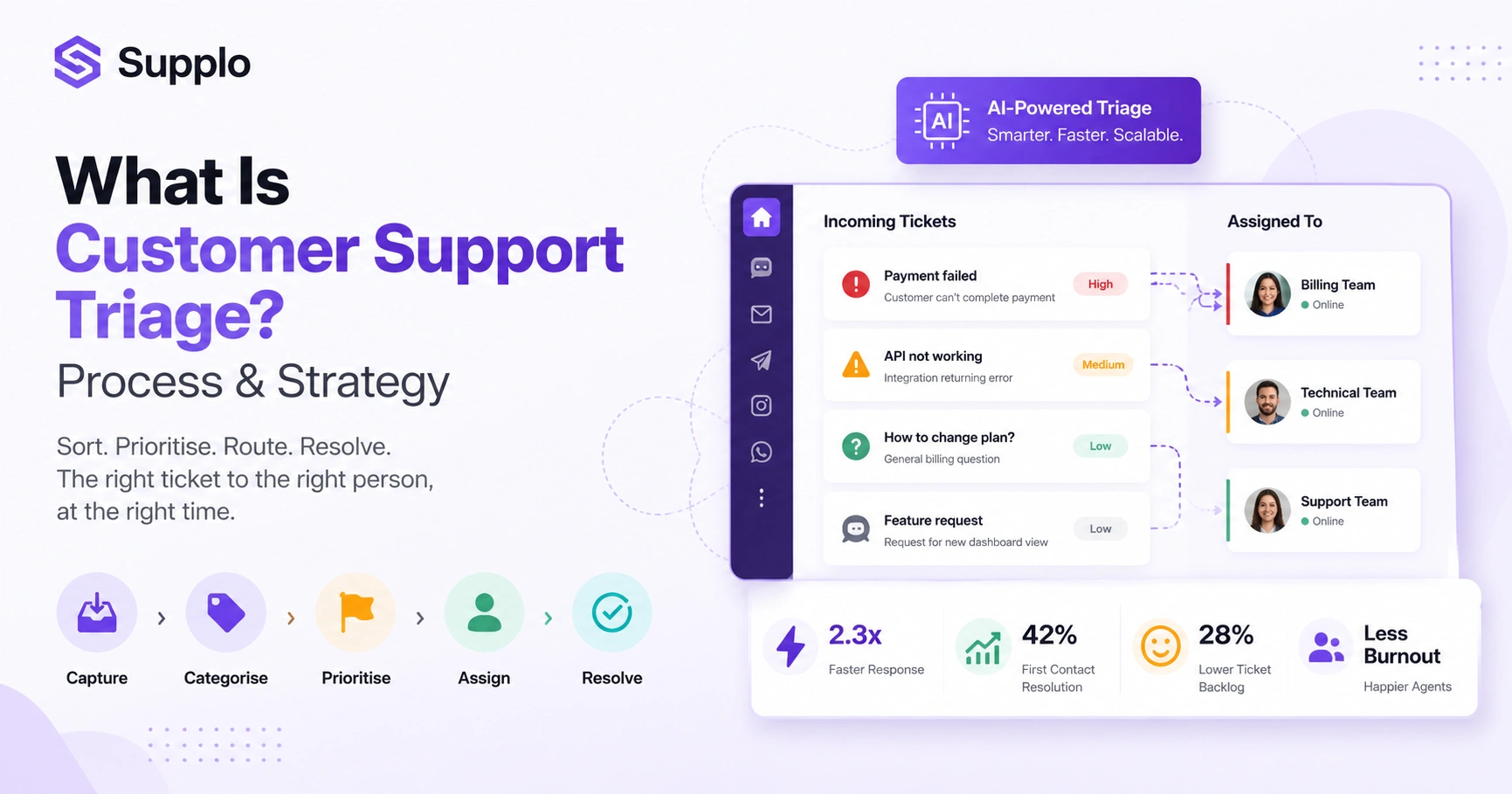
- A practical triage process involves capturing, categorising, prioritising, assigning, and resolving tickets.
- AI significantly enhances triage by automating classification, resolution, and handoffs.
- Triage can be implemented incrementally by layering rules onto your existing tools.
What is Customer Support Triage?
Customer support triage is the process of sorting incoming tickets by urgency, complexity, and topic so the right person (or AI agent) handles the right issue at the right time. Instead of treating every email, chat, or DM the same, triage lets you prioritise critical problems, route simple questions to automation, and prevent your team from burning out on low-value noise. It borrows heavily from medical triage, except instead of treating patients, you're treating support tickets.
At its core, triage answers three questions: How urgent is this? Who should handle it? What information do they already have? Effective triage moves beyond simple newest first sorting to categorise by intent (billing, technical, onboarding) and severity (blocker, normal, low-priority). A well-designed triage system reduces average first-response time because high-priority tickets jump the queue rather than waiting behind password resets. In a multichannel environment, triage becomes critical; an urgent tweet and a low-priority email require very different response times. Think of it as the traffic controller for your support desk; without it, everything gets stuck in the same gridlock.
Why Use Customer Support Triage? The Real Impact on Your Support Team
Using customer support triage isn't just about being organised; it directly impacts your team's ability to scale without chaos. Without triage, support agents often spend too much of their day context-switching between random tickets, which kills productivity and morale. Triage creates predictable workflows, so your best people focus on the work that truly requires human expertise, while simple requests are answered quickly, often before they even reach an agent.
Triage protects your support team from shiny object syndrome, in which every incoming message feels urgent because nothing has been prioritised. It reduces escalations because the most severe issues are identified before a customer has to wait hours and get frustrated. Teams using triage often report higher first-contact resolution rates because tickets land with the agent best equipped to handle them. It supports asynchronous work; your team in different time zones can pick up the right tickets without needing real-time handoffs. The hidden benefit is agent retention; triage removes the everything on fire feeling that drives experienced support pros to burnout.
A Practical Customer Support Triage Process: 5 Key Steps
A reliable customer support triage process doesn't have to be complicated. Once you define severity levels and a simple routing rulebook, the execution largely handles itself, especially if you're using modern tools. Here's a straightforward five-step flow that works for teams of any size: Capture, Categorise, Prioritise, Assign, and Resolve.
Here's how to implement these steps:
- Capture: Pull all tickets from email, chat widget, WhatsApp, Instagram, and Telegram into one unified inbox that brings all your channels together so nothing slips through.
- Categorise: Tag each ticket by topic (billing, technical, feature request) and intent (urgent, normal, informational).
- Prioritise: Use the category and sentiment to assign a priority level; critical blockers jump to the front, and general questions queue normally.
- Assign: AI routes the ticket to the appropriate human agent or auto-responds with a knowledge base article if the answer is known.
- Resolve or Escalate: The agent resolves or escalates; the AI learns from the outcome to keep getting smarter for the next ticket.
Key Benefits of Customer Support Triage for Growing Teams
The biggest benefit of customer support triage is simple: it stops your team from drowning as volume grows. When you're processing 50 tickets a day, you can get away with a shared inbox and good intentions. At 500 or 5,000, you need triage to route, prioritise, and automate without adding headcount. The secondary benefits include faster response times on revenue-critical issues and a much calmer team.
Benefits unlocked by effective triage include:
- Faster response on high-value tickets: Urgent billing or escalations jump ahead of general questions, ensuring your most critical customers get the immediate attention they need.
- Reduced agent burnout: Agents no longer have to constantly context-switch between random ticket types all day, leading to more focused work and less stress.
- Consistent SLA adherence: Triage ensures your most important service-level agreements (SLAs) are met first. This results in improved customer satisfaction and loyalty.
- Better AI learning: A triaged support flow feeds your AI properly categorised data. This means your AI learns to resolve more accurately over time, becoming an even more valuable asset.
- Cost control: Triage allows you to automate more tickets with confidence because you know which tickets the AI can handle and which need human intervention. This helps control your overall support costs.
How to Implement Customer Support Triage Without Overhauling Your Stack
You don't need an expensive enterprise tool or a three-month migration to implement customer support triage. Most teams already have the raw ingredients: a shared inbox, some form of tagging, and maybe a chatbot. The trick is to layer triage logic on top of what you already have, and that's where a platform like Supplo can fit without ripping out your existing setup.
To start implementing triage:
- Start with just two priority levels: Urgent and Everything Else. Refine from there as you learn what patterns emerge from your ticket volume.
- Use your existing FAQ or knowledge base to pre-route simple questions directly to automated responses without agent involvement, boosting self-service.
- Train your team on a simple triage checklist, so they classify incoming tickets consistently.
- If you use a multichannel inbox, ensure all channels (email, chat, Instagram, WhatsApp) feed into the same triage queue for a unified view.
- Choose a tool that lets you configure triage rules without needing a developer, so you can adjust routing as your team evolves.
Ready to streamline your support? See how Supplo can help you implement smarter triage without disruption. Start your free 14-day trial today.
The Most Common Customer Support Triage Mistakes And How to Avoid Them
Even well-intentioned triage setups fail when teams over-engineer the rules or under-invest in the basics. The most common mistake is creating too many priority levels. Five sounds sophisticated, but your team will spend more time debating whether this is P2 or P3 than actually helping customers. Simpler triage beats complex triage every time.
Here are common pitfalls and how to avoid them:
Mistakes:
- Too many categories. Start with 3-4 ticket types maximum and expand only when you see a clear need. Over-categorisation leads to confusion and misclassifications.
- Triage without automation. If you manually categorise 500 tickets a day, your team will hate triage within a week. Automation is crucial for scaling.
- Ignoring channel-specific triage. A WhatsApp message from a known customer needs different handling than a cold email. Tailor your rules where necessary.
- No triage feedback loop. If you never review whether tickets were correctly categorised, the system drifts into chaos. Regular audits are essential.
- Forgetting the human handoff. When AI can't resolve a ticket, the transition to a human agent must be seamless, not a cold transfer. Contextual handoff is key to customer satisfaction.
How AI is Changing Customer Support Triage for the Better
AI transforms customer support triage from a reactive chore into a proactive system that gets smarter over time. Instead of relying on static rules or manual sorting, modern AI triage can infer a ticket's intent and urgency from the language used. Combine that with a self-learning knowledge base, and you've got a triage system that resolves most incoming questions automatically and hands off only the complex cases to your human team.
AI-powered triage has several benefits:
- AI triage eliminates the garbage-in, garbage-out problem by learning from resolved tickets to improve future sorting accuracy.
- A self-learning AI agent can analyse a ticket's language, past interaction history, and customer sentiment to assign the correct priority instantly.
- The best AI triage doesn't just categorise, it pre-drafts responses for the human agent based on context, saving even more time.
- AI triage is especially effective for multilingual teams because it can assess intent regardless of language and route to the right language-capable agent.
- Legacy tools often charge per resolution; modern AI triage tools like Supplo offer pricing that doesn't punish you for growing your team by charging a flat rate per workspace, making AI triage cost-predictable.
A Simple Customer Support Triage Strategy for High-Volume Teams
A high-volume support team needs a triage strategy that scales without adding headcount. The winning approach is to let your automated layer handle the predictable, repetitive questions while your human team focuses on nuanced, high-emotion, or technical issues. This isn't about replacing people; it's about making sure every human minute is spent where it creates the most value.
Follow these steps for a high-volume triage strategy:
- Step 1: Identify the top 20% of question types that make up 80% of volume; these are your automation candidates. Focus your efforts where they'll have the biggest impact.
- Step 2: Build knowledge base articles for each of these question types and train your AI agent to handle triage automatically so it can resolve them before they reach an agent.
- Step 3: Set a clear triage rule: if the AI can't answer with high confidence (or whatever your threshold is), it passes to a human with full context for review.
- Step 4: Use your unified inbox (email, chat, WhatsApp, Instagram, Telegram) to give your team a single view of all prioritised tickets, regardless of channel.
- Step 5: Review your triage strategy weekly, ticket patterns shift, and your triage rules should shift with them to maintain effectiveness.
How to Measure the Impact of Your Customer Support Triage Setup
If you aren't measuring the impact of your triage system, you're flying blind. The key metrics to track aren't just speed; they're accuracy, deflection rate, and agent satisfaction. A triage system that's fast but constantly routes tickets to the wrong person is worse than no triage at all. Track the right data and tune your rules based on the numbers.
Key metrics to monitor:
- First Response Time (FRT): Are urgent tickets getting faster responses than low-priority ones? If not, your triage rules need work.
- Deflection Rate: What percentage of tickets are resolved by your AI agent without ever needing a human? This is your ROI benchmark for automation.
- Re-routing Rate: How often does an agent get a ticket and say this should have gone to someone else? High re-routing signals poor triage categorisation.
- Agent Satisfaction: Are your agents less stressed? Survey them, triage is supposed to help them, not add overhead. Happy agents are more productive.
- Cost Per Resolution: Track how your cost per ticket changes as automation improves. This is the business case for investing in better triage.
Key Takeaways
- Customer support triage is essential for managing growing ticket volumes and preventing agent burnout.
- A practical triage process focuses on capturing, categorising, prioritising, assigning, and resolving tickets.
- AI significantly enhances triage by automating repetitive tasks, improving accuracy, and learning from past interactions.
- Implement triage incrementally, starting with simple rules and refining them based on real data.
- Measure the impact of your triage system using metrics like First Response Time, Deflection Rate, and Re-routing Rate to ensure continuous improvement.
FAQ
Here are the most common questions teams ask when setting up triage, answered clearly and honestly.
What's the difference between ticket routing and ticket triage?
Routing is about delivery, making sure a ticket lands in the right inbox or agent queue. Triage is about priority and categorisation, deciding which ticket matters most right now. Triage includes routing, but it's a richer process that involves assessment and decision-making on urgency and complexity.
Can small teams benefit from triage, or is it only for large support desks?
Triage benefits any team with more than one support channel or more than one agent. Even two-person teams benefit from knowing which tickets to tackle first. It establishes good habits early and prepares you for growth.
Is AI-powered triage actually reliable?
Yes, when the AI is trained on your actual support data and knowledge base. It learns from real conversations, so accuracy improves over time. Modern AI agents can resolve a significant portion of tickets without human help, while accurately escalating complex issues.
How long does it take to set up a working triage system?
A basic system can go live in a few hours if you use a platform with built-in automation. Fine-tuning it for your specific workflows, understanding ticket patterns, and training your AI might take a week or two of iteration and observation.
What if a ticket is mis-categorised?
It happens. The best defence is a feedback loop in which agents can re-categorise tickets, and the system learns from those corrections. Review mis-categorised tickets weekly to identify patterns and refine your rules or AI training data.
Does triage work for WhatsApp and Instagram support, too?
Absolutely. Modern multichannel platforms treat every channel the same way inside a unified inbox, so triage rules apply equally to DMs, emails, and chat messages. This ensures consistent service across all your customer touchpoints. Supplo allows you to manage email, WhatsApp, Instagram, and Telegram in one place.
Can I use triage without any automation?
You can, but you probably won't want to. Manual triage works for very low volumes, but it doesn't scale. Automation is what makes triage sustainable and effective for any growing team by reducing manual effort and speeding up processing.
Compliance line: Supplo is not affiliated with any app or website. Please follow each app's terms and local regulations.


