On this page
Look, nobody wakes up hoping to escalate a ticket. But when you're stuck, or worse, a customer is stuck, knowing how to escalate a customer support ticket properly can be the difference between a saved relationship and a churned account.
Whether you're a frontline agent juggling ten chats or a manager building processes from scratch, this guide is for you. We're covering the full escalation workflow: what it is, when to do it, how to do it without burning bridges and how to build a system that scales.
Quick Answer
- Escalation is a structured handoff, not a failure; it prevents customers from having to repeat their story.
- Clear criteria prevent over-escalation and under-escalation: use severity levels, time-based triggers and VIP rules.
- Automation can triage escalations instantly and pass full context, reducing resolution time.
- Track escalation rate, time to escalation and re-escalation rate to continuously improve your process.
What Is a Customer Support Ticket Escalation?
Let's get this straight right away: escalating a ticket is not admitting defeat. It's a structured handoff.
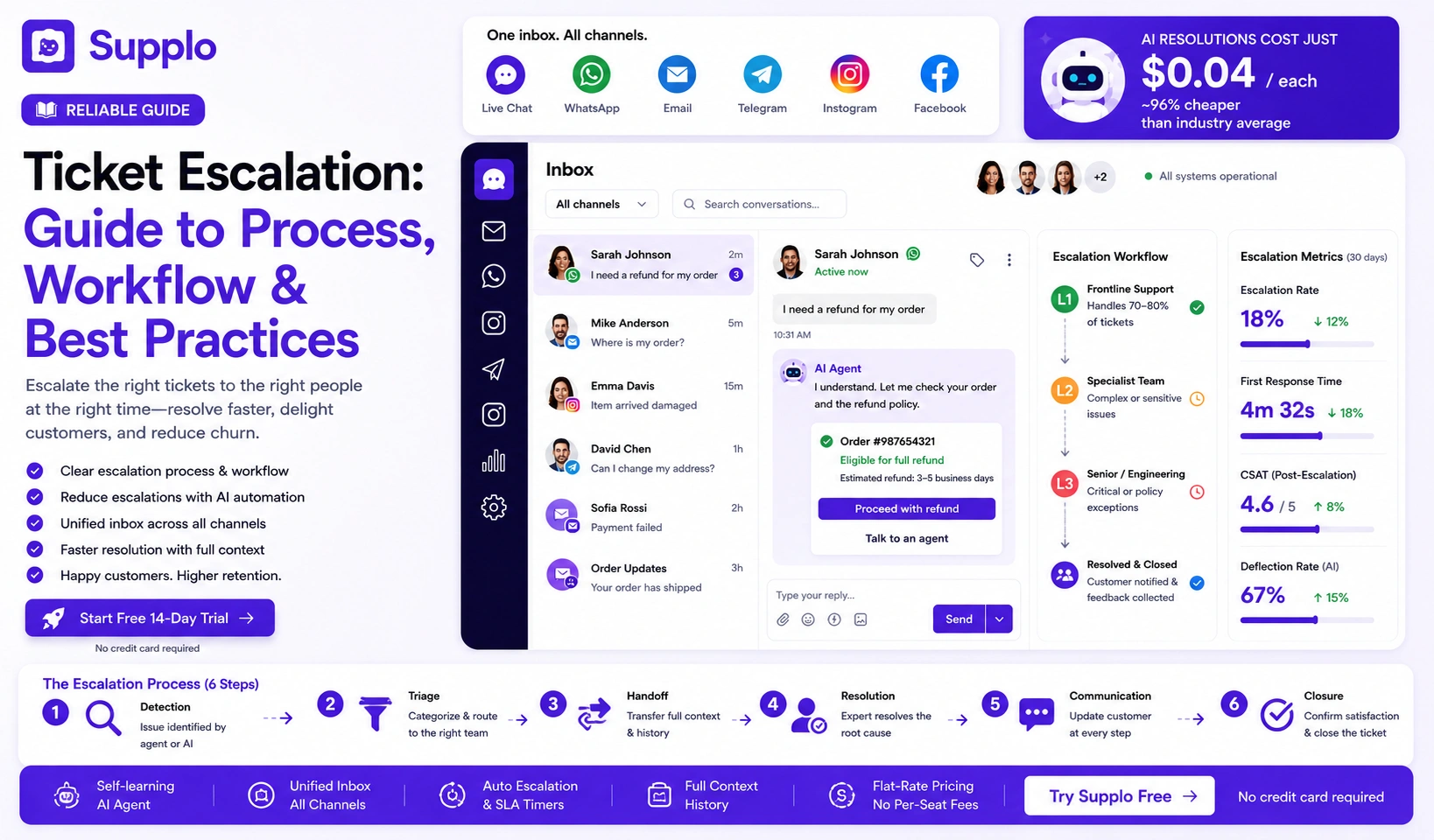
A customer support ticket escalation happens when a frontline agent realizes they can't fully resolve an issue; maybe they lack authority, expertise, or system access, so they pass it to someone who can. The keyword here is structured. This isn't taping a Post-it note to your manager's monitor. It's a formal process with clear steps, ownership and documentation.
Here's what good escalation looks like in practice:
- It's a formal process, not just "ask your manager in the hallway"
- The goal is faster resolution, not passing blame
- Two types exist: functional (need a specialist) and hierarchical (need management approval)
- Clear definitions prevent over-escalating every tricky ticket, or under-escalating a crisis
- Every escalation leaves an audit trail so you can learn from it later
Supplo is not affiliated with any app or website. Please follow each app's terms and local regulations.
When to Escalate a Customer Support Ticket
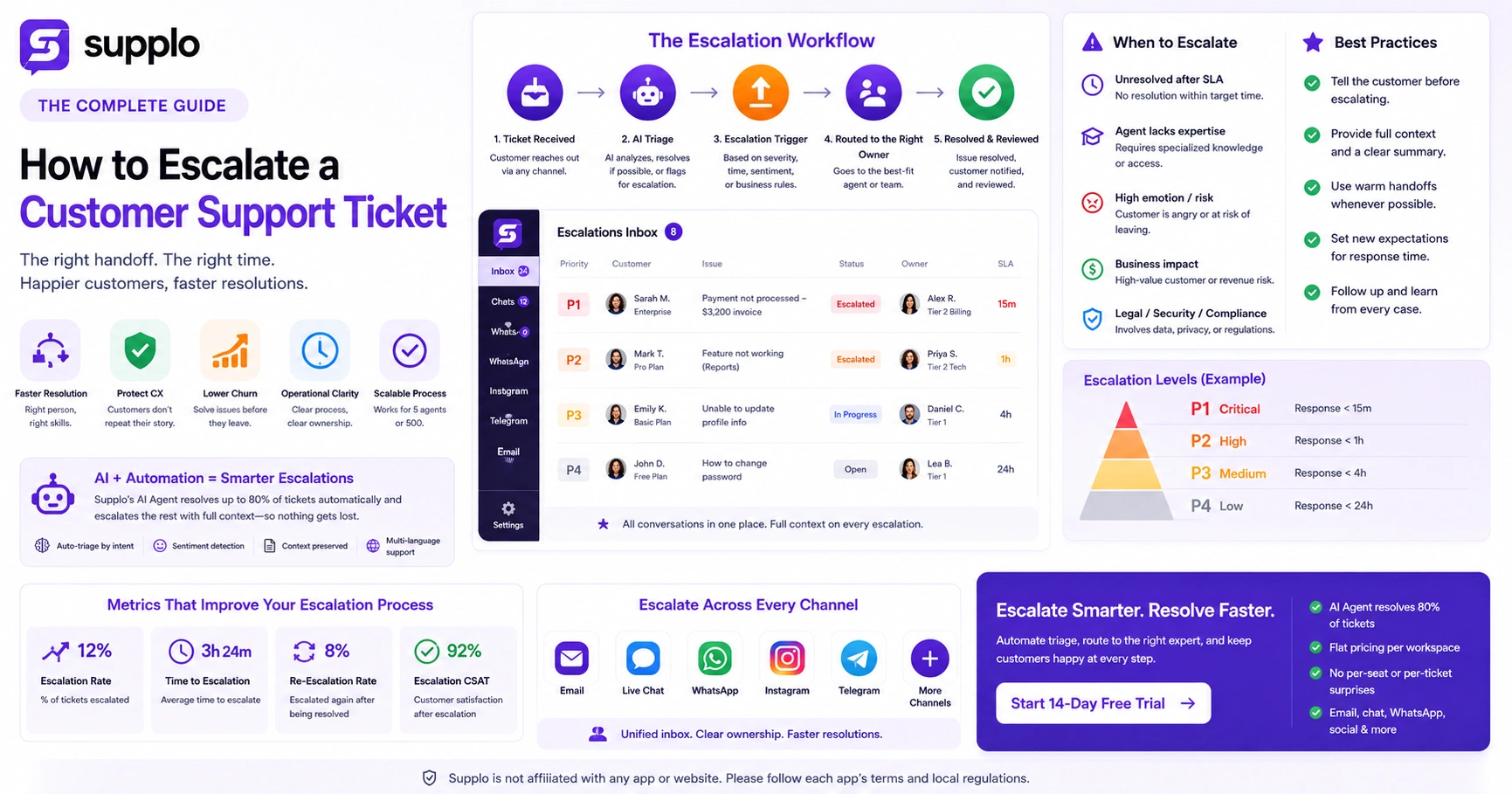
You don't escalate every hard ticket; you escalate the ones that must move up. Knowing when to escalate a customer support ticket comes down to having clear, written criteria that everyone on your team understands.
Think of it like triage in an ER: not every patient needs a surgeon, but the ones with critical symptoms shouldn't wait. Same logic applies here.
Common escalation triggers:
- Time-based triggers: ticket sitting unresolved for 24+ hours? Escalate.
- Knowledge gaps: the agent genuinely doesn't have the technical depth to solve it
- Emotional risk: customer is angry, frustrated, or threatening to leave
- Business impact: this single customer represents significant revenue
- Regulatory or legal concerns: anything touching data privacy, compliance, or security
Using a knowledge base to reduce unnecessary escalations can also help. Learn more about building a robust knowledge base.
The Criteria for a Solid Ticket Escalation Workflow
A ticket escalation workflow needs three things actually to work: clear ownership (who gets the ticket next), defined SLAs (how fast they must respond) and a feedback loop (so the original agent learns from the resolution).
Without these, escalations become finger-pointing exercises. "I thought you were handling it." "No, I sent it to her." Sound familiar?
Build your workflow around these elements:
- Severity levels: P1 (critical, the building is on fire), P2 (high), P3 (medium), P4 (low)
- Ownership rules: every escalated ticket must have exactly one assigned owner, no orphans
- Time limits: P1 escalations get a response within 15 minutes; P4 within 24 hours
- Handoff notes: the original agent writes a quick summary before transferring
- Post-resolution review: the team debriefs to see if the escalation could have been avoided
How to Escalate a Ticket to Management
This one's tricky. You need help, but you don't want to look like you're dumping your problem on your manager's lap.
The trick? Frame it as a request for help, not a handoff.
Start with a summary of what's happened, include what you've already tried and state exactly what you need: approval, access, a phone call, whatever it is. Managers respect agents who come prepared.
Do this right and your manager will trust your judgment more next time.
- Use a standard escalation template so managers get consistent context
- Never escalate without having attempted first-contact resolution first
- Be specific: "I need approval for a refund above my limit" is better than "Customer is unhappy"
- Copy the right person, don't spam the entire management chain
- Follow up after the manager resolves it so you understand how they handled it
The Best Support Ticket Escalation Best Practices for Fast Resolutions
Here's the golden rule of support ticket escalation best practices: communication first, process second.
Tell the customer they're being escalated. Introduce the new owner. Set a fresh expectation for response time. A customer who knows what's happening is a customer who stays calm.
The best teams also track escalation rates as a health metric. If 30% of your tickets get escalated, something's off. Either your front-line team needs more training, or they need more authority to resolve issues themselves.
Good escalations feel seamless to the customer; they shouldn't feel like they're starting over.
- Always tell the customer before the handoff happens
- Use an internal note to document why the escalation was triggered
- Do a "warm transfer" when possible; the original agent introduces the new one
- Limit escalation levels: two tiers max for most issues, three for complex ones
- Monitor escalation volume weekly and look for patterns (recurring product bugs, for example)
Ready to test your own escalation workflow?
Start a 14-day free trial of Supplo and see how a shared inbox + AI agent handles escalations for email, chat, WhatsApp, Instagram and Telegram, all at a flat workspace price, not per seat. → Start free trial
Customer Support Ticket Escalation Channels That Actually Work
The channels you use for escalation matter more than you'd think. A shared team inbox where escalations land visibly? That works. A dedicated Slack or Teams channel? Also works. But email-only? You're creating silos.
Modern teams need real-time visibility into who's handling what. Otherwise, tickets slip through cracks.
Effective escalation channels include:
- Live chat widgets that let you escalate mid-conversation without the customer leaving
- WhatsApp and Telegram support with internal escalation codes visible only to agents
- A prioritized inbox view where senior agents grab the highest-priority escalations first
- Automated routing rules that send P1 escalations directly to a manager's phone
- Pro tip: avoid escalations via personal DMs; they bypass your audit trail entirely
Managing a shared team inbox for escalations can significantly improve your workflow. Learn more about Supplo's shared inbox.
Building a Ticket Escalation Workflow That Scales With Your Team
A scalable ticket escalation workflow is one you can expand without having to rewrite your SOPs every time you hire someone new.
That means role-based routing (not name-based), automated triggers ("if unresolved in 8 hours, escalate to tier 2") and a tool that unifies all your channels into one escalation-ready timeline. Supplo's shared inbox does exactly that: email, chat, WhatsApp, Instagram and Telegram, all in one place.
Design for 5 agents today but 50 agents next year.
- Define levels broadly: tier 1 (frontline), tier 2 (specialist), tier 3 (management/engineering)
- Automate "if/then" rules: if priority is high and ticket is open >4 hours, flag it
- Include external escalation routes: if it's a bug, auto-create a task for the dev team
- Review workflow quarterly to adjust for new products or team growth
- Train every new hire on the escalation path in their first week; make it part of onboarding
Ready to test your own escalation workflow?
Start a 14-day free trial of Supplo and see how a shared inbox + AI agent handles escalations for email, chat, WhatsApp, Instagram and Telegram, all at a flat workspace price, not per seat. → Start free trial.
How Automation Changes Escalating Support Tickets
Automation takes the guesswork out of escalating support tickets. Your criteria are applied automatically; no human needs to decide whether a ticket should move up.
Here's a real example: Supplo's AI agent can resolve up to 80% of first-contact issues on its own. The remaining 20%? It escalates with full context attached—no dropped details. No asking the customer to repeat themselves.
The result? Fewer manual escalations, faster routing and a lower cost per resolution.
- Automated triage: AI reads the ticket and assigns the right escalation level instantly
- Context preservation: the AI attaches the full conversation history so the new owner doesn't miss anything
- Sentiment detection: if the customer's language turns negative, the system escalates automatically
- Multi-language escalations: Supplo's AI translates messages automatically, so language isn't a barrier
- Price visibility: automation shouldn't hide costs; Supplo's pricing is flat per workspace, not per seat or per escalation
If your current tool charges per escalation or per agent, you're overpaying.
Supplo's flat $ 0.04-per-resolution, per-workspace pricing means your bill doesn't balloon as you scale. Switch from legacy tools quietly, or start fresh- no contracts.
Common Support Ticket Escalation Rules and When to Break Them
Rules keep your process consistent. But rigid rules? They can hurt resolution times.
For example, a rule that says "only managers can issue refunds over $100" might slow down a critical escalation when the manager is at lunch. Smart teams set rules as guardrails, not gates; they give agents the authority to bend them when the customer's trust is at stake.
Rules worth bending sometimes:
- Rule: "Escalate only after three responses." Break it if the issue is time-sensitive.
- Rule: "No escalations on weekends." Break it for VIP customers or critical outages.
- Rule: "Only escalate to tier 2." Break it if the problem is clearly a product bug.
- Rule: "Always cc the manager." Break it if the customer is already stressed about too many people involved.
- Important: every broken rule should be logged and reviewed, not punished, but learned from
A common pitfall: escalations become a "blame game" when agents escalate too quickly to avoid ownership. A rule that agents must attempt at least two resolution steps before escalating can help.
How to Track and Improve Your Customer Service Ticket Escalation Process
You can't improve what you don't measure. To improve your customer service ticket escalation process, track three things:
- Escalation rate: what percentage of tickets get escalated
- Time to escalation: how fast they move up
- Re-escalation rate: how many come back up after being "resolved"
A high re-escalation rate is a red flag. It means your tier-2 or tier-3 team isn't fixing the root cause. They're patching symptoms.
Use your data to drive decisions:
- Dashboard metrics: escalation volume, average escalation response time, resolution time by tier
- Customer feedback: survey customers after an escalation to see if they felt well-handled
- Root cause analysis: is the same type of issue getting escalated repeatedly?
- Agent feedback: ask agents what would have helped them avoid the escalation
- Adjust criteria quarterly based on data, not hunches or gut feelings
If your current tool charges per escalation or per agent, you're overpaying.
Supplo's flat $ 0.04-per-resolution, per-workspace pricing means your bill doesn't balloon as you scale. Switch from legacy tools quietly, or start fresh- no contracts. → Compare pricing
Key Takeaways
- Escalation is a structured handoff, not a failure; it keeps customers from repeating their story and ensures the right person handles their issue.
- Clear escalation criteria prevent both over-escalation and under-escalation, saving your team time and your customers' frustration.
- Automation transforms the process by instantly triaging tickets, preserving context and flagging issues before they escalate unnecessarily.
- Track your metrics, escalation rate, time to escalation and re-escalation rate, then use that data to train your team and refine your workflow.
- Build for scale from day one. Design workflows that work for 5 agents today and 50 agents next year, with role-based routing and automated triggers.
FAQ
Is it safe to escalate a customer support ticket to a manager?
Yes. Escalating is a standard, safe part of customer service workflows. As long as you follow your company's procedure and inform the customer, there's no risk. Supplo is not affiliated with any app or website. Please follow each app's terms and local regulations.
How do I escalate a ticket without upsetting the customer?
Tell the customer early. Use a warm transfer: "I'm bringing in my senior colleague who handles these issues directly; they'll pick up right where we left off." Avoid phrases like "I can't help you."
What happens if my escalation request gets ignored?
Tag the ticket again with a higher priority, or use a shared inbox with mandatory response SLAs. If your tool supports re-escalation rules (like Supplo's), automate a follow-up alert after 1 hour of silence.
Can I escalate a ticket that was already closed?
Yes, but you need to reopen it with a clear note explaining why. Some teams call this a "re-escalation." Use it sparingly; repeated re-escalations suggest the first resolution didn't address the root cause.
What's the difference between functional and hierarchical escalation?
Functional escalation means the ticket goes to a specialist (e.g., a billing expert). Hierarchical escalation means it goes to someone with more authority (e.g., a manager). Most workflows use both.
Should I escalate every ticket that takes longer than 24 hours?
Not necessarily. Check the criteria first; if the agent is waiting on the customer for information, it's low priority. If an internal system or decision blocks the agent, escalate.
Can I automate escalations in my helpdesk?
Yes. Most modern platforms, including Supplo, support automated escalation rules based on time, priority, sentiment and keywords. Automation reduces human error and ensures no ticket falls through the cracks.
How can I ensure a seamless customer experience during an escalation?
Use a warm transfer to introduce the new agent, provide a clear handoff note and set new expectations for response time. Maintain open communication with the customer throughout the process to keep them informed and reassured.
Compliance line: Supplo is not affiliated with any app or website. Please follow each app's terms and local regulations.