On this page
Who It Is For
Let's be real, nobody wants to escalate a ticket. But when a customer's complex issue lands on a frontline agent who doesn't have the tools or authority to fix it, escalation isn't a failure. It's the smart move.
If you're running customer support, whether you're a scrappy startup team or a well-established enterprise, getting ticket escalation right can make or break your customer satisfaction scores. Done poorly, it's a black hole where tickets go to die. Done well? It's your safety net that keeps customers from jumping ship.
This guide walks you through the entire escalation process: what it is, how to structure it, and how to keep it from becoming a mess. Plus, we'll show you how to prevent many escalations before they even happen.
Quick Answer
- Ticket escalation meaning: The structured process of moving an issue from L1 to L2/L3 when an agent lacks authority or expertise.
- Best practices: Escalate early with full context, set SLAs per level, and over-communicate with the customer at each step.
- Reduce escalation: Use AI (like Supplo's) to resolve 80% of common issues before they hit your team, and expand your knowledge base.
- Prevent over-escalation: Set strict criteria, give agents more authority, and track escalation reversal rates.
Ticket Escalation Meaning: Defining What It Is and Isn't
Let's get the definition straight. Ticket escalation is the intentional, structured handoff of a support issue from a frontline agent to someone with more expertise, typically a specialist, manager, or technical team.
Here's the thing: too many teams treat escalation like a dirty word. It's not. Think of it as your emergency brake; you don't use it every day, but when you need it, you're glad it's there.
- Escalation kicks in when an agent lacks the authority, knowledge, or tools to resolve the issue.
- It differs from "ticket reassignment" (moving to balance workload); escalation is about skill level.
- Common triggers: billing disputes, technical bugs, account suspensions, and requests for sensitive data.
- A well-defined escalation process protects your SLA and builds trust with customers.
Supplo is not affiliated with any app or website. Please follow each app's terms and local regulations.
The Customer Support Escalation Process
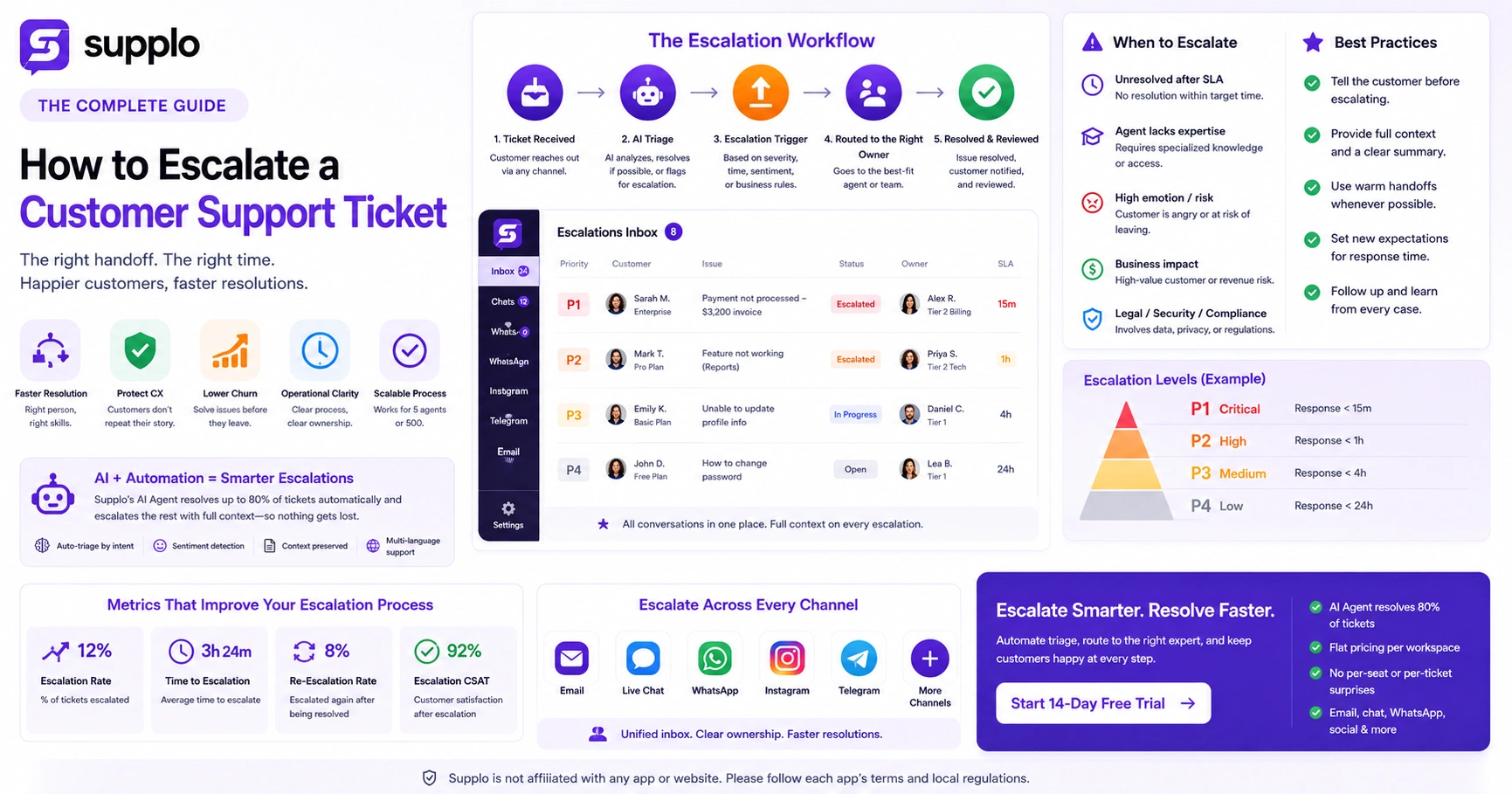
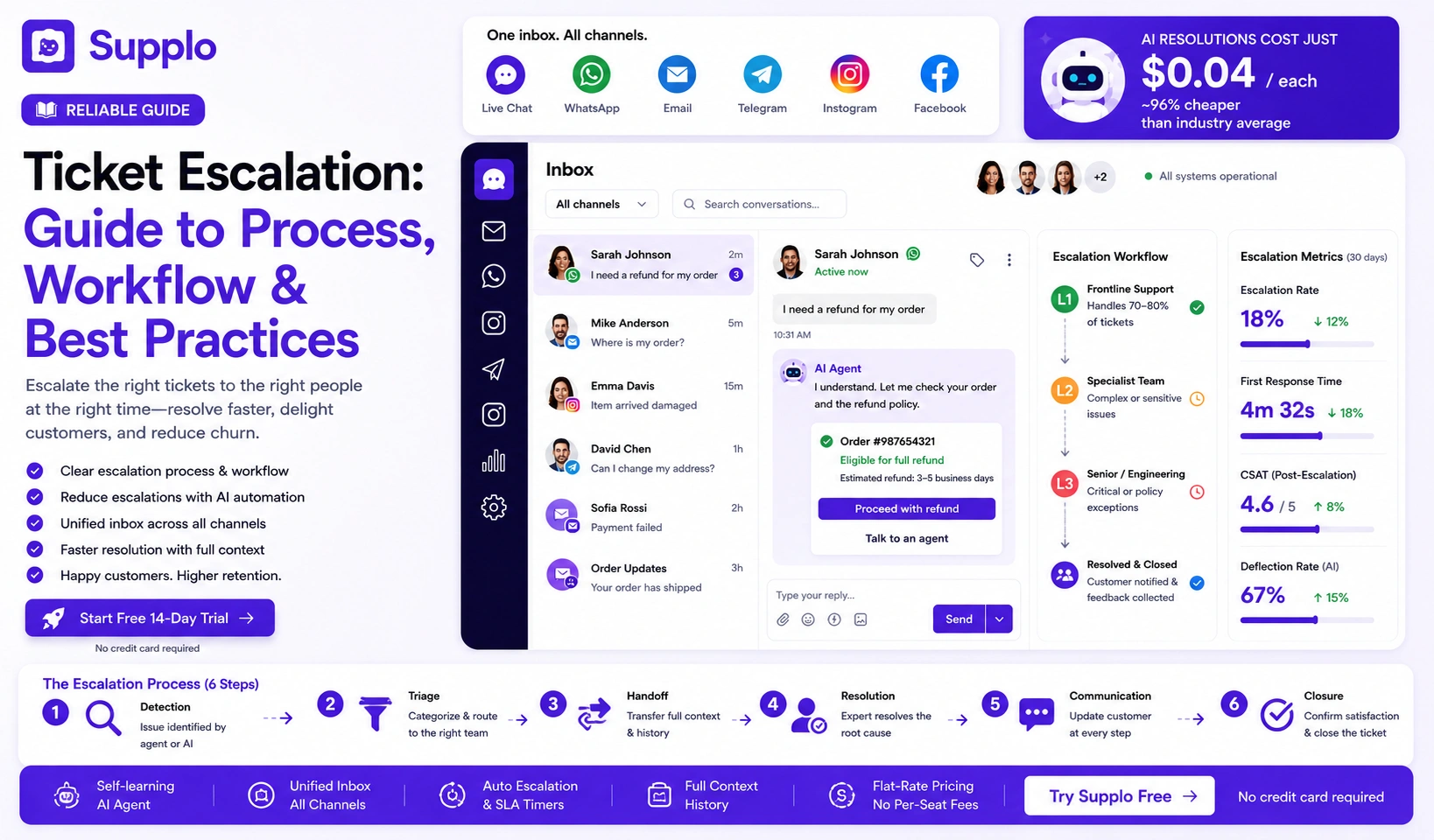
A reliable escalation process has six stages: detection, triage, handoff, resolution, communication, and closure. Each step needs clear ownership and a time limit. Without them, you get "escalation ping-pong," tickets tossed between departments with no one taking responsibility.
Here's how it actually plays out in a well-run support team:
- Detection: AI or agent flags issue as outside their scope (e.g., billing > $500).
- Triage: Assign to correct team (technical, billing, legal).
- Handoff: Transfer context-rich notes; never start from scratch.
- Resolution: Expert solves the root cause.
- Communication: Customer receives update at each stage.
- Closure: Customer confirms satisfaction; ticket is archived with tags.
Ticket Escalation Workflow: How to Structure It for Reliability
Your workflow should define escalation levels (L1 → L2 → L3), response SLAs per level, and a fallback for stalled tickets. The most reliable systems use automation: if an L2 ticket isn't addressed within 4 hours, it automatically escalates to a manager. This prevents silent queue rot.
- Level 1: Frontline handles 70–80% of tickets via the knowledge base or AI.
- Level 2: Specialists, technical, billing, or product team.
- Level 3: Engineering or senior leadership, for bugs or policy exceptions.
- Auto-escalation timer: 2h for critical, 24h for standard, 48h for low pri.
- Handoff rules: Agent must add a summary; no "reassign without note."
Try it free: Build your first escalation workflow in minutes. Start a free 14-day trial of Supplo, no credit card needed. See how a shared inbox and AI agent can handle escalations before they happen. → Try Supplo Free
Best Practices for Ticket Escalation: Rules That Reduce Friction
The three golden rules: escalate early when stuck, escalate to the right person, and never escalate without a customer update. Many teams wait too long; the average time-to-escalate should be < 15 minutes for complex issues. Document every escalation with a reason code (e.g., "missing permissions").
- Rule 1: Agent must exhaust their resources (knowledge base, team chat) before escalating.
- Rule 2: The escalation form must include: customer ID, issue summary, attempted steps, and expected resolution.
- Rule 3: Customer receives a notification: "Your case is being moved to a specialist. Expect a response in [time]."
- Pro tip: Use a shared team inbox (like Supplo's) so everyone sees the full thread and avoids duplicate work.
- Don't: Escalate for emotional relief; escalate only when technical or authority gaps exist.
How to Handle Ticket Escalation: Practical Tactics for Your Team
Handling an escalation well means owning the outcome, not just the ticket. Start with an empathetic acknowledgment: "I see you've been passed to me. Let me review everything and get back to you in X minutes." Then work backward from the desired resolution, not forward from the problem.
- Acknowledge fast: Reply within 5 minutes of receiving the ticket.
- Read the full history: Never ask the customer to repeat themselves.
- Set a clear ETA: "I'll have an update for you within 2 hours."
- Loop in SMEs early: If you're unsure, tag an expert before the customer asks.
- Close with confirmation: "Does this solve your problem? If not, I'll stay on the case."
Customer Support Escalation Strategies: Proactive vs. Reactive
Reactive escalation waits for the customer to ask for a manager. Proactive escalation flags potential issues before the customer notices, such as order delays, known bugs, or payment failures. Smart teams use proactive escalation to turn potential complaints into trust-building moments.
- Reactive: Customer requests escalation → agent transfers.
- Proactive: AI detects a pattern (e.g., three failed login attempts) → auto-escalates to security team → team reaches out to customer.
- Best for: Proactive works for technical or account-level issues; reactive works for subjective complaints.
- Tool needed: AI agent that flags anomalies and assigns escalation automatically.
How to Reduce Ticket Escalation: Prevention Through Design
The best way to reduce escalations is to make your first-line support smarter. Improve your knowledge base, train agents on common escalation triggers, and add self-service options (such as Supplo's AI agent) to resolve simple issues before they become tickets. Each escalation you prevent saves ~$15 in agent time.
- Expand the knowledge base: Cover the top 20 reasons for escalations.
- AI-powered auto-answers: Let AI resolve billing inquiries, password resets, and status checks.
- Agent training: Run weekly "escalation post-mortems" to identify patterns.
- Customer education: Add an FAQ section to pre-empt common questions.
- Measure: Track the escalation rate per agent; retrain those with rates above 20%.
Preventing Over-Escalation of Support Tickets: When "Help" Backfires
Over-escalation happens when teams escalate tickets that could be resolved at L1. It burns specialist time and frustrates customers who have to explain the issue again. The fix: set strict escalation criteria and give agents a "stop and think" prompt: "Can I solve this in < 10 minutes with my tools?"
- Common cause: Fear of negative CSAT → "better safe than sorry" mentality.
- Cost: Each unnecessary escalation adds 30–45 minutes to resolution time.
- Fix: Create a "Do Not Escalate" list of issues L1 can handle (e.g., refunds under $20, password resets).
- Tool: Use a checklist in your inbox (e.g., Supplo inbox tags) that agents must complete before escalating.
- Metric: Track "escalation reversal rate" % of escalated tickets that could have been solved at L1.
Still stuck with broken escalations? If your team is drowning in unnecessary handoffs, Supplo's AI agent resolves common issues instantly, so only real escalations reach your experts. Get started with $0.04 per resolution. → See AI Agent in Action
Minimizing Ticket Escalation With AI: The Self-Service Safety Valve
The most effective way to minimize escalations is to resolve tickets before a human sees them. Supplo's AI agent learns from your knowledge base and past conversations to answer up to 80% of incoming requests- billing, shipping, technical setup- at a flat $0.04 per resolution. That means fewer tickets ever reach your team, let alone an escalation queue.
- AI handles: Common questions, order status, account management, language translation.
- Clean handoff: If AI can't resolve, it creates a ticket with full context- no customer repeats.
- Cost: $0.04/resolution vs. $0.99+ per legacy tool resolution (e.g., some older platforms).
- Result: Escalation rate drops 40–60% because AI catches the simple stuff.
- Implementation: Connect your knowledge base and past 100 conversations; AI starts learning within hours.
Using Supplo's AI agent, you can minimize escalations by resolving common issues at the first touchpoint.
Effective Ticket Escalation in a Multi-Channel Inbox: WhatsApp, Email, Chat, Social
Escalation gets messy when tickets come from different channels: email, WhatsApp, Instagram DMs, and the chat widget. Each channel has different response expectations (WhatsApp users expect < 5 minutes; email users tolerate 1 hour). Effective escalation requires a unified inbox (like Supplo) that threads all channels into one view so your team escalates consistently, regardless of origin.
- Channel SLAs: WhatsApp/Telegram: 5m; Live chat: 30s; Email/Social: 1h.
- Inbox unification: Supplo merges email, widget, WhatsApp, Telegram, Instagram, Facebook into a single thread, no channel-based blind spots.
- Escalation tags by channel: "WhatsApp escalation" triggers auto-response: "A specialist will text you."
- Translation built-in: Messages auto-translate so language doesn't become an escalation trigger.
Email remains a core escalation channel; Supplo's email ticketing system keeps threads organized.
Ready to take control of your escalation process? Supplo unifies email, WhatsApp, Telegram, Instagram, Facebook Messenger, and live chat into one thread-based inbox. Plus, we accept payments via Crypto, Binance Pay, Payeer, GCash, AmanPay, QIWI Wallet, DOKU, Nigerian and South African cards, Skrill, and Payoneer so that global teams can start without friction.
Key Takeaways
- Ticket escalation is a safety valve, not a failure.
- A reliable escalation process has six stages: detection, triage, handoff, resolution, communication, and closure.
- Define escalation levels, response SLAs, and auto-escalation timers.
- Best practices include early escalation, clear handoffs, and customer updates.
- Reduce escalations by improving your knowledge base and using AI to handle common issues.
- Prevent over-escalation with strict criteria and agent empowerment.
- Unified omnichannel inboxes, like Supplo's, ensure consistent and efficient escalation across all channels.
FAQ
Is ticket escalation always a failure?
No. Escalation is a designed safety valve for issues beyond an agent's scope. The failure is when escalation happens without clear process or communication.
How many escalation levels should my team have?
Three levels are standard: L1 (frontline), L2 (specialist), L3 (engineering/senior). More than three levels usually cause confusion and slower resolutions.
What should I include in an escalation handoff note?
Customer ID, issue summary, steps already taken, expected resolution, and any urgency flags (e.g., "customer is at risk of churn").
How do I prevent customers from constantly requesting escalation?
Set expectations upfront: "I can handle this. If I can't, I'll personally transfer you to someone who can." Also, empower your frontline with authority; let them issue small refunds or credits without approval.
Can AI help reduce escalation?
Yes. AI agents (like Supplo's) resolve common issues automatically, reducing the number of tickets your team receives. They also flag tickets that need escalation, with full context, so your team can act faster.
What's the difference between escalation and ticket reassignment?
Escalation is based on skill level; your frontline can't solve it. Reassignment is workload-based; any level can solve it, but another agent has capacity.
Should I automate escalation?
Yes, but only for time-based triggers (e.g., a ticket left untouched for 2 hours) and rule-based triggers (e.g., the keyword "lawsuit" auto-escalates to legal). Never automate escalation for subjective reasons.
What tools can help with effective ticket escalation?
A unified inbox like Supplo's can help manage escalations across all channels. Supplo's AI agent can also resolve common issues before they reach your team, reducing the overall number of escalations.
Compliance line: Supplo is not affiliated with any app or website. Please follow each app's terms and local regulations.