On this page
Why a Solid Refund Request Process Is the Backbone of Customer Trust
Let's be real, nobody likes processing refunds. But here's the thing: how you handle a refund request often matters more to a customer than the actual product experience. A clear, predictable refund request process is customer support, not just a back-office policy. It's a promise that says, "We've got your back, even when things go wrong."
When customers feel secure that their request will be handled fairly, they're far more likely to purchase again. A sloppy or defensive refund handling procedure, on the other hand, erodes trust faster than almost any other support failure. And in a world where one bad experience can land you on a public inbox site? You really can't afford that.
- Refund-friendly brands often see higher customer lifetime value, and people remember how they were treated.
- A confusing process forces customers to escalate, increasing ticket volume for your team.
- Speed is a trust signal: acknowledging the refund request within minutes (not hours) sets the tone.
Quick Answer
- A solid refund request process builds customer trust and retains more customers.
- Automate straightforward refunds and handle exceptions manually.
- Use a consistent refund script that starts with empathy and offers a clear resolution.
- Track refund rate, CSAT, and repeat purchase rate to optimize your process.
How to Handle Refund Requests: The Workflow for Support Teams
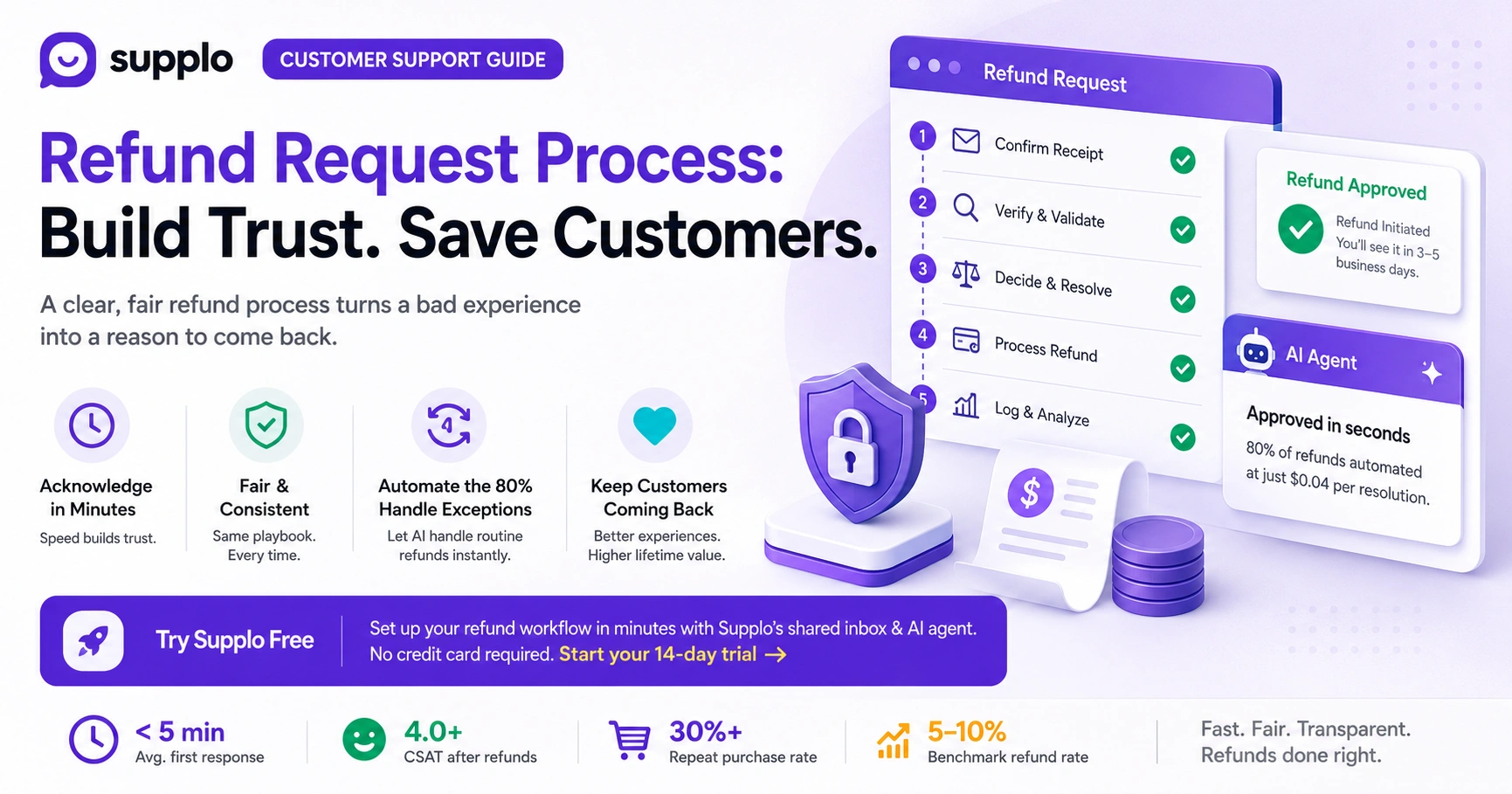
Handling a refund request well means having a repeatable workflow that starts with immediate acknowledgment and ends with a closed loop. Here's the playbook:
Steps:
- Auto-reply confirming receipt. Don't leave them hanging.
- Verify order details and policy eligibility.
- Make the call, approve, deny, or offer an alternative.
- Execute the refund and notify the customer.
- Log the outcome for trend analysis.
Every team member should follow the same playbook. Consistency builds trust. Inconsistency builds confusion.
- Use canned responses for initial acknowledgment to cut response time. Personalize later.
- Always ask for feedback: "What went wrong?" can uncover product issues before they escalate.
- For digital goods, validate usage before approving; for physical goods, confirm return tracking.
Try it free. Set up your refund workflow in minutes with Supplo's shared inbox and AI agent. No credit card required. Start your 14-day trial →
Key Refund Handling Procedures: What to Validate Before Saying Yes or No
Before processing any refund, your team needs to check three things: order existence and ownership, eligibility under your current policy (time window, condition, digital vs. physical), and fraud signals. A proper refund handling procedure also includes logging the reason code, which helps you spot systemic issues like broken features or poor sizing guides.
Here's what the best teams validate:
- Cross-reference the order date against your posted return window. No exceptions unless it's a goodwill play.
- For high-value refunds, require manager approval.
- Use a fraud-check tool or manual review for first-time buyers requesting immediate refunds.
- Log the reason code every single time. This data is gold for product and operations teams.
Managing Refund Requests at Scale: Automating the 80% Without Losing the Human Touch
The secret to managing refund requests efficiently? Let AI handle the straightforward cases, like in-policy returns or simple order cancellations, while routing exceptions to a human. With Supplo's AI agent, you can automate up to 80% of refund handling procedures at a flat $0.04 per resolution. The AI learns from your knowledge base and past conversations, so it can approve a valid refund or politely decline an out-of-policy request in seconds.
Think of it this way: your human team gets to focus on the tricky, nuanced stuff, while the bot handles the repetitive volume. Your inbox stays clean, customers get faster responses, and your refund rate doesn't spike.
- Set up auto-approval rules for orders under a certain value threshold.
- Use AI to detect sentiment: if a customer is frustrated, escalate to a human immediately.
- Integrate with your payment gateway so that refunds are processed instantly from the shared inbox.
Customer Service Refund Strategies That Protect Margins and Build Loyalty
The best customer service refund strategies treat the refund as the start of a relationship-saving conversation, not the end. Offer alternatives first: store credit, exchange, or a discount on the next purchase. But if the customer insists on a cash refund, process it immediately; fighting for a legitimate refund creates negative reviews and escalations.
Here's what works in practice:
- A "return and repurchase" flow keeps revenue while satisfying the customer.
- Train agents to apologize sincerely, even if liability is unclear, without admitting fault.
- Track refund reasons monthly to identify product or shipping problems early.
- For emotional customers, never lead with policy. Lead with understanding.
The Customer Support Refund Script: What to SayAnd What to Avoid
A customer support refund script is your team's safety net, but it shouldn't sound robotic. The goal is consistency with a human touch. Start with empathy, state your findings clearly, and offer the resolution.
Script for approved refund: "I understand this didn't meet your expectations. I've checked, and your order is within the 30-day window, so I'm authorizing the refund now. You'll see it in 3-5 business days. You'll get a confirmation email shortly."
Script for denied refund: Unfortunately, this item is outside our 30-day return window, but I'd like to offer you a 20% discount on your next order. I really want to make this right for you.
Script for partial refund: "Since the item was used, I can process a 50% refund. Does that work for you? If not, let's find another solution."
Avoid defensive language like per policy or we're not responsible. Instead, say "Our guidelines show." or "Let me see what I can do."
Processing Customer Refunds: Tools and Systems That Keep Your Team Fast
Processing customer refunds efficiently requires a unified system that connects your inbox, knowledge base, and payment processor. Supplo brings email, live chat, WhatsApp, Instagram DMs, and Facebook Messenger into a single thread-based inbox so your team never misses a refund request. You can trigger the refund directly from the ticket, log the reason, and move on, all without switching tabs.
The best part? You don't need to juggle six different tools. Everything lives in one place.
- Use a shared inbox to avoid duplicate responses to the same refund request.
- Connect payment gateways (including crypto via Binance Pay, GCash, Payeer) for instant processing.
- Auto-tag refund tickets for easy reporting and trend spotting.
- Build a knowledge base so customers can self-serve refund policies before contacting support.
How to Handle Customer Refunds: Tricky Edge Cases
Sometimes refund requests fall outside the happy path. Here's how to handle the curveballs without losing your cool:
Emotional customer: Stop. Pause. Validate their frustration. "I can see you're upset. Let me make this right." Then solve. Never argue with an emotional customer; you'll never win.
Late return: If it's 2 days over, approve. Goodwill goes a long way. If it's 2 months over, deny with a partial credit offer. Be fair, not rigid.
Policy loophole seekers: Stick to your documented refund handling procedures, but offer a fair alternative. Don't bend over backward, but don't be a brick wall either.
Repeat refunders: Flag their account and route to a senior agent for manual review. Some customers genuinely have bad luck; others... well, you know.
When a refund request falls outside policy, Supplo's AI routes it to your team instantly. Higher acceptance rates, fewer angry customers. See how it works →
Measuring Success: KPIs for Your Refund Process Customer Service Operations
To know whether your customer service team's refund process is working, you need to track the right metrics. Here's what matters:
- Refund rate: Benchmark around 5-10% for physical goods, 10-15% for digital subscriptions. A low refund rate isn't always good; it might mean customers are too frustrated to ask for a refund.
- Average handling time: The first-response time for refund tickets should remain under 5 minutes.
- CSAT after refunds: A score above 4.0 means your process is working.
- Repeat purchase rate post-refund: The ultimate test. Did the customer come back?
The goal isn't zero refunds. The goal is a fast, fair, and transparent refund request process, customer support that leaves customers willing to buy again, even after things went wrong.
Key Takeaways
- A fast, fair refund request process builds customer trust and boosts lifetime value.
- Automate straightforward refunds and handle exceptions manually.
- Use a consistent refund script that starts with empathy, states findings, and offers a clear resolution.
- Track refund rate, CSAT, and repeat purchase rate to improve your refund handling procedures continuously.
FAQ
Can a business legally refuse a refund?
Generally, yes, if the product is not defective and the customer is outside your posted return window. However, EU customers have a statutory 14-day cooling-off period for most online purchases. Always comply with local regulations.
Why do refunds take so long to process?
Once your business processes the refund, the payment provider (bank, PayPal, or crypto gateway) handles settlement, which can take 3-10 business days. Inform customers of this timeline upfront to reduce frustration.
Do I have to process a refund if there's no written return policy?
In many jurisdictions, a "no refunds" policy is unenforceable for defective or misrepresented items. Consumer protection laws typically give customers the right to a refund for faulty goods, regardless of a store's policy.
What should I say when denying a refund request?
Acknowledge their frustration, clearly explain why the refund doesn't meet policy (be specific), and offer an alternative like store credit, a discount, or an exchange. Never leave the customer with a dead end.
Can I charge a restocking fee on a refund?
Yes, if you disclose it in your policy before purchase. Restocking fees typically range from 10% to 20% and are common for electronics or large items.
How do I handle a refund request from an emotional or angry customer?
De-escalate first. Use language like "I can see this is frustrating" and "Let me take ownership of this for you." Never argue. If the request is valid, process it immediately. If not, offer a fair alternative.
Is it legal to ask a customer to return a product before issuing a refund?
Yes, for physical goods. For digital products or services, returns are usually not applicable. You can issue the refund upon receipt of the return or upon the tracking number.
Compliance line: Supplo is not affiliated with any app or website. Please follow each app's terms and local regulations.


