On this page
Let's be honest, customer support staffing is one of those things that sounds simple until you actually try to get it right. Hire too many people and you're burning cash on idle agents. Hire too few and your response times tank, customers get frustrated and churn starts climbing.
The sweet spot exists. You need the right formula, the right data and maybe a little help from automation.
This guide walks you through exactly how to calculate customer support staff needs, no fluff, no guesses, just numbers you can actually use.
Quick Answer
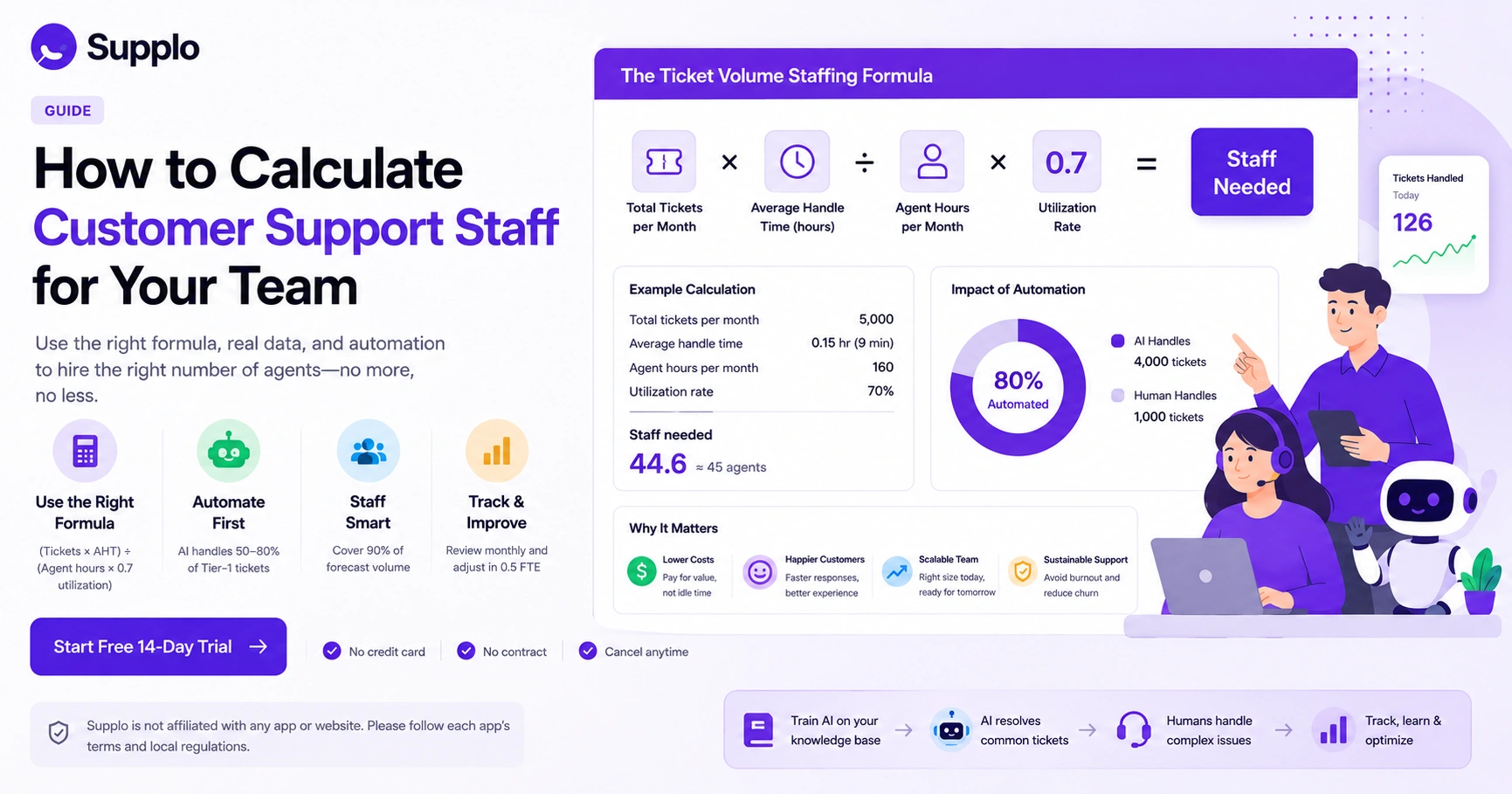
- Use the ticket volume staffing formula: (Total tickets per month × Average handle time in hours) ÷ (Agent hours per month × 0.7 utilization rate).
- Automate first: an AI agent can handle 50–80% of Tier-1 tickets, reducing your human staff by 60–70%.
- Staff for 90% of forecast volume and use automation for spikes to avoid overstaffing.
- Track your numbers monthly and adjust staffing in 0.5 FTE increments.
Why Most Teams Get Their Support Agent Count Wrong: The 4 Common Pitfalls
Most businesses miscalculate the size of their customer service team because they rely on intuition rather than data. The four biggest mistakes are:
- Mistake 1: Treating all ticket types equally (a billing refund takes 8 minutes; a password reset takes 2).
- Mistake 2: Staffing only for "average" volume, which burns out agents during spikes.
- Mistake 3: Forgetting that new agents need 2–4 weeks before they hit full capacity.
- Mistake 4: Letting email pile up while forcing agents to chase inbound phone calls.
Using a support ticket workload calculator exposes these gaps instantly. Correcting these four errors alone can reduce your actual staffing needs by 15–25% without lowering quality.
The Ticket Volume Staffing Formula: A Simple Way to Calculate Your Needs
Here's the core formula most staffing guides miss: Total tickets per month ÷ (Working hours per agent per month × 0.7 utilization rate).
The 0.7 utilization rate is the magic number here. It accounts for breaks, meetings, training and the mental downtime every human needs to stay sharp. If you try to push agents past 80% utilization for long, burnout isn't a maybe; it's a when.
Let's make it concrete. Say you get 5,000 tickets per month and each agent works 160 hours per month at 70% utilization. You'd need roughly 45 agents to keep things running smoothly. That might sound like a lot, but remember: utilization isn't about squeezing every second out of someone.
- Formula: (Monthly ticket volume × AHT in hours) ÷ (Monthly agent hours × Utilization %)
- Average handle time varies by channel: chat (4–6 min), email (8–12 min), phone (10–15 min)
- Utilization rate should never exceed 80% in practice; burnout sets in quickly above that
- Calculate separately for each channel if your team doesn't handle multiple channels
This ticket volume staffing formula works best when you also factor in average handle time and channel complexity.
Test the formula yourself. Use your own ticket data to see where your staffing stands. No signup, no commitment, just a practical benchmark you can use today.
Customer Service Agent Staffing Calculator: Build Your Own with 5 Data Points
You don't need expensive software to build your own customer service agent staffing calculator. A simple spreadsheet and five data points will get you surprisingly far:
- Total ticket volume broken by channel (email, chat, social, phone)
- Average handle time per channel (track this for a minimum of 30 days)
- Target service level (e.g., 80% of tickets answered within 2 hours)
- Average agent work hours per week minus admin and training
- Shrinkage percentage (time off, meetings, coaching, typically 15–25%)
Plug those into a simple spreadsheet formula and you'll see exactly where your staffing gaps are. Most teams discover they're understaffed by 20–30% on volume, or overstaffed by 15% on complexity.
Understanding the Customer Service Team Size Ratio: What the Data Actually Shows
You've probably heard the "one agent per 100 customers" rule of thumb. Here's the thing: it's practically useless in the real world.
A SaaS product with 1,000 active users but a buggy feature might generate 500 tickets a month, while a simpler product with 10,000 users generates only 200 tickets. Customer count alone tells you almost nothing about your actual workload.
The more reliable customer service team size ratio is agents per 1,000 tickets resolved per month, not per customer count.
- Standard ratio benchmarks: B2B SaaS (1:150–200 tickets), ecommerce (1:300–400 tickets)
- Customer count ratios are misleading if your churn is low but ticket volume is high
- Best practice: calculate your own ratio based on 3 months of historical data
- Industry benchmarks vary wildly; don't copy your competitor's ratio unthinkingly
- The ratio changes instantly once you introduce AI handling for Tier-1 tickets
How to Staff Support for Peak Season Without Blowing Your Budget
Peak season staffing is the most common reason teams end up with a bloated support budget. The temptation is to hire headcount for what's really just a temporary spike and then you're stuck with extra payroll for months after the rush is over.
Smart teams use a three-tier model instead:
- Tier 1 (Baseline): Full-time staff covering 100% of normal volume
- Tier 2 (Shoulder): Part-time or overflow contractors for 1.3x volume
- Tier 3 (Peak): AI agent handles 50–80% of Tier-1 tickets automatically
Pre-train your AI on past seasonal spikes to avoid cold-start problems. Don't forget to account for holiday schedules and reduced agent availability.
The Hidden Cost of Overstaffing vs. Understaffing Your Support Team
Here's what keeps me up at night: most teams fixate on understaffing but completely ignore the silent drain of overstaffing.
Understaffing directly hurts your customer experience: long wait times, angry customers and negative reviews. You feel that pain immediately.
But overstaffing is actually more dangerous to your bottom line. It bleeds cash silently through idle time, unnecessary payroll and management overhead. Research consistently shows that overstaffing by just one full-time equivalent (FTE) can cost $40k–$60k annually in salary plus benefits.
A support ticket workload calculator helps you find the sweet spot where you have enough coverage for 90% of volume without padding the payroll.
- Understaffing cost: Lost revenue from churned customers (5x acquisition cost)
- Overstaffing cost: Idle payroll + management overhead + wasted recruiting costs
- Sweet spot: Staff to 90% of forecast volume; let automation or OT handle the top 10%
- Use an AI agent as your overflow valve instead of paying full-time agents to wait
- Track idle time per agent monthly; anything above 15% means you're overstaffed
If your staffing numbers don't add up, your tool might be the problem. Legacy support platforms charge per seat, making it expensive to run the numbers right. Supplo charges per workspace, not per person.
→ See transparent pricing.
When to Hire a Human vs. When to Deploy an AI Agent
Not every ticket needs a human. In fact, most don't.
A practical staffing strategy is to map your tickets by complexity:
- Tier-1 (simple): typically 50–70% of all incoming volume, password resets, order status, basic how-to questions
- Tier-2 (moderate): require knowledge base + human judgment, refund exceptions, account merging, troubleshooting
- Tier-3 (complex): need empathetic, nuanced human support, escalated complaints, sensitive account issues, product feedback
Implement a bot-first routing system: The AI agent tries to resolve it; if it fails, hand off to a human. This division instantly reduces your required customer service team size by up to 50% in terms of volume, without lowering satisfaction.
Supplo is not affiliated with any app or website. Please follow each app's terms and local regulations.
How to Optimize Support Agent Count Over Time: Real-Time Adjustment
Your staffing needs change every month, so your agent count should too. Static headcount planning is a relic from the pre-AI era.
Set up a simple tracking system: measure weekly ticket volume, average handle time and service level. When handling time drops (because your agents get faster or your AI improves), recalculate your staffing formula. Most teams can reduce their agent count by 1–2 FTEs every quarter purely through efficiency gains, no new hires required.
- Track weekly: new tickets, AHT, CSAT and first-response time
- Re-run your staffing calculator every 90 days with updated data
- Watch for handle time creep; it signals training gaps or process issues
- Use AI analytics to surface which tickets are consuming disproportionate time
- Adjust up or down in increments of 0.5 FTE using part-time or contract staff
Automate First: How AI Changes Your Total Support Staff Needs
AI fundamentally changes how you calculate customer support staff needs. If your AI agent resolves 80% of incoming tickets automatically, your staffing formula shifts from "agents per ticket" to "agents per complex ticket."
Let me show you what that looks like in practice. 10,000 tickets per month with 80% automation means your team only needs to handle 2,000 tickets. That cuts your required staff by roughly 4x, assuming you have the right AI setup.
- Automation rate matters: 50% automation saves 25% staff; 80% saves 60% staff
- AI works best when trained on your knowledge base and past conversations; use a knowledge base to fuel it
- Human agents shift from repetitive tasks to high-value problem-solving
- AI cost is typically $0.04 per resolution vs. $0.99 for legacy tools
- Your support ticket workload calculator must include an automation reduction factor
Staffing Levels for Customer Support That Actually Scale
There is no one-size-fits-all staffing level. The right number of support agents depends on your ticket volume, complexity, service-level targets and the extent of automation you use.
The most reliable approach? Start with the ticket volume staffing formula, add an automation factor and track your ratio monthly. Aim for a staffing level where agents handle no more than 250–300 complex tickets per month after automation.
- Start with raw ticket volume, then apply your AHT and utilization formula.
- Add your automation percentage to get human-touch volume.
- Track actual vs. planned staffing for 3 months to validate your formula.
- Adjust ratios for channel mix (chat is faster, phone is slower, email is moderate).
- Revisit your staffing plan every quarter, not once a year.
Ready to optimize your support team size without blowing your budget? Start free with a 14-day trial, no credit card required. Your AI agent starts working immediately.
Key Takeaways
- Use the ticket-volume staffing formula to determine your baseline agent count.
- Automate first to reduce your human support staff by up to 60–70%.
- Staff for 90% of forecast volume and use automation for spikes to avoid overstaffing.
- Track your numbers monthly and adjust staffing in 0.5 FTE increments.
- Aim for a staffing level where agents handle no more than 250–300 complex tickets per month after automation.
FAQ
What's the fastest way to calculate my support staff needs?
Use the ticket volume staffing formula: (Total monthly tickets × Average handle time in hours) ÷ (Monthly agent hours × Utilization rate). This gives you a baseline number that accounts for handle time and agent downtime.
How many tickets can one support agent handle per day?
A typical full-time agent can handle 30–60 simple tickets, 15–25 moderate tickets, or 8–12 complex tickets per day. The exact number depends on the channel (chat is fastest, email is moderate, phone is slowest) and how much automation you use for Tier-1 issues.
What if my ticket volume changes every month? How do I staff for that?
Staff to your 90th percentile volume, not the average. Use an AI agent or overflow system to absorb the top 10% of spikes. This gives you a leaner team that can scale elastically without overpaying for idle agents.
Does AI actually reduce the number of agents I need?
Yes, significantly. An AI agent that resolves 80% of incoming tickets can reduce your required human staff by roughly 60–70%. The key is to train the AI on your specific knowledge base and past conversations so it handles real questions, not just canned responses.
Should I use a support ticket workload calculator before hiring?
Absolutely. A workload calculator helps you avoid both overstaffing and understaffing. Plug in your volume, handle time and service level targets and it will show you the exact headcount needed, plus the financial impact of being off by even one FTE.
What's the ideal support agent-to-customer ratio?
There is no universal ratio. It depends on ticket complexity, channel mix and automation level. A better metric is agents per 1,000 tickets resolved per month; aim for 1 agent per 250–300 complex tickets after automation.
How do I know if I'm overstaffing or understaffing my support team?
Track agent utilization rate. If agents are idle more than 15% of the time, you're likely overstaffed. If first-response time exceeds your target for more than 10% of tickets, you're understaffed. Run a staffing calculator quarterly to stay balanced.
Compliance line: Supplo is not affiliated with any app or website. Please follow each app's terms and local regulations.


