On this page
Every team has that one person who holds all the answers. The one everyone DMs when they need to know how to process a refund or where the latest product specs live. That's tribal knowledge and it's a bottleneck.
A centralized internal knowledge base fixes this. It takes all that scattered wisdom floating around in old emails, Slack threads and people's heads and puts it in one searchable spot. The result? Faster onboarding, fewer repetitive questions and a support team that actually sounds consistent.
This is for anyone tired of answering the same questions over and over. Team leads, ops folks, support managers, you know who you are.
Quick Answer
- An internal knowledge base centralizes scattered information into one searchable place, reducing repetitive questions and speeding up onboarding.
- Implementation works best when you start small: audit existing content, choose a knowledge base platform with AI search and assign content owners for regular updates.
- The best internal knowledge base software integrates with your existing tools (like Supplo's shared inbox) and includes analytics to track content gaps.
- Avoid common pitfalls: no ownership, too much content at launch and poor integration with daily workflows.
Why Your Team Needs a Centralized Internal Knowledge Base
Here's the thing about tribal knowledge: it scales terribly. When you've got five people, sure, everyone knows who to ask. When you've got fifty? Good luck.
A centralized internal knowledge base changes the game. It becomes your team's single source of truth for everything that matters.
- Onboarding gets faster. New hires aren't hunting down senior team members for basic processes. It's all right there.
- Knowledge silos disappear. You know that one person who holds the keys to the kingdom? They can take a vacation without the whole operation stalling.
- Compliance gets easier. Policies, product specs, scripts- they live in one place, version-controlled and reviewable.
Internal Knowledge Base Implementation
Audit Your Existing Information: Start with what you already have; don't build from scratch.
Before you set up an internal knowledge base, you need to know what you're working with. Dig through your documentation, FAQ lists, SOPs, onboarding guides and those support tickets you've answered a hundred times.
- Interview team leads to identify critical knowledge gaps. Ask them: "What question do you answer most often?"
- Remove outdated or duplicate information before importing—no point organizing garbage.
- Prioritize content that resolves the highest volume of recurring questions.
Choose the Right Internal Knowledge Base Software: Your software needs to be searchable, easy to update and connected to how your team actually works.
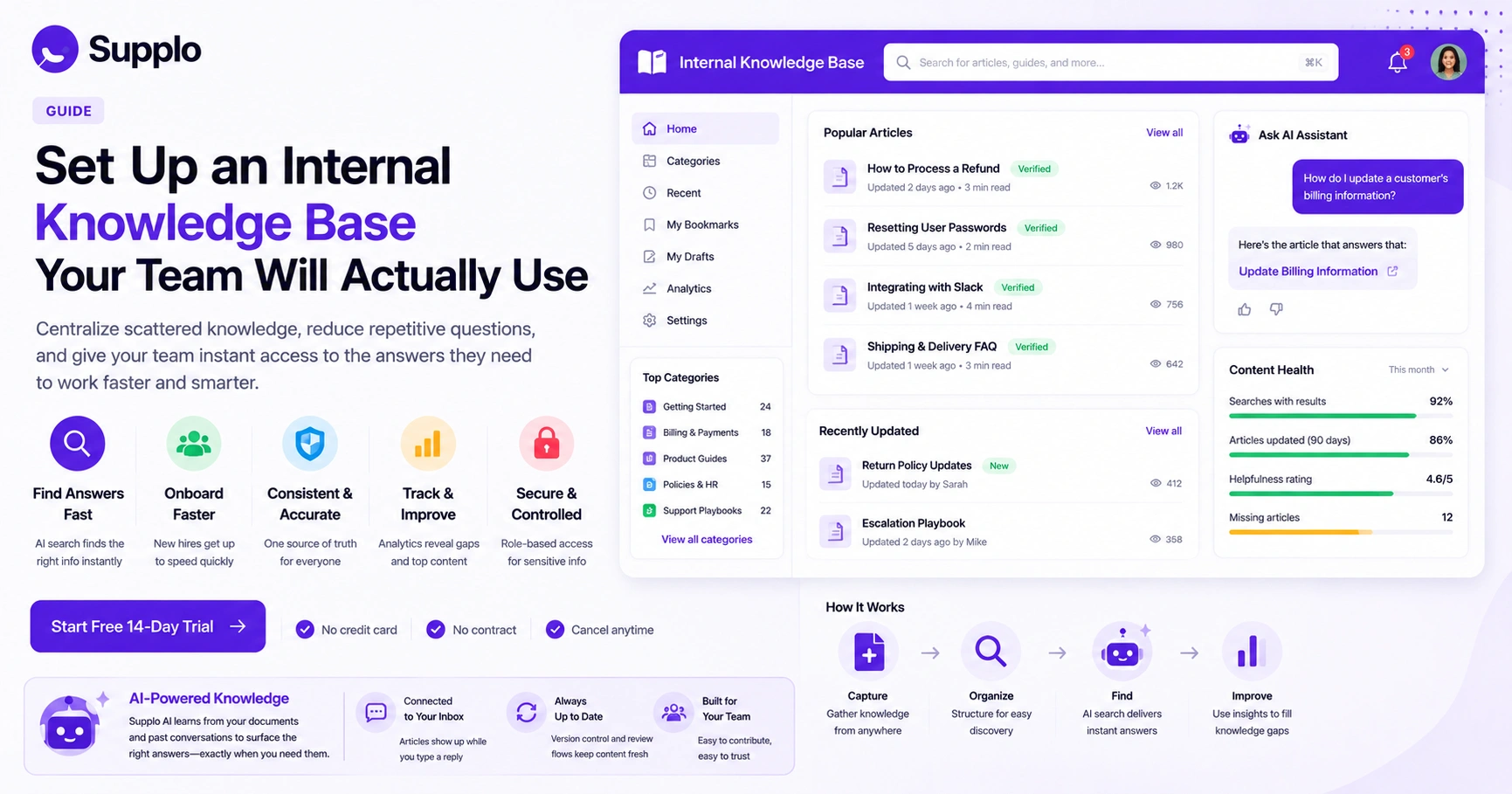
The best internal knowledge base software doesn't just host documents; it makes them findable. Look for instant publishing, version control and role-based access so your team can contribute without creating chaos. Platforms like Supplo make this straightforward by keeping your knowledge base directly connected to your customer conversations.
- Evaluate software based on search speed and AI-assisted retrieval. Nobody's got time to click through folders.
- Ensure it offers analytics so you can see which articles are searched for but missing.
- Prioritize tools that let non-technical team members update articles easily.
Ready to test how an internal knowledge base integrates with a shared team inbox? Start a free 14-day trial at Supplo.io, no credit card required. See how AI search surfaces the right article exactly when your team types a question.
Structure Content for Easy Discovery: Organize by how your team thinks, not by who wrote what.
Group your internal knowledge base by department, process, or product category. Use clear naming conventions for categories and tags so searching feels intuitive, not like detective work.
- Create a simple tiered structure: Category → Sub-category → Article.
- Use descriptive titles that match how your team actually asks questions.
- Add tags for synonyms and common industry terms to improve search recall.
Write and Maintain Accurate Articles: Clear, concise and action-first. That's the formula.
Assign ownership for each article category. Schedule quarterly audits to remove or update stale content. An outdated article is worse than no article at all; it actively misleads your team.
- Use step-by-step instructions, screenshots, or short video walkthroughs where helpful.
- Avoid jargon unless it's part of your internal vocabulary.
- Add a "last reviewed" date to signal freshness.
Integrate with Existing Tools: If it's not where your team already works, they won't use it.
Your internal team knowledge base needs to live inside the tools your team already has open. Connect it to your chat platform, email client, or customer support inbox. Supplo's inbox surfaces relevant knowledge base articles directly as an agent types a reply; that's the kind of frictionless integration you want.
- Connect your knowledge base to your customer support software.
- Embed search widgets on your intranet or team dashboards.
- Enable API access if you need custom integrations.
Key Features of the Best Internal Knowledge Base Software
The best internal knowledge base software goes beyond just hosting documents. It actually helps your team find what they need.
- AI search that understands natural language, not just exact keywords. Your team asks questions the way humans do.
- Role-based access to lock sensitive HR, legal, or financial content.
- Analytics dashboards showing search trends, missing content and popularity scores.
- Version history and approval workflows for published articles.
- Multi-language support if you have a distributed team.
Bonus points if the platform has an AI agent that learns from your knowledge base and automatically surfaces the right answers as your documentation grows.
How to Ensure Your Internal Team Knowledge Base is Reliable
Reliability comes from two things: accurate content and consistent updates. Assign a content owner for each major section and require a quarterly review stamp. A "verified" badge on recently reviewed articles builds team trust faster than any announcement.
- Set up a simple request-or-correction button so that team members can flag issues instantly.
- Track content health using metrics such as; articles not reviewed in 90 days.
- Create a quick-start checklist for new team members to test if documentation is complete.
Supplo is not affiliated with any app or website. Please follow each app's terms and local regulations.
Internal Knowledge Base Platform vs. Traditional Intranet
Let's call a spade a spade. A traditional intranet is fine for company announcements and HR policies, but it's usually terrible for quick, answer-based search. A dedicated internal knowledge base platform is built specifically for search speed, article structure and real-time updates.
You likely need both: an intranet for culture and an internal knowledge base for operational answers.
- Intranets are often static, requiring IT to publish changes. Knowledge bases empower any team member to contribute.
- Internal knowledge base search is designed for "how do I" questions, not browsing.
- A knowledge base provides usage analytics that an intranet typically doesn't.
How to Choose Internal Knowledge Base Software for Your Company
Start with your use case. Are you replacing outdated wikis? Supporting a remote team? Reducing support ticket volume by helping agents self-serve?
Prioritize software that balances ease of use with robust search, integrates with your existing tools and has a transparent pricing model that doesn't spike as your team scales.
- List must-have integrations (e.g., Slack, email, support desk).
- Decide who can create and edit content and whether to use open contribution vs. managed publishing.
- Compare price structures: per-seat vs. flat workspace fee. Models like Supplo's flat per-workspace pricing prevent bills from ballooning.
If you've struggled with knowledge base adoption in the past, the issue might be the platform, not your content. Platforms that isolate documentation from customer conversations create friction. Supplo connects your knowledge base directly to your support inbox, so articles show up automatically. Try it for free.
Common Pitfalls When You Set Up an Internal Knowledge Base and How to Avoid Them
Most internal knowledge base projects fail because of poor adoption, not poor software. Here's what usually goes wrong:
- Pitfall: No ownership → articles go stale. Fix: Assign a "content champion" per category.
- Pitfall: Too much structure upfront → overwhelmed team. Fix: Start flat and add hierarchy as needed.
- Pitfall: No integration → team forgets it exists. Fix: Embed search into your daily workflow tool.
The fix is simple: launch with 10 high-value articles, keep them short and appoint a documented owner for each.
Measuring Success: Is Your Internal Knowledge Base Working?
If your internal knowledge base is working, you'll see it in the numbers. Support ticket volume on common questions drops. Onboarding time shrinks. Search logs show high satisfaction rates.
- Monitor monthly search queries with zero results. Those are your content gaps.
- Track article views vs. "was this helpful?" ratings.
- Measure time-to-answer for your support team before and after implementation.
Key Takeaways
- An internal knowledge base centralizes scattered information into one searchable place, reducing repetitive questions and speeding up onboarding.
- Implementation works best when you start small: audit existing content, choose a knowledge base platform with AI search and assign content owners for regular updates.
- The best internal knowledge base software integrates with your existing tools and includes analytics to track content gaps.
- Avoid common pitfalls: no ownership, too much content at launch and poor integration with daily workflows.
- An internal knowledge base is a living resource that needs regular maintenance and updates to remain effective.
An internal knowledge base is not a one-time setup; it is a living resource. Supplo helps you maintain it with AI that learns from your past conversations and a shared inbox that keeps your team aligned. Set up your internal knowledge base today and keep your entire team on the same page, without per-seat fees. Start your free trial.
FAQ
Is it safe to store confidential information in an internal knowledge base?
Yes, if the software supports role-based permissions and encryption at rest. Always review your provider's security certifications and restrict access to sensitive articles to specific roles or departments.
Why do some internal knowledge base implementations fail?
Most fail due to lack of content maintenance and poor search functionality. If your team can't find answers in two clicks, they will stop using it completely.
Should we build our own internal knowledge base or buy software?
Buying specialized software is almost always faster and more reliable than building custom from scratch. You get AI search, analytics and integrations out of the box.
How often should we update our internal knowledge base?
Schedule a complete content audit quarterly. High-traffic articles (policies, product changes, support scripts) should be reviewed monthly or whenever a process changes.
Can an internal knowledge base completely replace onboarding documentation?
It should centralize it, but you still need a structured onboarding process. Use the knowledge base as the persistent reference that new hires can search after training.
What is the difference between an internal knowledge base and a wiki?
A knowledge base emphasizes fast, accurate search and answer retrieval. A wiki is often freer-form and better suited to collaborative long-form documentation.
How do we get our team actually to contribute to the knowledge base?
Make it part of the workflow, require a brief documentation step when closing a support ticket, or assign rotating "content duty" each sprint. Lead by example.
Compliance line: Supplo is not affiliated with any app or website. Please follow each app's terms and local regulations.