On this page
Every customer support team knows the feeling: an endless flood of incoming tickets, each one screaming for attention. Without a real system in place, agents burn out, critical issues get buried and customer satisfaction takes a nosedive. This guide is built for support managers, team leads and operations folks who want to turn chaotic queues into something that actually works. You'll learn how to define priority, categorise like a pro and use automation to serve customers better while keeping your team sane.
Quick Answer
- Use a shared framework – An urgency-impact matrix or weighted scoring eliminates guesswork and emotional decisions.
- Categorise consistently – Keep categories under 15 top-level tags for fast, accurate routing.
- Automate routine tasks – AI can resolve up to 80% of common tickets, freeing your team to focus on complex issues.
- Audit your queue weekly – Regularly review ageing tickets to prevent P3 issues from organically becoming P1 problems.
- Balance speed with quality – Aim for one-touch resolution (OTR) rather than just fast first response times.
Why Prioritising Support Tickets is Non-Negotiable for Customer Success
Here's the thing: when every ticket feels urgent, nothing actually is. Knowing how to prioritise support tickets effectively isn't about ignoring customers; it's about protecting your team's capacity and your brand's reputation. Without a defined system, agents waste energy on low-impact tasks while real problems go untouched.
A priority matrix changes that. It lets you stop guessing and start scoring, removing emotion from tough decisions. Your team's efforts are starting to align with what actually matters: revenue, customer sentiment and long-term retention. Plus, clear prioritisation of customer support workflows directly impacts team health. Less chaos means better outcomes for everyone.
Understanding Support Ticket Priority Levels: High, Medium, Low
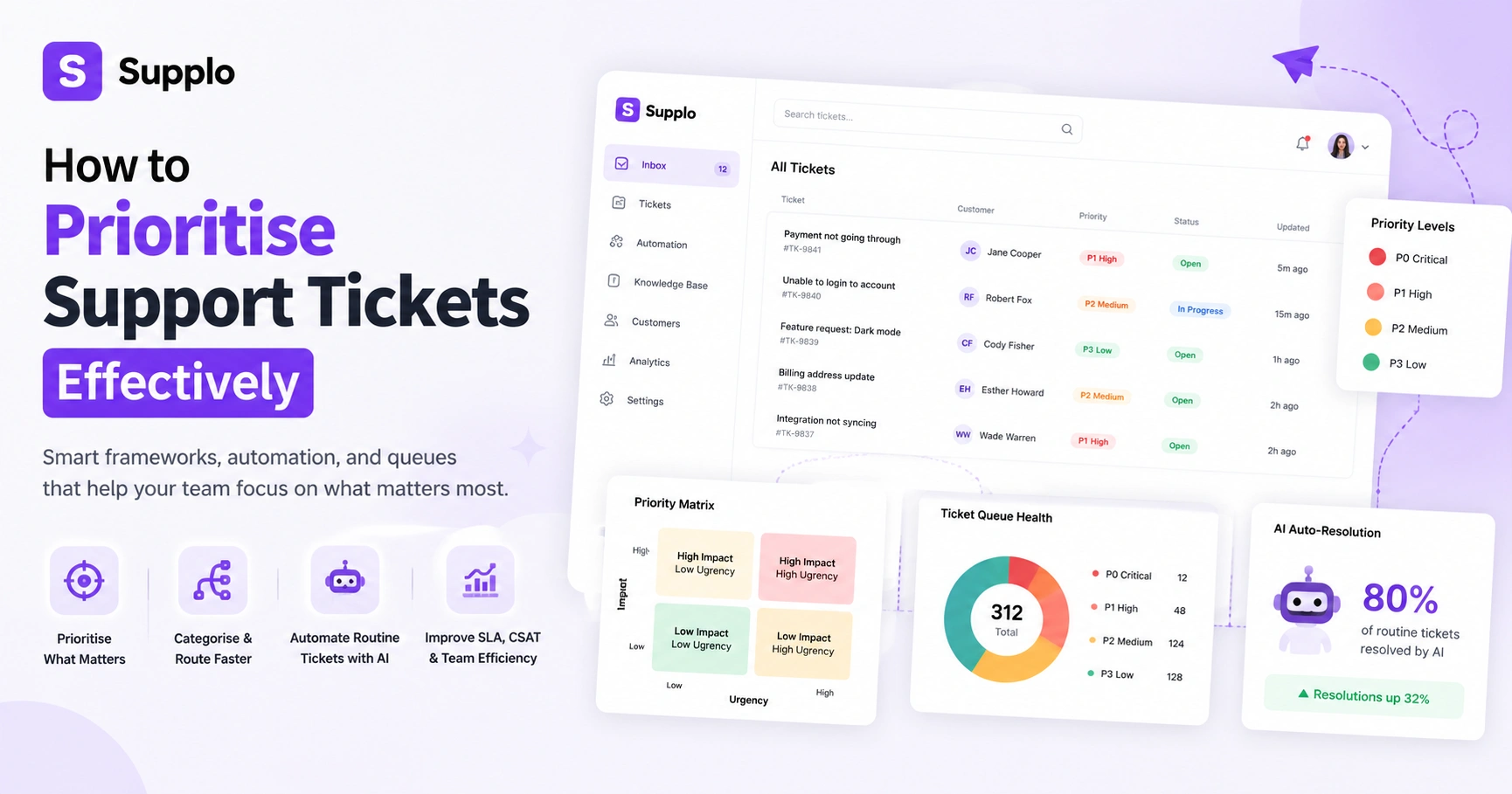
Before you can prioritise anything, your team needs a shared language around urgency. Support ticket priority levels usually fall into these categories:
- P0-Critical: Core service outage, security vulnerability, legal issues. These demand immediate attention and response.
- P1-High: A single user blocked, payment failures, or escalated VIP customer issues. Aim to respond within 1-2 hours.
- P2-Medium: Usability friction, missing features, or billing clarifications. Responses typically within 8-12 hours.
- P3-Low: General inquiries, documentation requests, or minor feature suggestions. A 24-48 hour response time is usually fine.
The nuance? You've got to combine severity with customer value. A low-priority issue for a high-value client might jump to P1. And remember: priority isn't static. A low-priority ticket can become critical if it's ignored too long.
How to Categorise Customer Service Tickets for Rapid Response
Categorising customer service tickets is the foundation of turning chaos into order. A solid taxonomy lets your AI agent or triage team route tickets immediately, no guessing involved.
Categories can be based on:
- Type: Billing, Technical, Account, Sales, General inquiries.
- Source: Channels like email, web chat, WhatsApp, Telegram, Instagram DM, Facebook Messenger.
- Symptom: Specific phrases such as Login failed, Payment declined, or Integration error.
- Customer Segment: VIPs, Enterprise clients, Onboarding status, or customers at risk of churn.
Keep your top-level category list concise, under 15 options. Too many categories overwhelm agents and lead to inconsistent classification. A well-structured shared inbox system is crucial for managing incoming channels effectively.
Compliance line: Supplo is not affiliated with any app or website. Please follow each app's terms and local regulations.
Ready to streamline your support? Now that you've got a category system, test it in a live environment without impacting your existing workflow. Start a free, 14-day trial with Supplo to apply your taxonomy to real tickets and see the difference in response time.
Effective Support Ticket Prioritisation Frameworks
Prioritisation frameworks remove the guesswork from your workflow. One of the most practical approaches is the Urgency-Impact Matrix:
- High Impact / High Urgency: Escalate immediately (e.g., system down).
- High Impact / Low Urgency: Schedule for thorough resolution (e.g., non-critical bug affecting many users).
- Low Impact / High Urgency: Assign quickly, but don't over-escalate (e.g., a password reset for a VIP).
- Low Impact / Low Urgency: Triage later, often self-serviceable (e.g., a how-to question).
For more granular control, try a weighted scoring system. It factors in things like:
- (Impact Score x 3) + (Urgency Score x 2) + (Customer Value Score x 1.5)
- Time-to-respond degradation: Automatically reducing a ticket's priority if it ages without interaction.
Reserve overrides for true VIP escalations, security alerts and brand crisis scenarios. These frameworks provide practical strategies for prioritising support tickets and managing queues effectively.
Strategies for Managing Support Ticket Queues During Peak Volume
Peak times hit hard: product launches, holiday seasons, major outages. Your queue explodes. The solution isn't just throwing more agents at it; it's intelligent queue management.
Here's how to effectively manage support ticket queues:
- Automated Acknowledgements: Use auto-responders to set clear expectations (e.g., "We'll reply within 2 hours. Here's a relevant KB article.").
- Skill-Based Routing: Automatically direct technical tickets to engineers and billing inquiries to finance-trained agents. Right person, right issue.
- Queue Ageing Alerts: Set alerts for any high-priority ticket untouched for a defined period (e.g., P0 for 15 minutes, P1 for 1 hour).
- Triage Mode: During extreme spikes, temporarily reduce response targets for low-priority tickets to free capacity for critical issues.
- Unified Shared Inbox: An integrated inbox lets your entire team see and collaborate on the same queue. No ticket falls through the cracks.
Organising Support Tickets: Creating a Shared Inbox System
Those days of managing support across separate email, chat, WhatsApp, Telegram, Instagram and Facebook Messenger accounts? They're over. Without a unified shared inbox system, your team will inevitably lose track of conversations, leading to frustrated customers and duplicate work.
A shared inbox pulls everything into one threaded environment. Agents get full context for every conversation, no toggling between apps. It also solves the "that's not my ticket" problem, because everyone sees the same queue and can collaborate effectively.
Key features of an effective shared inbox:
- Unified View: A single dashboard to manage all channels (email, web chat, WhatsApp Customer Support, Telegram Support, Instagram DMs, Facebook Messenger).
- Threaded Conversations: Comprehensive context from the initial message to the latest reply, all in one place.
- Collision Detection: Indicators show when another agent is viewing or typing, preventing duplicate responses.
- Assignment Rules: Automate ticket assignment based on keywords, source, or customer segment.
- Internal Notes: Share private context and collaborate without customers seeing the conversation.
Streamlining Customer Support Processes with Automation
Automation acts like a force multiplier for customer support processes. It transforms a reactive team into a proactive, strategic one. Repetitive tasks get handled automatically, freeing humans for more complex, empathetic work.
Leverage automation to:
- Auto-Categorize Tickets: Use Natural Language Processing (NLP) to automatically tag tickets with intents such as refund, cancel, or bug; no manual sorting needed.
- Instant Acknowledgements: Send automated replies that confirm receipt and set response expectations.
- Smart Routing: Automatically assign tickets to the correct team or agent based on category or keywords.
- Self-Service Deflection: Suggest relevant knowledge base articles before a ticket is formally created. Let customers help themselves.
- Automated Ticket Resolution: A well-trained AI agent can resolve up to 80% of common inquiries on its own, reducing your team's workload at a flat rate per resolution.
The goal of streamlining customer support processes through automation isn't to replace your team. It's to make them better at what they do.
Customer Support Workflow Prioritisation: Balancing Speed and Quality
Prioritising for speed alone often leads to fast but hollow support: tickets closed quickly but not actually resolved. Effective customer support workflow prioritisation means balancing First Response Time (FRT) with the overall Full Resolution Rate.
A ticket answered in 30 seconds that needs three follow-ups? That costs more than one that takes a few minutes but resolves things on first contact. Your north star metric should be One-Touch Resolution (OTR) rate, the percentage of tickets solved in a single reply. Aim for 70%+ OTR over time.
Consider these factors:
- FRT vs Resolution Time: Fast responses are good, but a speedy answer that doesn't solve the problem frustrates customers more.
- Sentiment Scoring: Track customer sentiment. If it drops significantly, automatically flag the conversation for human intervention.
- Empathy and Efficiency: Use AI for routine queries, but ensure a seamless handoff to a human when emotional complexity or unique problems arise.
- Review Solved but Re-opened Rate: A high re-opening rate indicates quality failures, not just speed issues.
Improving Support Operations with a Self-Learning AI Agent
Your support operations can get a serious upgrade from a self-learning AI agent. Unlike static chatbots, this kind of AI keeps improving by analysing interactions and pulling accurate answers from your knowledge base and past conversations. It adapts to new queries and phrasing over time.
A self-learning AI handles routine tickets efficiently, password resets, order status checks and account changes, providing instant resolutions. When an inquiry falls outside its confidence threshold, it performs a seamless handoff to a human agent, providing all the context.
Benefits of integrating a self-learning AI agent:
- Continuous Improvement: The AI learns from your existing data—no manual training required.
- Confidence-Based Handoff: It escalates to a human with full context when it's less than 90% confident.
- Multilingual Support: Automatically translates messages, letting your team support customers in any language.
- Flat-Rate Resolution: Forget unpredictable costs. Pay a fixed, flat rate per resolution.
- Risk-Free Trial: Explore the capabilities with a 14-day free trial, no commitment required.
Looking for predictable costs with powerful AI? Ongoing access to smart support shouldn't mean ballooning costs. With Supplo's flat-rate per-workspace pricing and support for crypto payments (Binance Pay, Payeer, GCash, AmanPay, QIWI Wallet, DOKU, Nigeria and South Africa cards, Skrill, Payoneer), your support operations stay lean and predictable. Try it free for 14 days, no credit card required. When it works, keep it.
Common Pitfalls in Support Ticket Management And How to Avoid Them
Even with the best intentions, support teams fall into predictable traps. The fastest way to fail? Treat every issue as urgent. Or let the loudest customers dictate your priorities.
Here are the pitfalls and how to sidestep them:
- Pitfall 1: Prioritising by Volume Instead of Impact: Letting a flood of low-severity tickets overshadow a single critical issue. Avoid by: Using a clear urgency-impact matrix.
- Pitfall 2: Category Bloat: Having too many or poorly defined categorisation options (think 40+ dropdown choices). Avoid by: Keeping categories concise and reviewing your taxonomy regularly.
- Pitfall 3: No Queue Audit: Failing to review your queues regularly, leading to P3 tickets becoming critical simply from age. Avoid by: Scheduling weekly queue audits and using ageing alerts.
- Pitfall 4: Ignoring the Voice of the Customer: Neglecting sentiment trends or feedback, leading indicators for future ticket volume. Avoid by: Integrating sentiment analysis into your workflow.
- Pitfall 5: Treating AI as Set-It-and-Forget-It: Expecting AI to perform flawlessly without oversight or knowledge base updates. Avoid by: Reviewing AI responses regularly and continuously updating your knowledge base.
Don't let your support system become a pitfall. Avoiding these issues starts with having the right tools. Supplo's shared inbox and self-learning AI agent provide queue ageing alerts, collision detection and automated routing, all within a single workspace. If a ticket gets stuck, you'll see it immediately and can adjust.
Key Takeaways
- Define Priority Clearly: Establish a shared understanding of priority across your team using frameworks such as the Urgency-Impact Matrix.
- Categorise & Route: Implement a concise ticket taxonomy and automate skill-based routing.
- Leverage Automation: Use AI to handle routine inquiries, freeing your human agents to focus on complex, empathetic support.
- Unified Workspace: Consolidate all communication channels into a single shared inbox for comprehensive context and seamless collaboration.
- Balance Speed and Quality: Focus on One-Touch Resolution (OTR) and effective issue resolution, not just fast first responses.
- Continuous Improvement: Regularly audit your queues and update your knowledge base to sustain an efficient support operation.
FAQ
Why is prioritising support tickets so hard for most teams?
Because urgency is subjective, without a shared framework, each agent's sense of urgency differs. A matrix or scoring system removes that guesswork, creating consistency.
What are the most common support ticket priority models?
The three-tier model (Critical, High, Low) and the urgency-impact matrix (a 2x2 grid), both derived from ITIL principles, are the most widely used methods.
Can AI really prioritise tickets without human oversight?
Yes, if it's continuously trained on your knowledge base and past conversations. A self-learning AI can classify and route tickets by intent with high accuracy, but regular audits of its decisions are still recommended.
How do I handle tickets that get stuck in the queue?
Set up ageing alerts within your support system. Any ticket that hasn't been touched within a predefined period (e.g., 2 hours for a P1) should auto-escalate to a senior agent or trigger an internal notification.
Should I prioritise customer value or issue severity?
Ideally, incorporate both. A high-value customer with a low-impact issue may still warrant faster attention than a free-tier customer with the same problem. Combine severity scores with customer tier weighting.
Does categorising tickets really save time?
Absolutely. Consistent categorisation reduces the time it takes to route a ticket from several minutes to mere seconds. That efficiency compounds significantly across hundreds of tickets per week.
What's the best way to test a new prioritisation system?
Start with a 14-day free trial of a tool like Supplo. Focus on one channel (e.g., email or chat), apply your new framework and compare your response times, resolution rates and team satisfaction metrics to your previous performance.
Compliance line: Supplo is not affiliated with any app or website. Please follow each app's terms and local regulations.