On this page
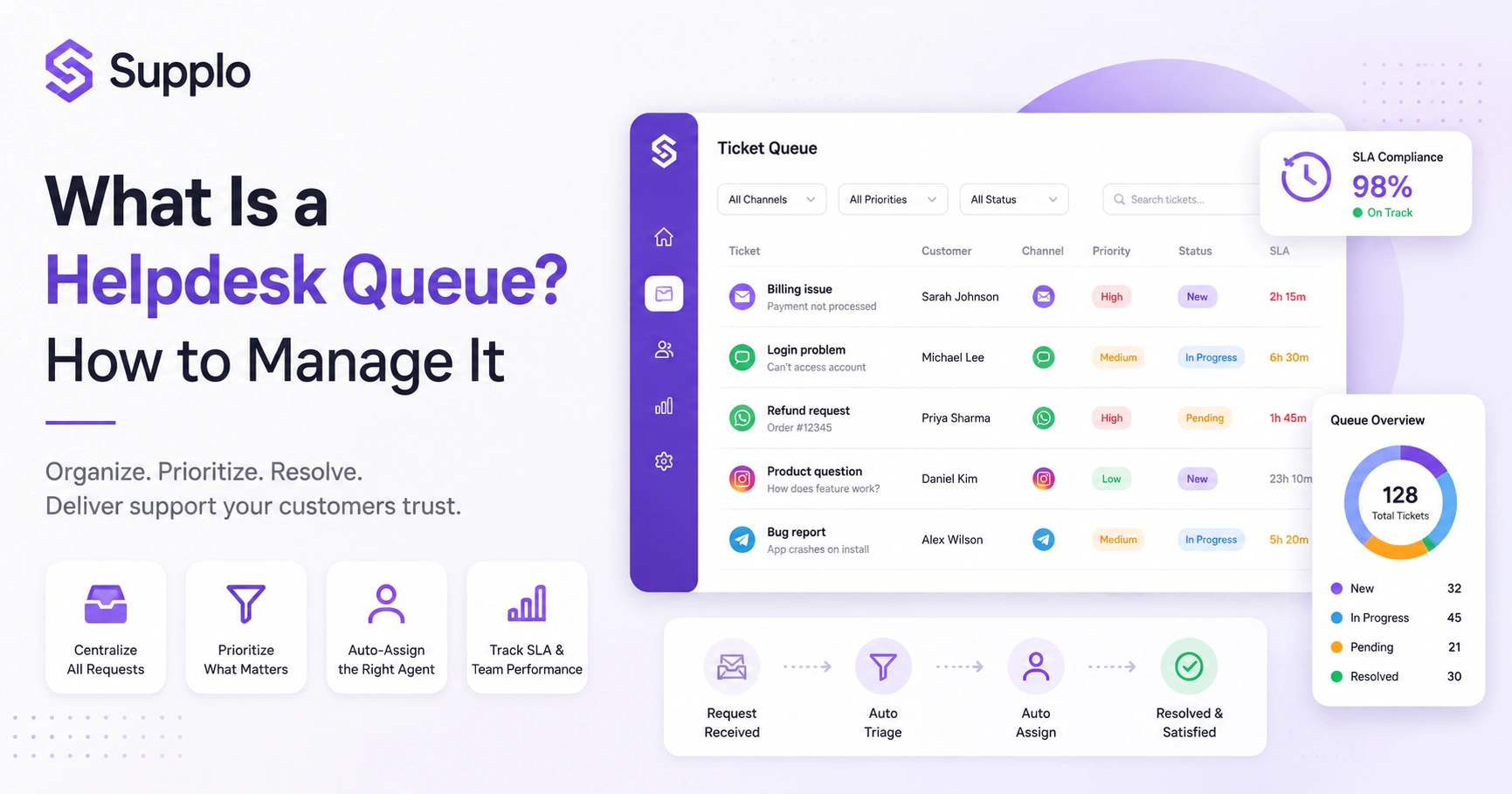
Picture a digital waiting room where every customer question, complaint, or request lines up in order. That's basically what a helpdesk queue is and how to manage it, in a nutshell. It's a structured system designed to log, sort and route incoming support tickets so nothing slips through the cracks. This guide is for customer support managers, team leads and business owners who want practical strategies to turn their support workflow from reactive chaos into something you can actually rely on. Get your queue right and you'll see faster response times, happier customers and a support team that isn't burning out.
Quick Answer
- A helpdesk queue organises all incoming customer service requests so no ticket gets lost in the shuffle.
- It prioritises tickets, automates routing and gives you visibility into your team's workload.
- Key features include auto-assignment, priority tagging, SLA tracking and multi-channel ingestion.
- AI-powered queue management can handle a big chunk of simple tickets automatically, freeing your humans for the tricky stuff.
- Effective management comes down to clear prioritisation, consistent workflow and the right software tools.
What Exactly Is a Helpdesk Queue? And Why It Matters for Reliability
A helpdesk queue is an ordered list of incoming customer support tickets awaiting resolution. Think of it as a digital holding area where each request gets logged, sorted and assigned, so nothing falls through the cracks. The reliability of your entire support system depends on how well this queue is structured. A poorly managed queue? You'll get lost tickets, frustrated customers and agents who are completely drained.
Every unresolved ticket lives in the queue, regardless of where it came from: email, chat, social DMs, you name it. Tickets get sorted by status (new, in-progress, pending, resolved) or priority score. Reliable queues prevent duplicate work by making sure one agent handles one ticket at a time. Plus, every ticket comes with a timestamp so you can track first-response and resolution times accurately.
How Does a Helpdesk Queue Differ From a Simple Inbox?
A standard email inbox shows you messages in the order they arrived, but it doesn't help you sort, prioritise, or assign work. A helpdesk queue actively manages the flow: it groups requests by type, tags them by urgency and automatically routes them to the right team member. This shift from a passive inbox to an active queue is the difference between pure chaos and consistently hitting response times.
Here's the thing about inboxes: every message sits flat and you're left manually figuring out what matters. A queue uses rules and automation to triage tickets before a human even looks at them. Shared queues prevent two agents from accidentally replying to the same customer. And with a queue, you can set Service Level Agreements (SLAs) and actually measure whether you're hitting them.
Key Features of a Helpdesk Queue That Make or Break Your Support Flow
Not all helpdesk queue software is created equal. The features that separate a truly reliable system from a frustrating one include automated ticket assignment, priority-based sorting and real-time visibility into your backlog. Without these, your queue is just another list, one that quietly buries your most urgent requests.
- Auto-assignment: Routes tickets to the right agent based on skill set or current workload
- Priority tagging: Lets you rank tickets by urgency (critical = system down, low = feature request)
- SLA tracking: Monitors time-to-response and escalates if deadlines are missed
- Multi-channel ingestion: Pulls in requests from email, live chat from your website, WhatsApp, Instagram, Telegram and more into a single queue
- Collision detection: Prevents two agents from working the same ticket at the same time
How to Set Up a Helpdesk Queue That Doesn't Drop Tickets
Setting up a helpdesk queue starts with choosing a tool that centralises all your channels in a single shared inbox. From there, you define your ticket statuses (new, open, pending, resolved), create priority rules and set up auto-assignment so tickets land on the right desk. The goal? Create a system where no ticket can enter without being logged and tracked all the way through to resolution.
- Step 1: Connect all your support channels (email, chat widget, social DMs) to the queue system
- Step 2: Define 4–5 clear statuses and train your team on when to use each one
- Step 3: Create priority rules (example: billing = high, general question = low)
- Step 4: Set up auto-assignment rules based on agent load or expertise
- Step 5: Test the flow with a few mock tickets before going live
See how a real queue system works. Start a free 14-day trial at Supplo, no credit card needed. Connect email, chat widget and social DMs in minutes.
Creating a Helpdesk Ticket Queue That Prioritises Urgency Without Sacrificing Quality
A good queue balances speed with the right level of attention. Instead of simply stacking tickets by arrival time, you should create a queue that prioritises urgent issues and groups similar requests. That way, a critical server outage takes precedence over a general feature request, but the backlog still gets cleared in a logical order.
Use a tiered priority system: critical (immediate), high (4 hours), medium (24 hours), low (48+ hours). Group tickets by category (billing, technical, account management) to batch similar work. Assign SLAs per priority level and automate reminders when deadlines approach. And whatever you do, avoid the urgent trap; it dilutes real emergencies and burns your agents out fast.
Configuring Helpdesk Queues for Multi-Channel Support: Email, Chat, Social
A reliable helpdesk queue pulls in requests from every channel your customers use- email, live chat, WhatsApp, Telegram, Instagram DMs, Facebook Messenger- and dumps them into one unified workspace. Without this, your agents have to toggle between platforms, which invites human error and slow response times. The configuration should preserve channel context (like this came in via Instagram DM), so the agent knows where to reply.
Each channel should map to the same ticket queue while retaining its channel tag. Live chat messages should enter the queue immediately if no agent is available to respond in real-time. Social DMs (Instagram, Facebook, Telegram) often need different response tones; configure tags accordingly. Email ticketing should auto-create a ticket from any incoming message to a support address. If you serve a global audience, the queue should support translations too.
Supplo is not affiliated with any app or website. Please follow each app's terms and local regulations.
Helpdesk Queue Management Tips: 5 Practical Steps to Keep the Flow Steady
Managing a helpdesk queue well is about consistency, not heroics. Start each shift by reviewing the queue depth, assign tickets to agents based on current workload (not seniority) and set clear expectations for when tickets will be handled. Use tags to flag issues that need follow-up and always close the loop with the customer before marking a ticket resolved.
- Tip 1: Review queue depth every morning; know your backlog before the day starts
- Tip 2: Assign tickets based on agent load, not role or rank, to prevent burnout
- Tip 3: Use tags to mark tickets needing follow-up (e.g., waiting on customer, pending fix)
- Tip 4: Set max pending limits so tickets don't sit unresolved for weeks
- Tip 5: Automate status updates to customers so they know their ticket hasn't been forgotten
Best Practices for Helpdesk Queues: Common Bottlenecks and How to Fix Them
The most common bottlenecks in a helpdesk queue are unclear prioritisation, lack of agent capacity visibility and poor escalation paths. The fix? Create a clear priority framework, give agents a view of the entire queue (not just their own tickets) and design an escalation path that automatically kicks in when a ticket exceeds its SLA threshold.
- Bottleneck 1: Everything is flagged high priority. Fix: define 3–4 priority levels and stick to them.
- Bottleneck 2: Agents can't see the full queue. Fix: use a shared inbox where everyone sees the same view.
- Bottleneck 3: No automated escalation. Fix: set SLA timers that escalate unhandled tickets to senior agents.
- Bottleneck 4: Too many back-and-forth questions. Fix: require customers to provide essential info before the ticket is submitted
- Bottleneck 5: No clear done criteria. Fix: define what resolved actually means for each ticket category.
Support Ticket Queue Optimisation: Using Software to Reduce Friction
Optimising a support ticket queue means using software to automate repetitive tasks, such as tagging, routing and even answering common questions. The best helpdesk queue software learns from past tickets and your knowledge base to resolve simple requests instantly, while handing complex ones to humans. This is where AI-powered tools like Supplo's AI agent make a real difference: the AI handles up to 80% of incoming tickets automatically, so the queue stays shallow and your team only sees the work that needs human judgment.
Automate ticket categorisation using keywords and past conversation history. Let the AI resolve known issues (password resets, order status, FAQs) immediately. Route complex or sensitive tickets directly to human agents without delay. Use queue analytics to spot peak hours, recurring issue types and agent performance. And optimise your knowledge base so the AI can pull accurate answers without hallucinating.
If your queue is full of repetitive questions, let Supplo's AI handle them. Flat $0.04 per AI resolution, handoff to humans when needed. Test it risk-free.
When to Hand Off From AI to a Human in a Queue-Based System
A reliable helpdesk queue knows exactly when to ask a human for backup. If the AI can't confidently resolve a ticket, say, because the issue is multi-step, sensitive, or requires account-level changes, it should hand off cleanly to a human agent with full context. The key is that the handoff is seamless: the agent picks up where the AI left off, so the customer doesn't have to repeat themselves.
Hand off for billing disputes, account deletions, or security-related issues. Hand off when the AI identifies customer frustration or repeated questions. Always preserve the conversation history in the queue so the human can pick up immediately. Set confidence thresholds: if the AI is less than 85% confident, escalate to a human. The handoff should automatically update the queue status (e.g., to pending human review).
How Much Does Helpdesk Queue Software Cost? Transparent Pricing That Scales
Legacy tools charge per seat and per resolution, so your bill climbs every time you hire someone or a ticket is answered. Supplo flips that model: you pay a flat fee per workspace, not per agent and AI resolutions cost a flat $0.04 each instead of the typical $0.99. That's predictable, transparent pricing that doesn't punish you for growing your team or having a high volume of simple questions.
Supplo starts with a free 14-day trial, no credit card required, to test the queue system. After the trial, pricing is per workspace, not per seat, so your bill stays stable as your team grows. AI agent resolves tickets at $0.04 per resolution, with no hidden per-seat fees. Supports payments via Crypto, Binance Pay, Payeer, GCash, AmanPay, QIWI Wallet, DOKU, Nigeria and South Africa cards, Skrill and Payoneer for global teams. No contracts, cancel anytime if the queue system doesn't fit your workflow.
Key Takeaways
- A helpdesk queue is a critical component for reliable and efficient customer support, providing structure and preventing lost tickets.
- It significantly improves on a simple inbox by offering active management through prioritisation, auto-assignment and SLA tracking.
- Essential features for effective queue management include multi-channel ingestion, collision detection and robust automation capabilities.
- Implementing a clear step-by-step workflow for setting up and managing your queue helps maintain steady ticket flow.
- AI plays a pivotal role in optimising helpdesk queues by automating the resolution of simple inquiries and facilitating seamless handoffs to human agents for complex issues.
Stop guessing, start optimising: Supplo gives you real-time queue analytics, auto-assignment and multi-channel ingestion in a single workspace. Start your free trial now at supplo.io.
FAQ
What is a helpdesk queue?
A helpdesk queue is an organised list of customer support tickets awaiting a response. It logs each request, assigns priorities and routes work to the right agent, so nothing gets lost.
How is a helpdesk queue different from a regular inbox?
A regular inbox shows emails in the order they arrive, without any structure. A helpdesk queue sorts tickets by urgency, assigns them to specific agents and tracks response times to help you meet SLAs.
What are the essential features of helpdesk queue software?
The must-haves are auto-assignment, priority tagging, SLA tracking, multi-channel ingestion (email, chat, social DMs) and collision detection to prevent duplicate replies.
Can AI help manage my helpdesk queue?
Yes. AI can automatically categorise tickets, resolve common questions instantly and hand off complex issues to a human with full context. This keeps the queue shallow and response times fast.
How do I set up a helpdesk queue for the first time?
Start by choosing software that centralises your channels in a single inbox. Then define your ticket statuses (new, open, pending, resolved), create priority rules and set up auto-assignment. Test with a few mock tickets before going live.
What should I do if my queue gets too long?
First, identify the bottleneck: is it assignment, resolution, or too many incoming requests? Then automate simple tickets with an AI agent, add capacity during peak hours and review your priority rules to ensure urgent issues get priority.
Is Supplo compliant with data protection regulations?
Supplo follows standard data security practices for a SaaS platform. Supplo is not affiliated with any app or website. Please follow each app's terms and local regulations.
Compliance line: Supplo is not affiliated with any app or website. Please follow each app's terms and local regulations.


