On this page
Who It Is For
So you're building a support team, and someone's already asking the big question: should we go with a shared inbox or a ticketing system? It's one of those debates that can split a room, honestly. Each approach has real strengths, and real blind spots. The right call depends on your team size, how you work, and what your customers actually expect from you. This guide breaks down the shared inbox vs. ticketing system question so you can stop guessing and start building.
This is for founders, ops leads, and support managers who are tired of hearing "let me transfer you to the right department." If you've got a team under 50 and you're drowning in fragmented inboxes, stick around.
Quick Answer
- Shared inbox vs. ticketing system? Shared inboxes win for teams under 50 who value speed, context, and real-time collaboration, without per-seat pricing.
- Key difference? Ticketing systems fragment conversations into numbers; shared inboxes keep everything in one readable thread.
- Cost trap? Legacy ticketing tools charge $0.99 per resolution or per agent seat; modern shared inboxes like Supplo offer flat-rate pricing starting at $0.04 per resolution.
- Who should switch? Any team tired of lost context, high ticket volume, or ballooning costs- a shared inbox cuts complexity.
What Is a Shared Inbox? And When It's the Right Choice
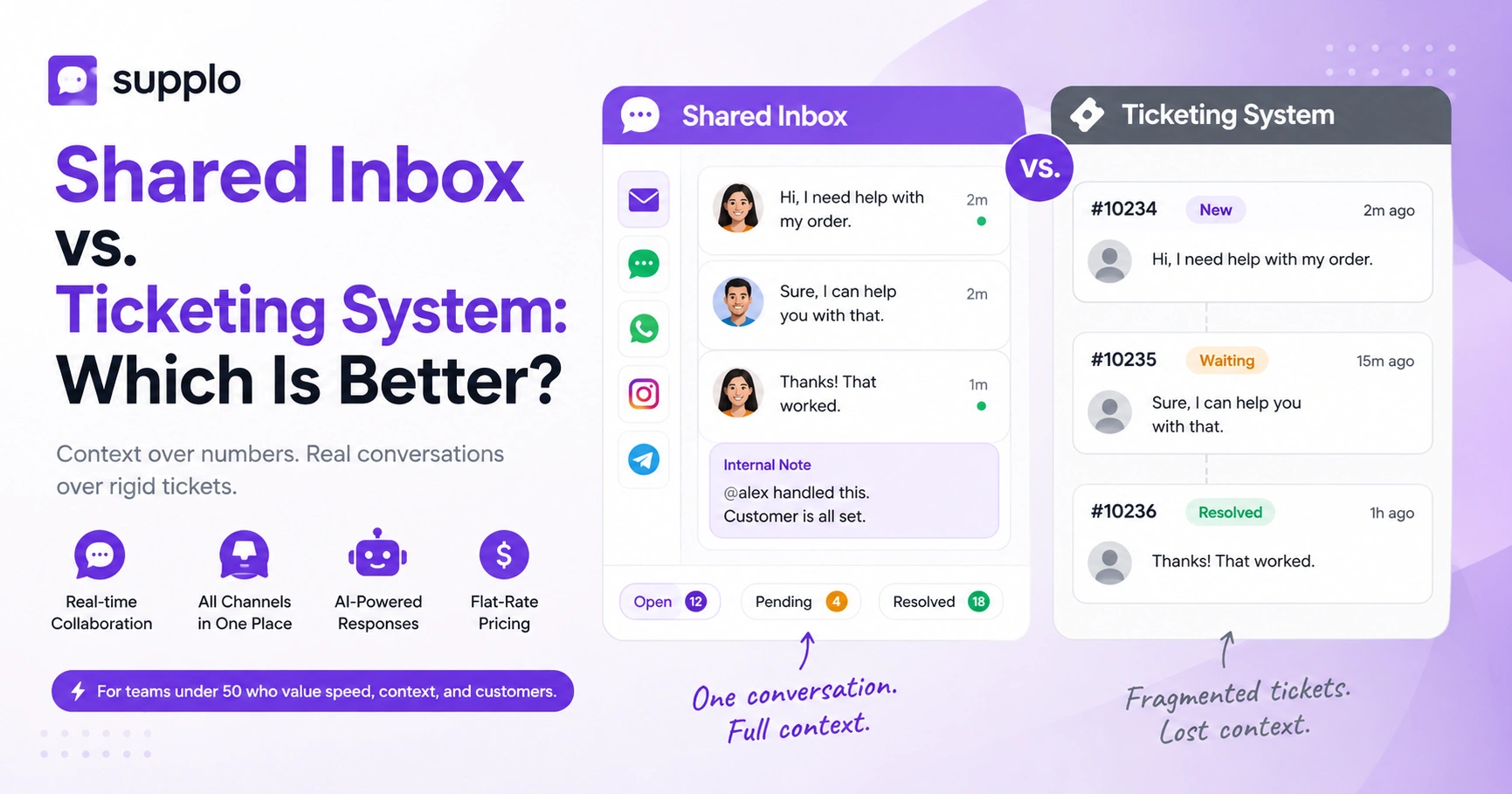
Here's the short version: a shared inbox is a single place where your whole team can see every customer message, email, live chat, Instagram DMs, you name it, in a single threaded view, no ticket numbers, no queues, no "who's handling this?" panic.
Think of it like a group chat for customer service. Anyone on the team can see the full history, hop in when they have the answer, and leave internal notes for each other. It's fast, it's human, and it just works for smaller teams.
- Assignments are collaborative: someone "claims" a conversation, and everyone else knows it's covered.
- Conversations are sorted by status (open, pending, resolved), not by arbitrary ticket numbers.
- No more forwarding emails around; everything stays in one thread.
If your team is under 50 people and you're tired of losing context in forwarded threads, a shared inbox is probably your best bet.
What Is a Ticketing System? The Traditional Approach
A ticketing system turns every customer inquiry into a numbered "ticket" that moves through a queue. It's built for large enterprises with strict SLAs and multi-tier support structures. Sounds organized, right? In theory, yes.
But here's the catch: customers often have to repeat their story to three different agents. And agents spend more time updating statuses and routing tickets than actually solving problems.
- Tickets move through stages like items on a conveyor belt (new, open, waiting, closed).
- Automation rules can feel powerful, until a customer uses unexpected phrasing and the whole thing breaks.
- And the pricing? Legacy tools often charge per agent or per ticket, which gets expensive fast.
Shared Inbox vs. Ticketing System: The Core Differences
The real difference comes down to context vs. structure.
A shared inbox keeps every message in one chronological thread. You see the customer's tone, the full history, and the resolution, all without toggling between screens. A ticketing system, on the other hand, prioritizes data: ticket numbers, response times, linear workflows.
For teams that need speed and human connection, the shared inbox wins. For highly regulated call centers with tiered support, a ticketing system still has its place. But for most growing teams? The choice is clear.
- Context: Shared inbox = threaded conversation. Ticketing system = fragmented ticket comments.
- Speed: A shared inbox handles real-time chats and emails in the same view; ticket systems often lag in chat.
- Cost: Shared inboxes (like Supplo) often use flat pricing; ticket systems charge per agent or per ticket.
- Transparency: With a shared inbox, no customer feels like a "ticket number."
When you're debating shared inbox vs ticketing system which is better, remember: context almost always wins.
Key Benefits of a Shared Inbox for Customer Service Teams
A shared inbox eliminates the "who's handling this?" game. Everyone sees who's assigned, what's been said, and what's still unresolved—the biggest wins: speed, transparency, and way less context-switching.
- No more forwarding: Messages stay in one thread, no lost "Can you handle this?" emails.
- Status at a glance: Open, pending, and resolved views give you a heartbeat of your team's workload.
- AI-assisted replies: Modern shared inboxes like Supplo can draft responses or auto-resolve simple FAQs.
- Multichannel by default: Email, website chat, WhatsApp, Instagram, Telegram, all in one place.
You can resolve a chat, an email, and an Instagram DM all from one window. Internal notes and @mentions let you loop in a colleague without leaving the customer waiting. It's collaborative support at its best.
When a Ticketing System Still Makes Sense And Its Hidden Costs
Let's be fair: ticketing systems aren't all bad. They shine in high-volume environments with rigid SLAs, multi-tier support, or regulatory compliance demands (think finance or healthcare). If you need to audit every step of a resolution and generate agent performance reports, tickets provide that structure.
But here's what nobody tells you about the hidden costs:
- Per-agent pricing that balloons as your team grows
- Per-ticket fees ($0.99 per "resolution" adds up fast)
- Setup time that takes weeks instead of hours
- Customer friction from navigating ticket numbers and hold times
For small- to mid-sized teams, ticket queues often create unnecessary bureaucracy. You end up managing the system instead of helping customers.
- When it works: Call centers with 100+ agents, strict escalation rules, or audit trails.
- When it backfires: Small-to-mid teams where ticket queues create unnecessary bureaucracy.
- Hidden costs: $0.99 per "resolution" from legacy tools, seat fees that double with every hire, and setup time that takes weeks instead of hours.
How the Best Ticketing System Features Compare to a Modern Shared Inbox
Here's the thing: the best ticketing system features- auto-assignment, priority queues, SLA tracking- sound powerful on paper. But a well-built shared inbox now offers many of the same features without the overhead.
Auto-routing exists in shared inboxes, but it's based on conversation content rather than ticket fields. Priority queues? Tags and status labels surface urgent messages instantly. The difference is that a shared inbox feels like a team collaboration tool, while a ticket system feels like a database.
- Auto-assignment: Both can do it, but shared inboxes let humans override easily.
- SLA tracking: Shared inboxes provide time tracking; ticket systems enforce hard deadlines.
- Reporting: Ticket systems excel at raw data; shared inboxes give you actionable context.
- User experience: Shared inboxes are easier for agents to adopt and for customers to love.
Why Thread-Based Beats Ticket-Based for Real-Time Support
Reliability in customer support isn't just about uptime; it's about never losing context. A thread-based shared inbox preserves every message in a single, chronological flow. Nothing gets orphaned or misrouted.
With a ticketing system, a message can end up in the wrong queue or get closed prematurely, forcing the customer to start over. For real-time channels like live chat and WhatsApp, a shared inbox is more reliable because it treats the conversation as a living thread rather than a static record.
- No orphaned replies: In a ticket system, an agent's reply can create a new ticket, losing the thread.
- Consistent context: Agents see the full history at a glance, reducing miscommunication.
- Real-time visibility: Multiple agents can view and contribute to the same thread simultaneously.
- Faster resolution: Industry data suggests conversational support reduces resolution time by up to 30%.
Shared Inbox for Customer Support: The Collaborative Inbox Features That Matter
A shared inbox isn't just a place to read messages; it's a collaborative workspace. Here's what actually matters:
- Internal notes: Leave context or instructions visible only to your team.
- Assignment: Claim a conversation so no one else duplicates work.
- Status labels: Open, pending, waiting on customer, resolved, customizable to your flow.
- Thread merging: Combine multiple messages from the same customer into one conversation.
These features transform a chaotic inbox into a well-oiled, transparent machine. No more "Did you see that email from Sarah?" conversations.
What to Look for in a Customer Service Inbox
If you're evaluating a customer service inbox, shared or ticketing-focused, look for these:
Must-have list:
- Multichannel inbox (email, chat, WhatsApp, Instagram, Telegram, Facebook)
- AI agent that auto-resolves simple tickets
- Flat per-workspace pricing (not per seat or per ticket)
- Easy migration from existing tools
- Internal notes and assignment features
Red flags:
- $0.99+ per resolution fees
- Setup requiring IT or developer support
- Contracts longer than month-to-month
Avoid tools that charge per ticket or force you into multi-year contracts. You also want seamless integrations and a setup process that takes hours, not weeks. A 14-day free trial is the bare minimum; anything less suggests hidden complexity.
Making the Switch: How to Move from a Ticketing System to a Shared Inbox
Switching doesn't mean losing order; it means upgrading to a more human way of working. Here's how:
Steps:
- Export data from your old system (support history, contacts, macros).
- Set up your shared inbox channels (email, chat, social).
- Upload your knowledge base so the AI agent can start learning.
- Invite your team, assign roles, and go live- no complex routing rules needed.
- Monitor the transition; you'll likely see fewer lost conversations immediately.
The learning curve is shallow because the interface mimics email. Most teams see a productivity boost within the first week.
Key Takeaways
- Shared inbox vs. ticketing system? Shared inboxes win for teams under 50 who value speed, context, and real-time collaboration, without per-seat pricing.
- Key difference? Ticketing systems fragment conversations into numbers; shared inboxes keep everything in one readable thread.
- Cost trap? Legacy ticketing tools charge $0.99 per resolution or per agent seat; modern shared inboxes like Supplo offer flat-rate pricing starting at $0.04 per resolution.
- Who should switch? Any team tired of lost context, high ticket volume, or ballooning costs- a shared inbox cuts complexity.
FAQ
Can a shared inbox completely replace a ticketing system?
It depends on your team size and needs. For most small-to-mid-size businesses, a shared inbox handles everything a ticketing system does, plus real-time chat and multichannel support, without the overhead. For large enterprises with strict SLAs and multi-tier support, a hybrid approach may be better.
What's the biggest downside of a ticketing system?
The biggest downside is the loss of context. A ticketing system strips conversations into numbered fragments, forcing customers to repeat themselves and agents to piece together history. Also, per-seat or per-ticket pricing can get expensive fast.
Does a shared inbox support email and social channels?
Yes, modern shared inboxes like Supplo unify email, website chat, WhatsApp, Instagram DMs, Telegram, and Facebook Messenger into one thread-based view. No more switching tabs.
How does AI help in a shared inbox?
AI can auto-answer common questions, suggest replies based on your knowledge base, and route conversations to the right team member. Supplo's AI agent resolves up to 80% of incoming tickets automatically (an industry-standard range), freeing your team to focus on complex issues.
Is it hard to migrate from a ticketing system to a shared inbox?
Not typically. Most legacy ticketing systems allow CSV exports of ticket history. Setting up a shared inbox often takes hours, not weeks. Look for platforms with a 14-day free trial like Supplo to test the flow before committing.
What if my team is spread across different time zones?
Shared inboxes are built for asynchronous collaboration. Team members can see the full thread, leave internal notes, and pick up where others left off, regardless of time zone.
Which is better for a 5-person support team: shared inbox or ticketing system?
For a team of 5 to 20 people, a shared inbox is almost always better. It's faster to learn, more affordable on a flat-rate plan, and preserves the personal touch that customers love. A ticketing system would introduce unnecessary complexity.
Compliance line: Supplo is not affiliated with any app or website. Please follow each app's terms and local regulations.