On this page
Customer support workflow automation is not just a buzzword. It's the strategic use of technology to streamline how you handle customer inquiries, so your team can focus on what actually matters.
For businesses trying to cut operational costs, speed up response times, and free up human agents for the tricky stuff, automation is the way to go. This guide walks you through building a reliable, AI-powered system that handles crazy volume spikes without breaking a sweat, never misses a message across channels, and gracefully hands off to your team when a human touch is genuinely needed.
This article is for customer support managers, operations leaders, and business owners who want real automation, not the kind that frustrates customers or blows up your budget. We're talking about moving from reactive, firefighting support to proactive, efficient, AI-assisted customer service.
Quick Answer
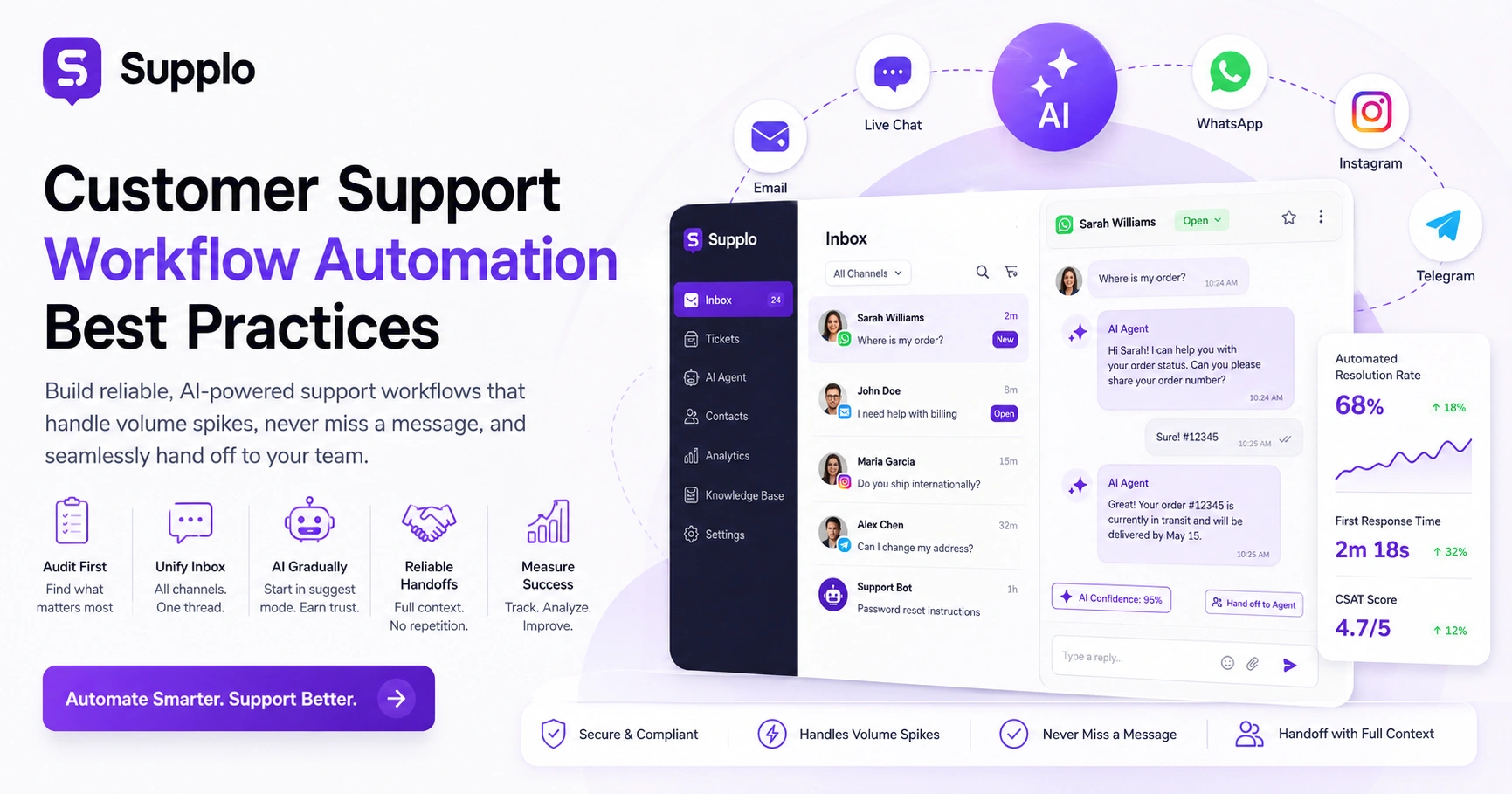
- Audit First: Map your current pain points and identify the high-volume, low-complexity queries before you automate anything.
- Unify the Inbox: Pull all your channels (email, chat, WhatsApp, social) into one threaded view. No more tab juggling.
- Implement AI Gradually: Start with your AI agent in suggest mode for low-risk tasks. Let it earn your trust first.
- Prioritize Reliable Handoffs: Make sure the transition from AI to human is seamless, with full context and no repetition for the customer.
- Measure Success Systematically: Track automated resolution rates, first response times, and CSAT scores. Then refine.
What is Customer Support Workflow Automation, and Why Does Reliability Matter?
Here's the simple version: customer support workflow automation means using technology to automate the repetitive stuff, ticket routing, canned responses, chat triage, so your team can spend their energy on complex problems that actually need human thinking.
But here's the catch. Reliability is everything. And reliability means your automation handles volume spikes without breaking. It doesn't miss messages from any channel. And when the AI hits its limit, it smoothly escalates to a human, without sounding like a broken record.
Think about it this way: if your workflow drops a WhatsApp message or misroutes a support ticket, it's not really automated. It's a liability.
Automating customer support workflows means orchestrating tasks from the moment a customer reaches out until their issue is resolved. That includes automatically categorizing inquiries, routing them to the right team, deploying AI agents for instant answers, and giving human agents the tools to collaborate efficiently.
True automation goes way beyond simple rules-based responses. We're talking adaptive, AI-driven systems that actually learn from interactions. They get better over time. They ensure accurate answers and appropriate escalations. The goal? Continuous operation, correct routing, and accurate answers, even when things get hectic.
And when AI can't resolve an issue? A reliable system triggers a failover to human agents, handing them all the context they need without missing a beat.
The First Best Practice: Audit Your Current Support Chaos Before Automating
Before you implement a single automation rule, map where your tickets actually come from. Email. Website chat. WhatsApp. Social DMs. Figure out where they get stuck.
Here's what most teams discover when they do this: they're manually copying and pasting answers across tools. That's exactly what automation should fix. A proper audit reveals the 20% of tasks that account for 80% of repetitive work. It's the Pareto principle in action.
Start by identifying your top three ticket sources. Then analyze how response times vary for each one. This helps you pinpoint where inquiries might be going unanswered or taking too long to resolve.
Document every repeat question you can find. Where is my order? What are your business hours? How do I reset my password? These are your automation candidates.
Also, take a hard look at your existing support stack. Tool sprawl is a real problem. Separate tools for email, another for chat, and another for social media. This creates reliability risks and forces manual double-entry. Ask yourself: do your current systems actually integrate, or are your agents constantly switching between disconnected platforms?
Ready to automate without the risk?
Start with Supplo's 14-day free trial to unify your inbox and test AI-driven workflows. See if your support chaos can be streamlined.
Try Supplo Free →
Unified Customer Support Inbox Setup: The Non-Negotiable Foundation for Multi-Channel Workflows
A unified inbox pulls email, live chat, WhatsApp, Instagram DMs, Telegram, and Facebook Messenger into a single chronological thread: a simple concept, massive impact.
This is the single most reliable way to ensure no customer falls through the cracks. Your team never juggles six browser tabs again. Supplo's thread-based inbox makes this setup take minutes, not weeks.
Think of a unified inbox as your single source of truth for all customer conversations, regardless of the channel they come from. When tools are siloed, things get missed. Even advanced AI can't triage effectively if customer data is scattered across disconnected systems.
The magic is in the context. Messages are kept in full context, showing the entire conversation thread rather than isolated snippets. Supplo integrates various communication channels, so all inquiries appear in a single inbox, ready for processing. This includes email, website chat widget, and various social channels.
Ticket Management Workflow Best Practices: From Triage to Resolution
A smart ticket management workflow triages automatically by intent, urgency, and channel. A password reset query? Route it to self-help. A canceled demand? Send that straight to a live agent.
Best practices include auto-tagging, setting SLAs for each ticket type, and ensuring your workflow learns from resolved tickets over time. It should get smarter the more you use it.
Automated processes should auto-assign tickets based on agent availability and skill level. When we talk about customer support workflow automation best practices, setting specific response time targets (SLAs) per ticket priority is a must. For example, five minutes for urgent issues, two hours for standard inquiries.
AI can also suggest responses by pulling relevant information from your knowledge base. This speeds things up without removing human oversight.
To prevent duplicated effort, the system should archive and deduplicate similar tickets. But here's the key: while automation provides structure, the workflow should never rigidly lock agents into templates. Allow for manual overrides when necessary. Supplo's email ticketing feature ensures seamless routing and management of email-based inquiries.
Implementing AI in Support: How to Deploy a Self-Learning AI Agent Without Losing the Human Touch
Implementing AI in support? Start by feeding it your core knowledge base. Let it handle the repeat questions first.
Here's a best practice I really believe in: set the AI to suggest and verify in the first week, not auto-resolve. Let it learn. Let it prove itself. A self-learning AI gets better as it ingests resolved tickets and agent corrections. But you must review its outputs initially to maintain accuracy.
A self-learning AI improves its performance by drawing insights from your knowledge base and past customer conversations. Start by deploying the AI for low-risk, high-volume queries. Shipping status. Business hours. Frequently asked questions.
Set confidence thresholds so that the AI resolves issues only when it is at least 95% confident in its answer. This prevents it from guessing when it shouldn't.
Crucially, empower your agents to teach the AI by editing its responses. This continuously refines its accuracy. Supplo offers practical implementation steps and transparent flat-rate pricing for its AI agent, ensuring predictable costs as your AI improves. For more on optimizing your knowledge base, review our dedicated guide.
AI Customer Service Workflow: Best Practices for Handoffs and Escalation
The reliability of an AI customer service workflow comes down to clean handoffs.
When the AI can't resolve an issue, as detected through sentiment analysis, repeated rephrasing, or explicit requests to speak to a human, it must transfer context instantly to a live agent. The customer should never have to repeat themselves. The worst sin? A dead-end bot that traps customers with no way out.
Specific conditions should trigger handoffs. Negative keywords. Sentiment analysis flags. The system must transfer a full conversation summary and relevant tags to the human agent, ensuring the agent has complete context. And the workflow mustn't hide the option for human help.
Test handoff reliability under peak-load conditions, such as during a flash sale. A unified shared inbox view of escalated tickets prevents duplicates and ensures efficient handling. Supplo offers predictable pricing that supports robust AI customer service workflows without hidden costs.
The Shared Inbox Best Practices Your Remote Team Actually Needs
A shared inbox needs to do a few specific things right. It must prevent collisions (two agents replying to the same ticket). It should support private notes for internal collaboration. And it needs to show real-time typing indicators.
Best practice? Assign ownership per ticket immediately upon routing. Implement a first-assigned, first-resolved rule to avoid cherry-picking easy tickets.
To avoid agent collisions, the shared inbox should lock tickets when an agent is actively replying to them. Agents should be able to see if a ticket has been forwarded or viewed by another team member. The system needs to support tags and custom views to enable efficient filtering of high-priority items.
The workflow should enable seamless agent-to-agent reassignment, complete with detailed notes for context. This ensures every customer interaction remains transparent and organized.
Want a shared inbox that actually works?
Supplo handles multiple channels in one thread, prevents collisions, and supports private notes; no more tab juggling.
See Unified Inbox →
Automating Customer Support Workflows for WhatsApp, Telegram, and Instagram DMs
Automating social channel support means the AI responds inside the native app. Not through some clunky portal.
Reliable multi-channel automation respects the platform's rate limits. It maintains message threading. And it translates across languages. Supplo's agent handles WhatsApp, Telegram, and Instagram DM queries in a single thread while preserving formatting and media.
It's critical that the AI can handle context across multiple messages. Not just respond to one-off questions. For global businesses, robust multi-lingual support that auto-translates inbound and outbound messages is essential.
The system should also respect business hours settings. Offer automated replies after hours. Queue inquiries for the next shift. Proper integration with each platform's API is crucial for delivery reliability and maintaining message integrity. Supplo supports seamless WhatsApp customer support, Telegram support, and Instagram DMs, ensuring a consistent customer experience across these popular channels.
Supplo is not affiliated with any app or website. Please follow each app's terms and local regulations.
Measuring the Success of Your AI Customer Support Workflow
Track automated resolution rate. Track first response time. Track customer satisfaction (CSAT) for both AI-resolved and human-escalated tickets.
A reliable AI workflow should maintain a clear resolution rate baseline within a few weeks. If handoff volume spikes or CSAT drops, the AI's dataset may need refinement.
Define and monitor key metrics. Automated resolution rate. Average first response time. Average handle time. Also track the deflection rate, how many potential tickets were resolved by the AI or self-service options.
Monitor agent sentiment too. Are they spending less time on rote work and more on meaningful interactions? That's the whole point.
Establish a baseline for these metrics before implementing automation. Then measure them monthly to track improvements. If CSAT for AI-resolved tickets declines, it indicates a need to review and refine the AI's answer choices or escalation triggers.
Why Legacy Tools Fail at Workflow Automation And How Supplo Fixes It
Legacy tools were built before AI was reliable. They charge per-seat even though your support team is lean. They gatekeeper automation behind expensive tiers.
Supplo offers a flat per-workspace price. So your automation costs don't explode as your team grows. And instead of per-resolution pricing (you know, the $0.99+ variety), Supplo charges a flat $0.04 per AI resolution.
It's the practical alternative. No complex workflows that break under load. No lock-in.
Traditional per-seat pricing punishes growing teams, especially those looking to leverage automated workflows efficiently. High per-resolution costs for AI agents can quickly outweigh the value of resolving the ticket. Supplo integrates all your communication channels and AI into one workspace, eliminating the need for expensive plugins or complex integrations.
With Supplo, you get flat, predictable, and transparent fees, no hidden costs. No surprises. The platform is designed for quick setup, providing a unified inbox without requiring custom code. This makes it a practical alternative for businesses seeking effective best practices for customer support workflow automation. Supplo offers compelling value compared to legacy tools.
Stop overpaying for legacy support tools.
Switch to Supplo's flat per-workspace pricing with $0.04 per AI resolution. Transparent, scalable, reliable.
Key Takeaways
- Strategic Audit: Before automating, identify your support team's biggest pain points and manually handled, repetitive tasks.
- Unified Foundation: Implement a unified inbox to consolidate all customer communication channels for a consistent view.
- Gradual AI Adoption: Introduce AI for high-volume, low-complexity tasks, letting it learn and refine before full deployment.
- Seamless Handoffs: Design clear escalation paths to human agents with full context transfer when AI cannot resolve an issue.
- Continuous Measurement: Regularly track key metrics like resolution rates, response times, and CSAT to ensure workflow reliability and efficiency.
FAQ
Is it safe to automate my customer support with AI?
Yes, if the AI is deployed with guardrails. Supplo's self-learning AI operates on your knowledge base, never invents answers outside its training data, and hands off to a human the moment it's uncertain. Always review the first few hundred AI responses before turning off the training wheels.
Why do some AI automation workflows fail?
Most failures happen because the AI wasn't given enough context, such as an out-of-date knowledge base or a unified inbox that doesn't include all channels. Workflows also fail when handoff to a human is poorly designed or hidden from the customer.
Should I use AI to automate my entire support flow right away?
No. Start with the highest-volume, lowest-urgency tickets (order status, shipping, password resets). Let the AI learn for a week in suggest mode before turning on auto-resolve. Gradual rollout prevents customer frustration.
What is a unified inbox, and why is it important for automation?
A unified inbox brings all customer conversations, email, chat, WhatsApp, and social DMs into a single chronological thread. Without it, automation tools don't see the full picture and may miss tickets or respond incorrectly.
How do I measure if my AI support workflow is reliable?
Track three numbers: automated resolution rate (how many tickets the AI closes), first response time (should drop significantly), and customer satisfaction for both AI and human-touched tickets. If CSAT drops, review the AI's answer choices.
Can AI handle multi-language customer support reliably?
Yes, when the AI includes built-in translation. Supplo's AI translates inbound messages and responds in the customer's language without requiring a human translator on each shift.
What happens when the AI can't answer a question?
A reliable workflow detects uncertainty (repeated rephrasing, negative sentiment) and escalates to a human with full context. The customer should never have to repeat themselves. Supplo passes the entire conversation thread for a seamless handoff.
Compliance line: Supplo is not affiliated with any app or website. Please follow each app's terms and local regulations.