On this page
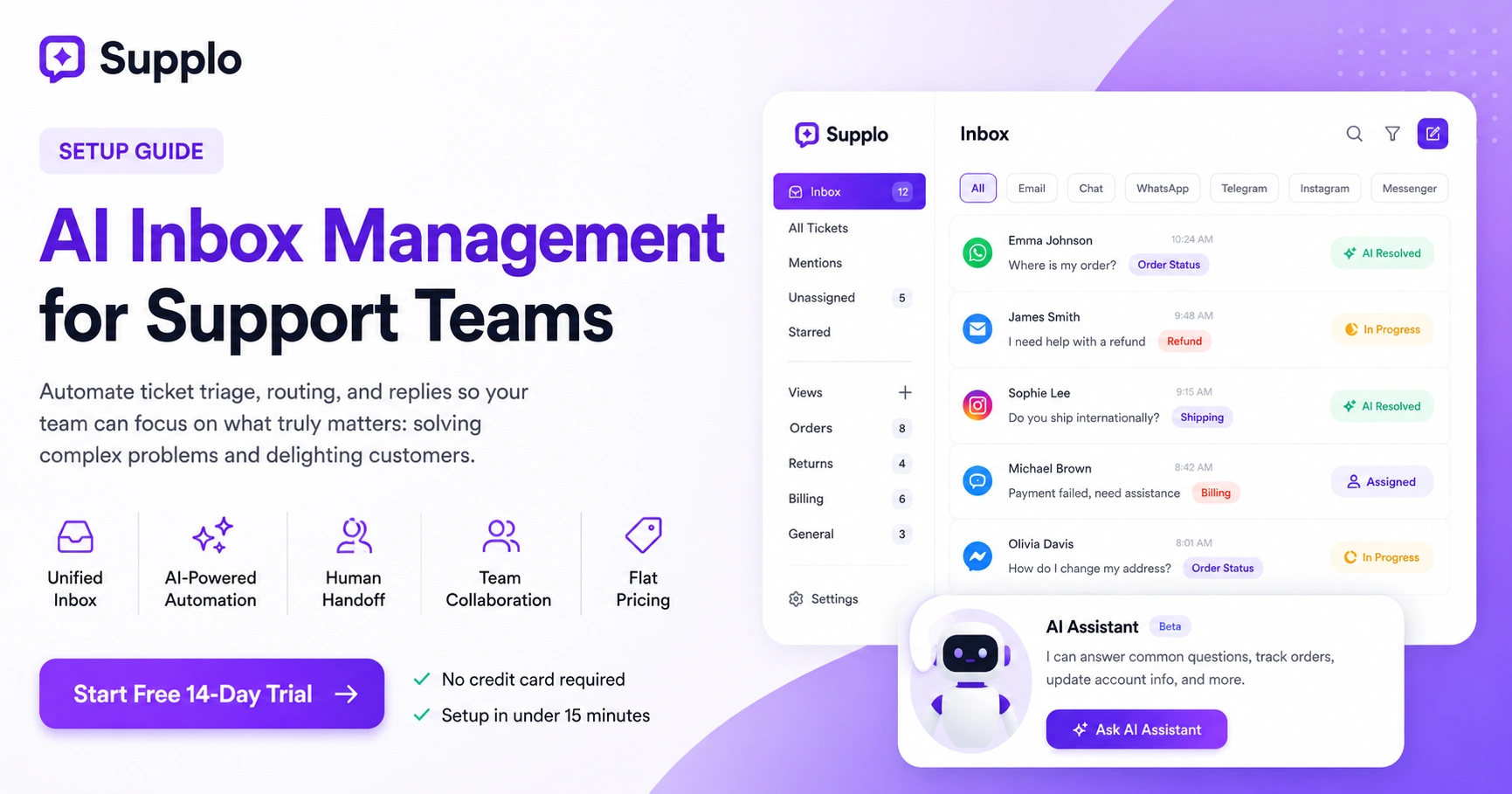
Your team is still manually sorting messages that a decent AI could handle in seconds. Sound familiar? That's exactly why AI inbox management for support teams is becoming non-negotiable. It takes the repetitive grunt work off your plate: auto-tagging, routing and even replying to common questions, so your agents can focus on the tricky stuff that actually needs a human brain.
This guide is for support teams who want to work smarter, not harder, without blowing their budget on bloated legacy software. If you've got an inbox that feels more like a firehose than a funnel, keep reading.
Quick Answer
- Automate ticket triage and response with AI.
- Cut response times dramatically and reduce burnout.
- Connect all channels to a single unified inbox.
- Train the AI on your existing knowledge base.
- Set clear escalation rules for complex issues.
- Start free with a 14-day trial at Supplo.io.
Why Your Support Team Can’t Afford a Dumb Inbox Anymore
Here's the hard truth: a traditional inbox that can't sort, tag, or auto-respond is costing you more than you think. Every minute an agent spends triaging messages is a minute they're not solving real problems. AI inbox management flips that equation: it learns from past conversations and routes tickets instantly. The outcome? Faster responses, less stress and a team that actually enjoys their work again.
- The average support agent wastes hours each day just triaging messages: AI inbox automation cuts that to nearly zero.
- Customers expect replies in minutes, not hours. A smart inbox helps you hit that bar without hiring more people.
- Legacy tools charge per seat. Modern AI inbox solutions like Supplo use flat per-workspace pricing, so scaling doesn't blow your budget.
What Is AI Inbox Management? And How It Differs from Legacy Ticketing
Put simply, AI inbox management uses machine learning to automatically categorize, prioritize and respond to incoming support messages: whether they come from email, chat, social DMs, or anywhere else. Unlike old-school ticketing systems that force manual sorting and tagging, an AI-powered inbox learns from your team's behavior and knowledge base. It resolves tickets on its own or hands them off cleanly.
- It unifies all channels into a single thread-based inbox, so agents never need to switch tabs.
- The AI improves over time without constant retraining.
- Pricing shifts from per-seat to per-workspace, keeping costs predictable.
The 5 Must-Have Features of the Best AI Inbox Management Tools
Not all AI inbox tools are created equal: trust me, we've seen plenty that look good on paper but fall apart in practice. The best ones share five key features: multichannel unification, a self-learning AI that can handle most tickets automatically, a clean human handoff, real-time collaboration tools and transparent pricing. Miss any of these and you're just adding another layer of manual work.
- Multichannel unification: Email, website widget, WhatsApp, Telegram, Instagram, Facebook Messenger: all in one thread inbox.
- Self-learning AI: Trains on your knowledge base and past conversations to answer accurately.
- Clean handoff: AI transfers to a human agent without losing context.
- Collaboration tools: Internal notes, shared drafts and assignment rules.
- Flat pricing: No surprise bills as your team grows.
How to Set Up an AI-Powered Inbox for Customer Support
Setting up an AI inbox takes less than 15 minutes if you start with the right tool. First, connect all your channels: email, chat widget, WhatsApp, Telegram, Instagram DMs, Facebook Messenger, into one workspace. Then upload your knowledge base so the AI can learn from previous conversations. Finally, set rules for when the AI should hand off to a human and watch it start resolving tickets immediately. This is exactly how you get AI inbox management for support teams up and running without a headache.
Connect Your Communication Channels
Start by linking every channel your customers use to reach you. Email, live chat widgets, WhatsApp, Telegram, Instagram DMs, Facebook Messenger: they all feed into one central inbox. With Supplo, you can do this in just a few clicks. No more bouncing between tabs.
Train the AI on Your Knowledge Base
Upload your existing knowledge base to teach the AI about your products, services and common issues. Use the built-in knowledge base editor to add FAQs and product docs. The more data you feed it, the smarter it gets.
Define Escalation Rules
Set rules for when the AI should hand a ticket to a human agent. You can define triggers based on sentiment, specific keywords, or the length of time a ticket has been open. This way, complex issues get human attention while routine queries are handled instantly.
- Start free with a 14-day trial to test configuration without commitment.
- Use the built-in knowledge base editor to add FAQs and product docs.
- Define escalation triggers like sentiment, specific keywords, or ticket age.
Automate Your Support Inbox Without Losing the Human Touch
Here's what a lot of people get wrong: automation doesn't mean your team becomes invisible. The best AI inbox tools let you choose exactly which requests the AI handles and which ones get escalated. You can set tone markers, include a clear "talk to a human" button and make sure complex conversations always go to a real person. The trick is balancing speed with empathy.
- Use personalization tokens (customer name, order info) in AI replies to keep them warm.
- Add a clear option to reach a human agent on every automated response.
- Review AI performance weekly to refine which tickets it should handle.
AI Inbox Management for Remote and Distributed Teams
Remote teams have it rough: time zones, async communication and tools that don't talk to each other. AI inbox management solves all of that by giving you a single source of truth for every support conversation. Agents can collaborate with internal notes and mentions and the AI handles the first response even when nobody's online.
- Thread-based inbox keeps context across shifts and time zones.
- Mobile apps let agents respond from anywhere.
- Automated translation breaks language barriers with customers worldwide.
Choosing the Right AI Ticketing System for Small Business
Small businesses don't need enterprise complexity. What you need is something affordable, quick to set up and simple enough that you don't need a dedicated IT team. Look for flat per-workspace pricing (not per seat), self-service onboarding and a free trial so you can test before committing. Supplo's AI inbox automation for small businesses is built exactly for this: no hidden fees, no seat limits.
- Avoid per-seat models that punish growth; choose flat pricing.
- Make sure the AI can learn from your existing knowledge base without coding.
- Check for integrations with tools you already use (e.g., email, Shopify).
Configuring a Smart Inbox for Customer Support
Once your basic inbox is humming along, fine-tune it. Create custom tag groups, set up auto-replies for common questions and use sentiment analysis to flag urgent tickets. A smart inbox isn't just about AI responses: it's about organizing the chaos so your team sees exactly what matters.
- Create rule-based auto-tagging for product issues, refunds, or complaints.
- Use saved replies for repetitive answers the AI can't yet handle.
- Monitor unanswered tickets to improve AI coverage over time.
Collaboration Features That Make AI Inbox Tools a Game-Changer
AI inbox tools aren't just for automation: they're collaboration hubs. Internal notes, @mentions, shared drafts and assignment rules let your team work together without leaving the inbox. This is especially valuable for distributed teams where quick back-and-forth is hard.
- Internal notes stay hidden from customers but visible to your team.
- Shared drafts let multiple agents polish a single reply.
- Assignment rules route tickets to the right person based on skills or workload.
How to Tell If Your AI Inbox Is Actually Working
You need real metrics: resolution rate, first response time, customer satisfaction (CSAT) and escalation rate. A good AI inbox should boost resolution rate without hurting CSAT. Track these weekly and adjust your knowledge base or escalation rules to keep improving.
- Compare response times before and after AI implementation.
- Monitor how many tickets the AI resolves fully vs. hands off.
- Gather customer feedback on auto-replies: tweak tone if needed.
Common Pitfalls and How to Avoid Them When Automating Support
The biggest mistake? Letting the AI run unsupervised. Poorly trained AI frustrates customers with irrelevant replies. Other pitfalls include over-automation (no human option) and ignoring multi-language support. Test your AI on real tickets first and always provide a human escape.
- Start with a limited set of tickets and expand as accuracy improves.
- Never automate sensitive account-specific actions (password resets, billing).
- Update your knowledge base regularly to keep AI answers up to date.
Future-Proofing Your Support with AI Inbox Automation
AI inbox tech is evolving fast. To stay ahead, choose a tool that updates its AI models automatically, supports new channels as they emerge and offers flexible pricing that grows with you. Look for a solution that invests in continuous learning: not just static rules.
- Pick a platform that adds new integrations regularly (e.g., WhatsApp Business API updates).
- Ensure your AI inbox can handle increased ticket volume without manual scaling.
- Evaluate vendor transparency: do they publish uptime and accuracy stats?
Key Takeaways
- AI inbox management automates ticket triage and response, freeing your support team to focus on complex issues.
- The best solutions unify email, chat, WhatsApp, Telegram, Instagram and Facebook Messenger into one thread inbox.
- To get started, connect your channels, train the AI on your knowledge base and set escalation rules. Start free with a 14-day trial.
- Avoid common pitfalls by testing AI on real tickets and providing a human-agent escape route for sensitive issues.
- Choose a tool that supports continuous learning and adds new integrations regularly to future-proof your support operations.
FAQ
Is AI inbox management legal for customer support?
Yes, as long as you comply with data protection regulations (GDPR, CCPA) and inform customers that automated responses are used. Supplo is not affiliated with any app or website. Please follow each app's terms and local regulations.
Why do some AI inbox tools fail to resolve tickets correctly?
Usually because the AI wasn't trained on enough relevant data or the knowledge base is outdated. Regularly update your FAQ and history to improve accuracy.
Should I use a one-time setup or an ongoing service for AI inbox automation?
An ongoing subscription ensures your AI learns from new conversations and adapts to changes in your products or policies. One-time setups quickly become stale.
What should I NOT use AI inbox automation for?
Avoid using AI for sensitive account changes, legal disputes, or conversations that require empathy-heavy judgment. Always escalate these to a human agent.
How long does it take to train an AI inbox for my team?
With a modern tool like Supplo, you can see meaningful results within the first week. Full optimization takes about a month as the AI learns from your team's corrections.
Can AI inbox management work for teams using multiple languages?
Yes. Supplo automatically translates messages, so your AI can handle requests in any language and reply in the customer's preferred language.
What if the AI inbox resolution rate drops?
Review recent knowledge base changes, check for new ticket patterns and update rules. Most platforms provide analytics to pinpoint where the AI is struggling.
Compliance line: Supplo is not affiliated with any app or website. Please follow each app's terms and local regulations.


