On this page
Customer support can feel like a never-ending game of whack-a-mole. You’re juggling emails, chats, DMs, and phone calls, all while trying to keep your team sane. An AI-powered helpdesk: what it is and how it works is the answer to that chaos. Think of it as your most reliable junior agent, one that never sleeps, never needs a coffee break, and handles the boring, repetitive stuff so your humans can focus on the tricky problems. This guide breaks down exactly what it is, how it actually functions, and why it might be the best thing you do for your team this year.
Quick Answer
- Definition: An AI-powered helpdesk is a customer support platform that uses artificial intelligence to automatically handle responses, organize tickets, and resolve common issues without needing a human to lift a finger.
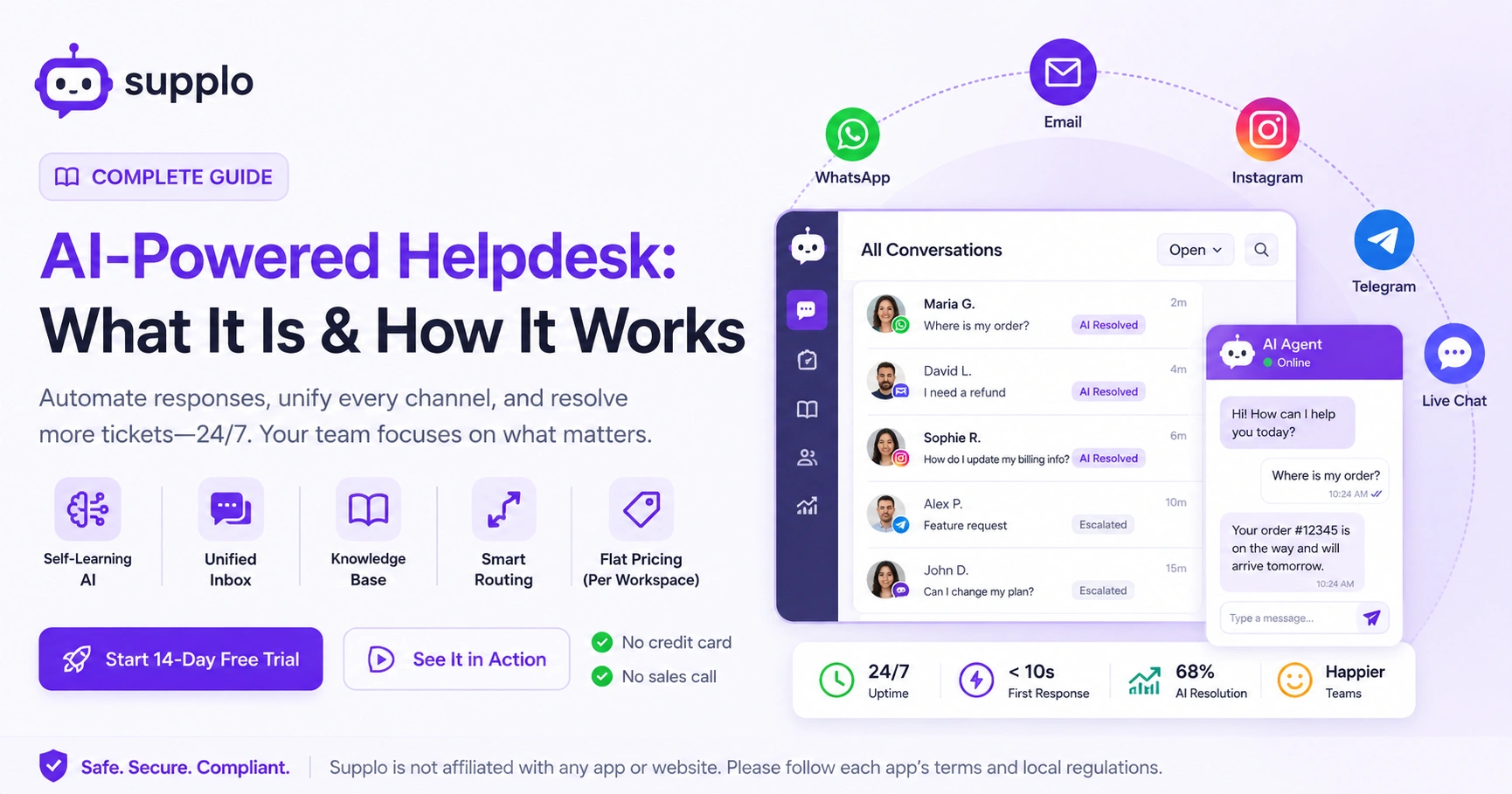
- Key Features: Self-learning AI, a unified inbox that pulls everything together, smart knowledge base integration, intent-based routing, and flat pricing that won't surprise you.
- Benefits: 24/7 support, lower cost per ticket, blazing-fast first responses, and a much happier support team.
- Common Pitfalls: Letting your knowledge base get stale, forgetting to build a clear escalation path, and getting trapped by per-seat pricing models.
- Quick Start: Upload your knowledge base, connect your channels (email, WhatsApp, chat), set your escalation rules, and test it with a real customer query.
What Is an AI-Powered Helpdesk? Definition and Core Concept
An AI-powered helpdesk is a platform that uses artificial intelligence, usually natural language processing and machine learning, to handle customer queries automatically. It’s not just a simple chatbot that spits out generic FAQs. This thing actually learns from your specific knowledge base and past conversations to give context-aware answers. It’s like having a junior agent who’s read every single piece of documentation you’ve ever written and never gets bored answering the same question.
- Traditional helpdesks are just passive buckets for tickets. This one actively resolves, categorizes, and escalates them.
- The AI doesn't guess. It looks at your product details, your help docs, and what worked before to form a precise answer.
- Multi-language support is built-in. The AI translates queries and responses on the fly, no extra tools needed.
- Supplo’s AI agent, for example, resolves tickets at a flat cost per resolution, not per seat, which completely changes the economics of scaling support.
How Does an AI-Powered Helpdesk Actually Work?
It works in three simple stages: ingestion, inference, and action. First, the AI swallows up your knowledge base, past tickets, and any uploaded docs to build a reference model. When a customer message comes in via email, chat, WhatsApp, or Instagram, the AI reads the intent, matches it against known solutions, and generates a response. If it’s confident, it replies automatically. If not, it routes the ticket to a human with the full conversation history attached. No one has to repeat themselves.
- The “self-learning” part means it gets better over time. Every resolved ticket becomes training data for the next similar query.
- Most modern AI helpdesks use retrieval-augmented generation (RAG). This keeps answers grounded in your real data, preventing hallucinations.
- Handoffs are clean. The human agent can see the entire conversation history and what the AI has already tried, so nobody asks the customer to repeat themselves.
- Supplo’s AI agent handles the first response. If it can’t resolve, it flags the ticket and sends it to your team inbox with zero friction.
Key Features of an AI-Powered Helpdesk You Can’t Ignore
Not all AI help desks are built the same way. The features that actually matter include a self-learning AI that trains on your specific data, true multichannel unification (email, live chat, WhatsApp, Telegram, Instagram in one thread), and a shared team inbox that prevents agents from stepping on each other. You also need an AI-accessible knowledge base, smart routing based on intent, and transparent pricing that doesn’t penalize you as your team grows.
- Self-learning AI: It improves from every interaction, not from manual retraining scripts.
- Unified inbox: All channels collapse into one threaded view. No more alt-tabbing between tabs.
- Knowledge base integration: The AI pulls answers directly from your help center or uploaded docs without copying and pasting.
- Intent-based routing: It determines whether a message is a complaint, a billing question, or a feature request before routing.
- Flat pricing per workspace: Unlike per-seat models that skyrocket when you hire one more agent.
What to Look for in an AI Helpdesk
Before you pick a platform, run this checklist: Does the AI actually learn from MY content, or is it a generic bot? Can it handle WhatsApp, Telegram, Instagram DMs, Facebook Messenger, email, and chat? Does it offer a flat pricing model, or will your cost double if you add a single agent? Can it translate on the fly? And most importantly, can you test it before you commit? If a vendor hides behind a sales call, that’s a red flag.
- Data-source learning: Must integrate with your existing knowledge base and past tickets.
- Multichannel support: Not just email and chat, social DMs and messaging apps are now table stakes.
- Transparent pricing: Avoid per-seat traps. Look for flat workspace rates or per-resolution models.
- Clean human handoff: The AI should pass full context, not just a ticket number.
- Free trial or demo: You should be able to see it work with your actual data before paying.
The Real Benefits of an AI-Powered Helpdesk and Why Teams Switch
The biggest benefit isn’t speed; it’s reliability at scale. A well-trained AI helpdesk resolves incoming issues consistently, in any language, 24/7, without burning out or asking for a raise. Teams report that their human agents stop drowning in repetitive Level 1 tickets and start doing higher-value work. The impact on the bottom line is clear: fewer support hires needed, faster resolution times, and customers who don’t wait three days for a reply.
- 24/7 uptime: Customers get answers at 3 AM on a Sunday. The AI doesn’t clock out.
- Reduced cost per ticket: Traditional helpdesks charge per seat, which scales poorly. AI-first models like Supplo charge per resolution or per workspace.
- Faster first response time: Most AI responses are under 10 seconds from message receipt.
- Multilingual without hiring translators: The AI translates both customer queries and agent replies.
- Team morale improves: Human agents stop doing copy-paste work and start solving real problems.
How an AI Helpdesk Impacts Your Support Operations Long-Term
Over six to twelve months, an AI helpdesk fundamentally shifts how your support team operates. Ticket volume doesn’t necessarily drop, but the composition changes. The AI absorbs the repetitive, low-effort tickets, leaving your agents with complex, high-value cases. This means you may need fewer junior agents and more senior problem-solvers. Your customer satisfaction scores typically trend upward because wait times shrink, and every customer gets a fast, consistent baseline experience.
- Shift from volume to quality: Agents handle fewer tickets but more meaningful interactions.
- Data-driven improvement: The AI reveals common pain points in your product that you might have missed.
- Scaling without hiring: Adding 1,000 customers doesn’t always mean adding a new support headcount.
- Language barrier disappears: You can serve customers in Japanese, Spanish, or Arabic without a multilingual team.
Common Pitfalls to Avoid When Adopting AI Customer Support
The biggest mistake is treating an AI helpdesk like a “set it and forget it” tool. You still need to maintain your knowledge base, review AI responses for quality, and define clear escalation rules. Another common error is disabling the human handoff entirely; customers can tell when they’re trapped in a bot loop. Also, watch out for vendors that charge per agent seat; that model punishes you for growing your team, which is exactly what you don’t want.
- Stale knowledge base: If your docs are outdated, the AI’s answers will be too.
- No escalation path: Customers stuck in AI-only loops will churn fast.
- Per-seat pricing creep: Double-check the pricing page. Flat rates are safer as you grow.
- Ignoring negative feedback: If customers repeatedly say “speak to a human,” the AI needs retraining.
How to Set Up Your First AI Helpdesk in Under an Hour
Start by picking a platform that offers a free trial; Supplo’s is 14 days, no credit card required. Upload your knowledge base or FAQ docs directly into the AI’s training source. Configure your channels: connect your email, website widget, WhatsApp, and any social DMs. Set your escalation rules (e.g., if the AI confidence is below 80%, hand off to a human). Finally, test it with a few real customer queries before going live. The whole process takes about 45 minutes if your docs are ready.
- Upload existing help articles, PDFs, or Notion docs as the AI’s reference material.
- Connect channels one by one: email first, then chat widget, then messaging apps.
- Define “handoff triggers”, specific keywords or sentiment flags that route to humans.
- Run a dry run: ask the AI questions yourself. Fix obvious gaps in the knowledge base.
- Go live with a “beta” tag if you’re nervous. Let the AI handle 10% of tickets first, then ramp up.
Ready to see it in action? Start your 14-day free trial at Supplo.io, no credit card, no sales call, no commitment. Upload your knowledge base and connect your first channel in under 30 minutes. See what your customers have been missing.
Safety, Compliance, and What the Fine Print Means for You
Most AI helpdesk providers store your data in encrypted cloud environments, but you still need to check their data residency and GDPR compliance. If you handle payment data (credit cards, billing info), make sure the platform doesn’t log or train on that data. Supplo is not affiliated with any app or website. Please follow each app's terms and local regulations. Also, if you accept payments via crypto, Binance Pay, GCash, or regional methods, ensure the helpdesk doesn’t store sensitive transaction details.
- Data encryption: Verify that messages and knowledge base content are encrypted at rest and in transit.
- GDPR and CCPA: If you serve customers in the EU or California, the platform must support data deletion requests.
- Payment data handling: The helpdesk should never log full payment payloads. Use tokenization or a separate payment processor.
- Third-party channel compliance: WhatsApp, Instagram, and Telegram each have their own terms. Ensure your AI responses comply with their messaging policies.
When Does an AI Helpdesk Still Need a Human Agent?
An AI helpdesk is excellent for password resets, order status checks, and FAQ-level queries. But it struggles with nuanced emotional situations, angry customers, complex refund negotiations, or sensitive account security issues. Any time a customer asks for a human, the AI should hand off immediately rather than try to deflect. The best AI helpdesks know their limits and have a clean, context-rich transfer mechanism built in.
- Emotional escalation: Angry or frustrated customers need empathy, not a perfectly formatted answer.
- Billing disputes: If money is involved, humans handle the negotiation; AI can prepare the data.
- Account security: Password resets are fine, but account takeover or fraud cases need human verification.
- Custom requests: Any request that deviates from documented processes is best routed to a person.
- The “handoff” moment: The AI should transfer the entire conversation history, including what it tried, so the human doesn’t have to start from scratch.
The “Handoff” Moment, Making the Transition Seamless
The handoff from AI to human should be seamless and context-rich. The AI should provide the human agent with the full conversation history and what it has already tried. This ensures a smooth transition and prevents the customer from having to repeat themselves, which is a common frustration.
Is an AI Helpdesk Right for Your Business? Decision Framework
To decide if an AI helpdesk is right for your business, consider these factors:
- Volume of repetitive tickets: If you have a high volume of Level 1 tickets, an AI helpdesk can handle them efficiently.
- Multichannel support needs: If you need to support customers on multiple platforms like email, chat, WhatsApp, and social media, an AI helpdesk can unify these channels.
- Budget constraints: If you need to reduce support costs while maintaining or improving service quality, an AI helpdesk’s flat-fee pricing model can be a game-changer.
- Team scalability: If you expect rapid growth and need a solution that scales without linearly increasing your support headcount, an AI helpdesk is a good fit.
Worried about implementation? You’re not alone. Most teams get set up in under an hour, and our support team (yes, real humans) is here if you hit a snag. Start your free trial, and we’ll help you configure escalation rules, connect WhatsApp or Telegram, and fine-tune your AI responses. If it doesn’t work for your use case, you lose nothing.
Key Takeaways
- An AI-powered helpdesk automates responses, sorts tickets, and resolves common issues without human input.
- Key features include self-learning AI, unified inbox, knowledge base integration, and flat pricing.
- Benefits include 24/7 uptime, reduced cost per ticket, faster response times, and improved team morale.
- Pitfalls to avoid include stale knowledge base, lack of escalation paths, and per-seat pricing traps.
- AI help desks are still necessary for complex, emotional, and custom requests that require a human touch.
- Consider your business’s ticket volume, multichannel support needs, budget constraints, and scalability when deciding if an AI helpdesk is right for you.
AI helpdesk isn’t a one-time purchase; it’s a partner. Supplo grows with you. Flat per-workspace pricing means your cost stays predictable even if your team doubles. Ready to make support your competitive advantage? Start your free trial today or explore our transparent pricing.
FAQ
Is it legal to use an AI helpdesk for customer support?
Yes, it’s completely legal as long as you comply with data privacy laws (GDPR, CCPA) and each platform’s terms of service. Disclose to customers that they may be interacting with an AI assistant.
Why do some AI helpdesk responses feel robotic or wrong?
Usually because the knowledge base is outdated or the AI hasn't been trained on enough real conversations. Regularly update your docs and feed past tickets into the AI to retrain it.
Can I use an AI helpdesk for free to test it?
Most reputable providers offer a free trial. Supplo offers a 14-day free trial with no credit card required. Test with real customer queries before committing.
What’s the difference between an AI helpdesk and a traditional ticketing system?
A traditional system organizes tickets. An AI helpdesk actually resolves tickets by generating answers, routing intelligently, and learning from past interactions.
Do I still need human agents if I have an AI helpdesk?
Yes. AI handles the repetitive 80% of tickets, but humans are still needed for complex issues, emotional escalations, and cases where the AI confidence is low.
Will my customers know they’re talking to AI?
Best practice is to disclose it. Some platforms mark AI responses with a small “AI-powered” badge. Customers appreciate honesty more than a fake human persona.
How do I prevent the AI from hallucinating wrong answers?
Use a platform that employs retrieval-augmented generation (RAG), which forces the AI to base answers only on your ingested data, not on general internet knowledge.
What if I need help during the setup?
Most providers, including Supplo, offer support during the trial period. If you have any questions, reach out to their team. They can help you configure your AI helpdesk and fine-tune its performance.
Compliance line: Supplo is not affiliated with any app or website. Please follow each app's terms and local regulations.


