On this page
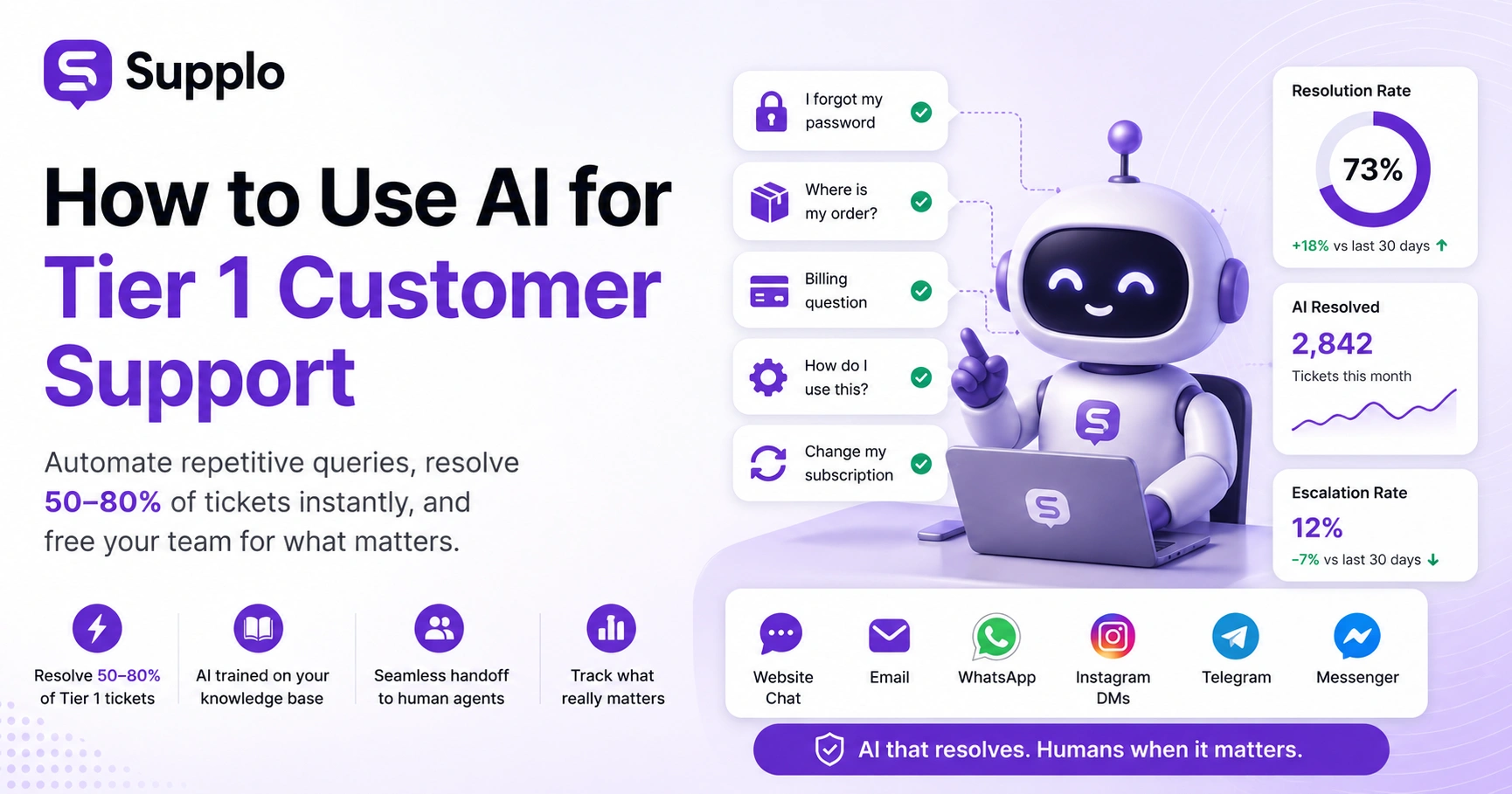
Implementing AI in customer support can feel daunting, but it doesn't have to be. The most practical and impactful place to start is with your Tier 1 inquiries- the repetitive, high-volume questions that consume significant agent time. This guide breaks down exactly how to leverage AI to automate common customer queries, improve efficiency, and free your human agents to focus on more complex issues.
This article is for support managers, customer experience leaders and business owners looking for a practical, transparent approach to AI automation in their customer support operations. You'll learn when to use AI for simple resolutions and when to ensure a seamless handoff to a human.
Quick Answer
- AI can handle 50–80% of Tier 1 tickets, such as password resets, order tracking and billing questions, when trained on accurate knowledge.
- Start by auditing your most frequent ticket types and building a high-quality knowledge base to feed your AI agent.
- Implement AI gradually, beginning with a single channel like your website chat and expand after verifying accuracy and performance.
- Prioritise genuine resolution rather than deflection; track metrics such as resolution rate, human escalation rate, and customer satisfaction.
- Look for AI solutions with transparent pricing (such as flat per-resolution or per-workspace pricing) and robust handoff capabilities to human agents.
What Exactly Is Tier 1 Support And Why AI Works There First
Tier 1 support is your front door. It's where customers land with the basics, password resets, order status checks, billing questions, and basic troubleshooting. These tickets are repetitive, high-volume and often demand the same answer delivered at speed. Sound like a perfect job for AI? That's because it is.
An AI agent trained on your knowledge base can resolve 50–80% of these tickets in seconds. Not minutes. Seconds. That keeps your human team free for the nuanced, emotionally charged issues that actually need their brainpower. Tier 1 is defined by repetition; the same 20 or so question types make up 80% of volume for many businesses. That's not a guess; it's a pattern worth exploiting.
Unlike Tier 2 or Tier 3, Tier 1 rarely requires deep product knowledge or extensive account research. The ROI is immediate: fewer tickets reach human agents, which means a lower cost per resolution. This is where using AI for Tier 1 customer support really comes into its own.
The 5 Most Common Tier 1 Tickets AI Can Resolve Today
The best AI agents for Tier 1 support are built to handle the big five categories: account access and password recovery, order tracking and shipping updates, billing inquiries and refund status, basic product usage questions and subscription management (upgrades, downgrades, cancellations). These account for the bulk of daily inbound volume for most SaaS and e-commerce businesses.
A well-trained AI conversational agent for Tier 1 resolves each one by pulling from your knowledge base, matching intent and responding with the exact answer- no routing, no waiting, no human bandwidth burned.
- Password reset flows: AI authenticates, verifies identity and triggers secure reset links.
- Order tracking: AI pulls API data to give real-time status without agent intervention.
- Billing questions: AI explains charges, shows receipt history and initiates refund requests.
- Product help: AI links to knowledge base articles, video tutorials or setup guides.
- Subscription changes: AI processes plan upgrades or cancellations based on your rules.
How to Apply AI to Tier 1 Support Without Breaking Your Workflow
Applying AI to Tier 1 support doesn't mean flipping a switch and letting a bot loose on every inbound message. It starts with auditing your ticket data: identify the 10–15 question types that account for 70% of the volume, map them to existing knowledge base answers, and train your AI agent on those patterns. Then, you set confidence thresholds, let the AI resolve when it's 95%+ certain and escalate everything else to a human.
Start live by testing with a subset of channels (like website chat only), monitor resolution rates and expand gradually. Supplo was built for exactly this workflow: connect your support channels, upload your knowledge base or let the AI learn from past conversations and define handoff rules in minutes.
Checklist for Applying AI to Tier 1 Support:
- Run a ticket audit: Export the last 90 days of tickets and categorise them by type and resolution path.
- Map knowledge: Link each common ticket type to an existing knowledge base article or workflow (e.g., the refund policy for "I want a refund").
- Set confidence thresholds: AI responds automatically only when the certainty score is above a certain threshold (e.g., 90-95%).
- Test on one channel first: A website chat widget is usually the lowest-risk starting point.
- Expand gradually: Roll out to email ticketing, WhatsApp or Instagram DMs only after verifying accuracy and consistent escalation rates.
The goal is to integrate AI as a powerful assistant, not a chaotic disruption.
Ready to see what AI-powered Tier 1 support looks like?
Start your free 14-day trial at Supplo, no credit card required. Connect your channels, upload your knowledge base and let the AI start resolving tickets in under an hour. Flat $0.04 per resolution, no per-seat fees and a shared inbox that unifies email, chat, WhatsApp, Instagram, Telegram and Messenger.
Building Your AI Knowledge Base: The Foundation of Accurate Resolution
Your AI agent is only as good as the knowledge it draws from. A well-structured knowledge base, with clean, concise answers categorised by topic and intent, is the single biggest factor in how many Tier 1 tickets are resolved automatically. Start with your top 20 FAQ articles, write each in plain language (no marketing fluff) and include step-by-step instructions where applicable. Link related articles so the AI can pull context.
And don't let it sit: review your knowledge base monthly to add new questions and remove outdated information. Supplo's self-learning AI doesn't just read your knowledge base; it also learns from past conversations, improving its accuracy over time without you having to retrain it manually. This continuous learning is crucial for effective AI resolution for Tier 1 tickets.
Tips for an Effective AI Knowledge Base:
- Write articles for the customer's question, not the feature you're selling.
- Use consistent formatting: problem statement → step-by-step solution → related links.
- Cover edge cases: What if my subscription already expired? alongside the standard cancellation flow.
- Tag articles by ticket type (billing, account, shipping) so the AI routes intelligently.
- Integrate your knowledge base directly with your AI agent for seamless access.
Setting Up AI Chatbots for Tier 1 Support
Setting up an AI chatbot for Tier 1 support takes less than an afternoon with the right tool. Start by creating your Supplo workspace; no credit card required for the 14-day trial. Connect your channels: website widget, email, WhatsApp, Instagram DMs, Telegram, and Facebook Messenger all integrate into a single shared inbox.
Upload or write your knowledge base articles, or let the AI learn from your last 30 days of support tickets. Configure handoff rules, define when the AI should step back and connect a customer to a human (e.g., when sentiment is negative or the question is unanswerable). Test in preview mode, then go live. The AI will start resolving tickets immediately, and your team can review every interaction in the unified inbox. This streamlined process makes deploying AI chatbots for Tier 1 support efficient.
Step-by-Step Setup:
- Create your workspace at supplo.io and complete onboarding.
- Connect channels from your website widget to WhatsApp and Telegram.
- Upload or author knowledge base articles in a clear, question-answer format.
- Set confidence thresholds: start conservative (90%+), then lower as accuracy improves.
- Define escalation triggers: profanity, repeated confusion, and specific keywords such as "manager" or "refund".
Ticket Deflection vs Resolution, Why One Matters More
Ticket deflection means an AI prevented a ticket from reaching a human agent, but deflection doesn't always mean the customer's problem was solved. Resolution means the answer was accurate and complete enough that the customer didn't come back. The difference matters because deflection can mask poor AI performance. If the bot responds with a semi-relevant link and the customer gives up, that's a deflection, not a resolution.
The better metric is resolution rate: the percentage of tickets where the AI provided a definitive, satisfying answer. Supplo tracks both, but our focus is on genuine resolution. When the AI resolves, it's actually solving the problem, not just pushing it offline. Effective Tier 1 support ticket-deflection AI should prioritise customer satisfaction through accurate resolution. This is key for true AI automation for Tier 1 support tickets.
- Deflection: bot responded; customer didn't open another ticket (might mean they gave up).
- Resolution = AI answered correctly, customer confirmed or didn't follow up.
- High deflection with low resolution suggests customers are leaving without being helped.
- Track follow-up rate: tickets the AI resolved that spawn a related ticket within 48 hours.
What to Look for in the Best AI Chatbot for Tier 1 Support
The best AI chatbot for Tier 1 support isn't the one with the most features; it's the one that actually resolves tickets accurately, hands off cleanly and doesn't cost a fortune as your team grows. Look for an AI that learns from your existing knowledge base and past conversations, supports the channels your customers actually use (WhatsApp, Instagram, website chat, email) and translates messages so language barriers don't create new tickets.
Pricing matters too: flat per-resolution or per-workspace pricing keeps costs predictable. Supplo charges $0.04 per AI resolution with no per-seat fees, so your bill stays flat even when your team expands. And unlike some tools that hide what the AI can't do, we're transparent about confidence scores, escalation paths and where human attention is still required. This makes for robust, AI-powered Tier 1 customer service. Consider this when choosing the best AI chatbot for Tier 1 support.
Key Features to Prioritise:
- Multichannel support: AI should work on email, web chat, WhatsApp, Instagram, Telegram and Messenger.
- Self-learning: AI that improves from resolved conversations, not just static articles.
- Transparent handoff: Clear escalation rules with full human takeover context.
- Fair pricing: No per-seat fees, no surprise overage charges, flat per-resolution or per-workspace pricing models.
- Easy integration: Connects to your existing stack (knowledge base, CRM, ticketing) without extensive developer hours. For a comparison of offerings, consider reviewing our take on Supplo vs Intercom.
When AI Hands Off to a Human: The Escalation Playbook
Even the best AI agent knows its limits. The key to great Tier 1 support is designing a handoff that feels seamless, not like the customer hit a dead end. When your AI can't resolve a ticket because the question is too complex, the customer is frustrated, or the answer requires account-level changes, it should instantly pass the full conversation context to a human agent. No, let me transfer you to a specialist to hold music. No asking the customer to repeat themselves.
Supplo's shared inbox makes this automatic: the human agent sees the entire thread, the AI's attempted resolution and the customer's sentiment score. The transition takes seconds, and the customer never feels like they've been bounced. This strategy ensures faster ticket resolution with AI.
Steps for a Seamless Escalation:
- Define trigger conditions: low AI confidence, negative sentiment, specific keywords, or repeat questions.
- Implement a robust handoff protocol: pass conversation history, attempted AI answers and customer context.
- Prioritise human queue: escalated tickets should jump ahead of new ones.
- Equip agents with tools: a unified inbox that shows all channels, thread context, and customer history.
- Post-resolution review: assess if the AI missed something it could have learned; update the knowledge base accordingly.
Measuring Success: Metrics That Actually Matter for Tier 1 AI
Vanity metrics like total conversations handled don't tell you whether your AI is actually helping. The metrics worth tracking are resolution rate (what percentage of tickets the AI solved completely), human escalation rate (how often the AI needed backup), customer satisfaction after AI interactions and cost per resolution. Also track the follow-up rate: if a customer reopens a ticket within 48 hours of an AI response, that AI answer didn't actually resolve the issue.
Supplo surfaces all of these in your dashboard so you know exactly where your AI excels and where it needs training. Over time, the goal is simple: increase the resolution rate while keeping the escalation rate stable or declining. This effectively measures AI automation for Tier 1 support tickets.
Key Metrics for Tier 1 AI Success:
- Resolution rate: Tickets closed by AI without human touch needed (target: 60–80%).
- Escalation rate: Tickets where AI attempted but passed to a human (should decrease over time).
- CSAT after AI: Survey customers who interacted with the AI agent only.
- Cost per resolution: Total AI cost ÷ total AI-resolved tickets (Supplo: $0.04 flat).
- Follow-up rate: Tickets reopened within 48 hours of AI resolution (under 10% is healthy).
Common Pitfalls with AI-Powered Tier 1 Support And How to Avoid Them
The most common mistake teams make is deploying AI without enough training data, expecting a brand-new AI agent to resolve tickets perfectly from day one. Other pitfalls include using AI on channels it wasn't optimised for (such as letting a web-only bot handle WhatsApp messages), setting confidence thresholds too low (resolving tickets the AI isn't sure about), and failing to update the knowledge base as products and policies change.
The fix is simple: start small, train thoroughly, monitor constantly and update weekly. Supplo's self-learning AI improves with every interaction, but it still needs you to keep the knowledge base up to date. Our pricing stays flat per workspace, so you can iterate without worrying about per-seat costs ballooning as you experiment. These are pitfalls to avoid when setting up AI chatbots for Tier 1 support.
Common Pitfalls and Solutions:
- Pitfall 1: Launching without training data.
- Solution: AI needs at least 50–100 examples and a robust knowledge base to be useful.
- Pitfall 2: Ignoring negative sentiment.
- Solution: AI shouldn't handle angry customers without human backup; configure immediate handoff.
- Pitfall 3: Static knowledge base.
- Solution: Update monthly as products, policies and FAQs change.
- Pitfall 4: One-channel AI.
- Solution: If customers reach you on WhatsApp, your AI needs to be there too; ensure multichannel capability.
- Pitfall 5: Hidden costs.
- Solution: Avoid per-seat pricing, which makes AI expensive as you scale; choose flat per-resolution or per-workspace models. For instance, compare our model to Supplo Pricing.
Already tried AI support and hit a wall?
Most bots fail because they're expensive to scale or trained on bad data. Supplo's self-learning AI improves with every conversation, and our flat pricing means your bill doesn't balloon when you add agents. If your current AI isn't cutting it, switch in minutes.
Supplo supports payments via Crypto, Binance Pay, Payeer, GCash, AmanPay, QIWI Wallet, DOKU, Nigerian and South African cards, Skrill, and Payoneer.
Stop paying per seat for AI that barely works.
You need a Tier 1 AI that actually resolves tickets, hands off cleanly and costs what it should, not what legacy tools dictate. Supplo delivers resolution at $0.04 per ticket, transparent escalation and a shared inbox that works across every channel your customers use.
Start your free trial → No credit card. No hidden fees. No nonsense.
Compliance Line:
Supplo is not affiliated with any app or website. Please follow each app's terms and local regulations.
FAQ
Can AI really replace human Tier 1 support agents?
No, AI augments Tier 1; it doesn't replace it. The best setup is an AI agent that handles repetitive questions like password resets and order tracking, then hands off complex or sensitive issues to humans. The goal is fewer boring tickets for your team, not zero humans.
How long does it take to set up an AI chatbot for Tier 1 support?
With Supplo, you can go from signup to live in under an hour. Connect your channels, upload your knowledge base and configure handoff rules. The AI starts learning from your past conversations immediately. Full optimization usually takes 2–3 weeks as the agent learns your specific patterns.
What happens when the AI doesn't know the answer?
The AI should hand off to a human agent with full context: what the customer asked, what the AI attempted and the conversation history. Supplo does this automatically. The customer never has to repeat themselves.
How do I know if my AI is actually resolving tickets?
Track resolution rate (percentage of tickets the AI closes without human help), escalation rate (tickets passed to humans) and follow-up rate (tickets reopened within 48 hours). Supplo's dashboard shows all three in real time.
What types of questions should I NOT let AI handle?
Avoid using AI for account security changes, refund disputes that require human judgment, sensitive data requests and anything involving legal liability or compliance. Set your AI to escalate these immediately.
How much does AI Tier 1 support cost?
Costs vary widely. Legacy tools often charge per seat plus per-resolution fees (often $0.99+ each). Supplo charges a flat $0.04 per AI resolution with no per-seat fees, and we also offer flat per-workspace pricing. The cost per ticket drops as your volume grows.
How do I train my AI agent to get better over time?
Regularly update your knowledge base with new FAQs, review AI-resolved tickets for accuracy and let the AI learn from every conversation. Supplo's self-learning AI improves automatically; it reads resolved tickets, notes what worked and applies that knowledge to future conversations.
Compliance line: Supplo is not affiliated with any app or website. Please follow each app's terms and local regulations.


