On this page
Why a Sincere Customer Apology Email Is Your Best Retention Tool
Look, nobody enjoys writing a sorry email. But here’s the truth: a well-crafted apology email does way more than say sorry; it actively rebuilds trust and stops churn in its tracks. When a customer feels heard and fairly compensated, they’re far more likely to forgive the blunder and stick around. And let’s be real: keeping a customer you almost lost is way cheaper than hunting for a new one.
- Customers who get a personalized, timely apology are less likely to leave a scathing public review.
- A sincere apology signals that your company values the relationship over the transaction.
- Skip the apology, or worse, send a generic “we value your feedback” line and you risk turning a fixable issue into a permanent loss.
When you master writing a customer apology email, you turn a moment of failure into a loyalty-building opportunity.
The Anatomy of a Perfect Service Apology Email
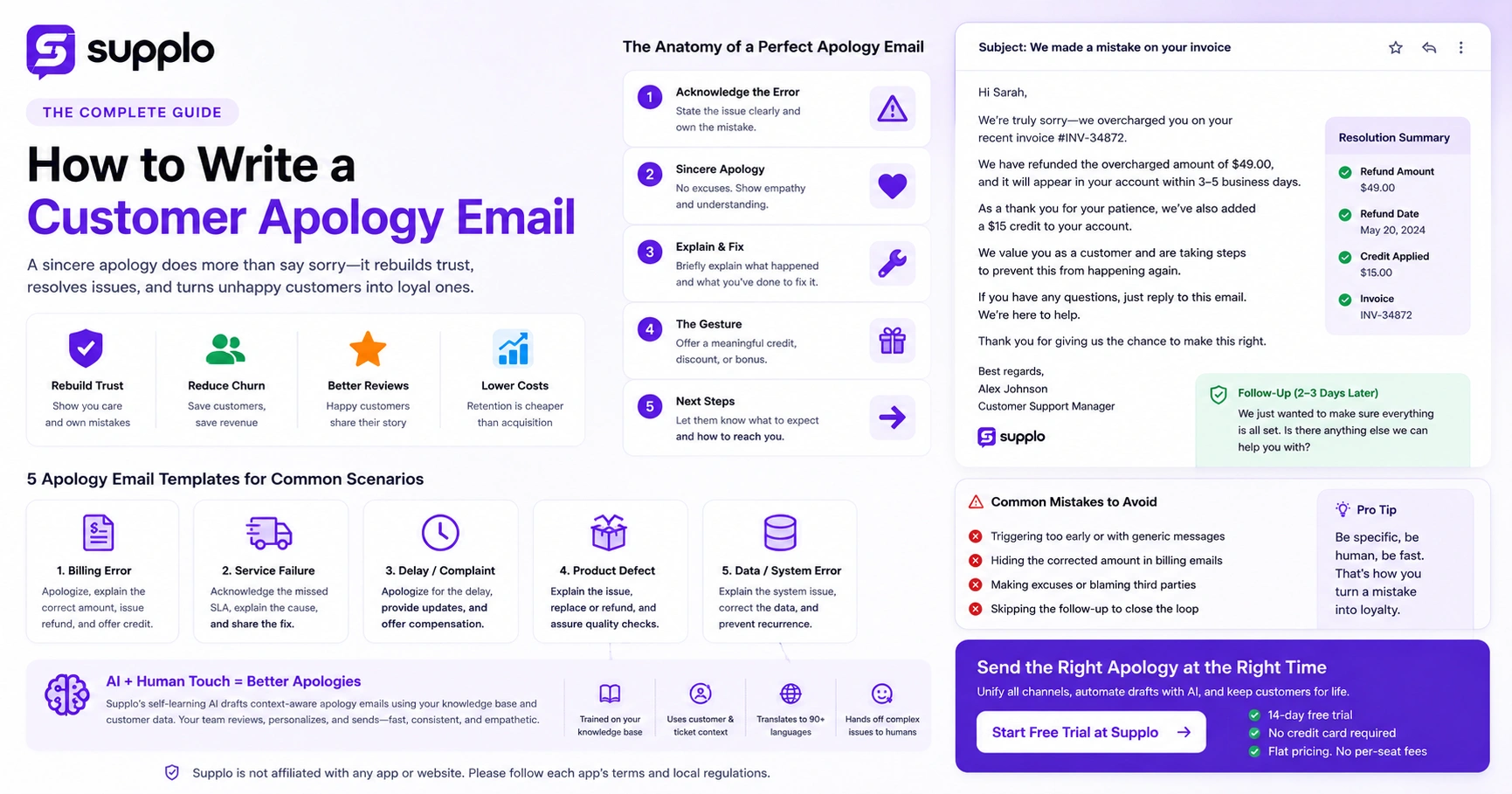
The best apology emails stick to a simple structure: acknowledge the exact error, apologize without excuses, briefly explain what happened, state the fix and offer a meaningful gesture. Cut the legalese, drop the defensive tone and never promise vague things like “we’ll do better.” Instead, show the customer exactly what you’ve already done to make things right.
- Subject Line: Be specific to the issue (e.g., “We made a mistake on your invoice”). This boosts open rates fast.
- Opening Line: Address them by name and state the error directly. Don’t bury the lead.
- The Fix: Detail the concrete action you’ve taken (refund processed, replacement shipped, feature fixed).
- The Gesture: Offer a credit, discount, or loyalty bonus proportional to the inconvenience caused.
5 Customer Apology Email Templates for Common Scenarios
Having ready-to-use templates keeps your support team consistent, but you must personalize each one before hitting send. Below are five templates you can adapt for billing errors, service failures, complaints, product defects and data issues. Each follows the anatomy above.
- Template 1: Apology for Billing Error to Customer
- Focus on the exact amount overcharged, the refund timeline and a small service credit.
- Template 2: Apology Email for Service Failure to Customer
- Clearly state the missed SLA, the cause of the delay and the immediate fix or workaround.
- Template 3: Customer Complaint Apology Email Examples (Generic Delay)
- A flexible structure for shipping delays, feature outages, or miscommunication.
- Template 4: Customer Service Apology Email Script (Product Defect)
- Cover the return/replacement process and quality assurance steps taken.
- Template 5: How to Write an Email for Billing Errors (Data-Focused Fix)
- Explain the system bug that caused the mistake, plus steps to prevent recurrence.
How to Apologize for Bad Service Via Email Without Sounding Robotic
Customers can smell a canned apology from a mile away. To sound human, use conversational language, include specific details from their ticket and avoid corporate phrases like “we strive to provide.” Use their name, mention the exact product or service involved and write the email like you’re talking to them in person.
- Drop the jargon: Replace “inconvenience caused” with “we let you down.”
- Be specific: Instead of “regarding your recent issue,” say “about your order #12345 that arrived damaged.”
- Own the mistake: Use “I/we made a mistake,” not “there was a mistake.”
- Let a tiny bit of your personality show; a controlled tone that fits your brand makes the apology feel real.
The Biggest Mistake You Can Make in a Customer Billing Issue Apology
Here’s the big one: sending a billing apology without the corrected number. If you say “we apologize for the billing error” but never clearly state the correct amount, the customer still doesn’t trust your system. Always include the correct charge, the refund amount and the date the adjustment hits their account.
- Never hide behind “system glitch” without explaining the root cause in simple terms.
- Don’t blame a third-party processor unless it’s the direct, verifiable cause.
- Always include a direct link or button to view the corrected invoice inside your support portal.
- If the error involves overcharging, confirm the refund before you send the email, not after.
A well-structured email that nails this step is exactly what writing a customer apology email is all about.
How AI Can Help You Write Consistent, Empathetic Apology Emails at Scale
A self-learning AI agent can draft context-aware apology emails based on your knowledge base and past successful resolutions. It handles the structure while your team adds the human touch, cutting response time from hours to minutes without losing quality. The AI translates the apology into your customer’s language and routes complex billing issues to the right human agent if needed.
Supplo is not affiliated with any app or website. Please follow each app's terms and local regulations.
- The AI pulls the customer’s history, the ticket context and the relevant resolution from your knowledge base.
- It generates the draft with the correct tone, but a human always reviews and approves before sending.
- For billing errors, the AI can verify the issue against your CRM data and include exact amounts in the draft.
- Translation capabilities ensure non-native speakers receive a culturally appropriate apology, not a literal mess.
Need a fast way to track which customers still need a follow-up? Try Supplo’s free 14-day trial. See how a unified multichannel inbox and AI agent can help you send the right apology at the right moment. Start Free Trial at Supplo
Service Complaint Resolution Email: The Follow-Up That Closes the Loop
One apology email is rarely enough. A service complaint is only truly resolved when you follow up to confirm the fix worked. Two to three days after the initial apology, send a short email asking if the resolution met their expectations. This simple step signals you genuinely care about the outcome, not just closing a ticket.
- The follow-up should be brief: “We hope the refund is processed correctly. Is there anything else we can help with?”
- Use a survey link or a simple reply-to-this-email prompt to gauge sentiment.
- If the customer replies negatively, escalate to a senior agent immediately instead of auto-closing.
Use email ticketing for billing issues to keep everything organized and trackable.
Key Takeaways
- A sincere apology email must include: 1) Acknowledgment of the specific error, 2) A clear resolution or refund step, 3) A follow-up to close the loop.
- Templates save time but must be personalized with the customer’s name and specific issue details.
- AI can draft consistent apology emails, but human review is essential to maintain empathy and accuracy.
- Billing error apologies must include the corrected amount before sending.
FAQ
Should I admit fault in a written apology email?
Yes, but only for verifiable issues. Avoid speculative admissions that could create legal exposure without basis. Stick to what you know for sure.
How fast should I send a customer apology email?
Within 24 hours for non-critical issues; within 2 hours for billing or service outages. Speed signals priority to the customer.
What if the customer doesn’t reply to my apology?
Wait 48 hours, then send one brief follow-up. If still no response, close the loop internally and note the resolution in your CRM.
Can I use the same apology template for every situation?
No. Each scenario- billing error, service failure, product defect- requires a unique structure, specific details and a tailored resolution.
Should I include a discount or credit in every apology?
Not always. A sincere explanation and a fast fix often matter more than a generic coupon. Reserve compensation for tangible inconvenience.
Is it safe to apologize for a billing error caused by the customer?
Frame it as a misunderstanding, not blame. Use neutral language like “It looks like our system processed the amount differently than intended.”
What is the best subject line for a billing apology email?
“Your Name, we made an error on your recent invoice” or “Important: Correction to your billing statement.” Be specific and honest.
Compliance line: Supplo is not affiliated with any app or website. Please follow each app's terms and local regulations.


