On this page
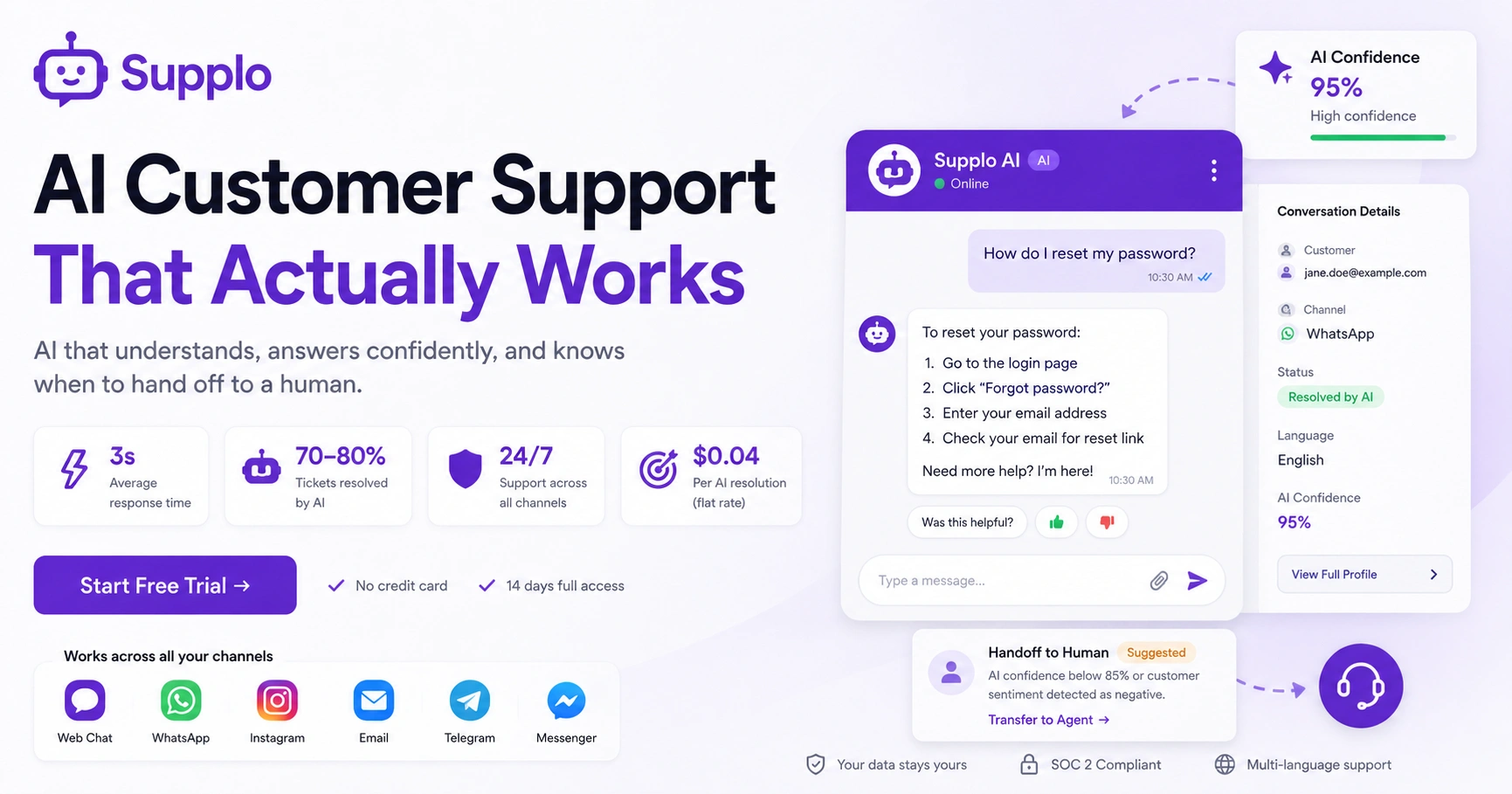
So let's cut through the noise. A customer support AI agent works by digesting your knowledge base, past conversations and product docs, then using natural language processing (NLP) to understand what your customer actually means and match it to the best answer. It's not just scanning for keywords. Your customer could ask How do I reset my password? Five different ways and the AI still gets it right. And when it's not confident enough? It hands the conversation to a human with full context, so nobody has to repeat themselves.
Quick Answer
- A customer support AI agent reads your knowledge base, understands intent through NLP and answers based on confidence scores; no wild guessing.
- Modern AI typically handles 70–80% of those repetitive tickets on its own, then passes complex stuff to humans with everything they need.
- Pricing for AI support runs from $0.04 (modern per-resolution) to $0.99 (legacy per-resolution) per ticket; per-seat models charge per agent, not per answer.
- The AI takeover isn't about firing everyone. It's about moving your team from mind-numbing repetition to actually solving interesting problems.
What Is a Customer Support AI Agent and How Does It Actually Work?
Straight answer: it ingests your business's knowledge base, past conversations and product docs, then uses NLP to match incoming questions to the right answers. It understands intent, not just words. Ask: How do I reset my password? Five different ways and it still finds the right guide. When it's not sure, it hands it off to a human with full context. Nobody repeats themselves.
The AI starts with your knowledge base as its foundation, then learns from every real conversation it handles. Over time, it gets better at your specific products and tone. It uses a confidence score: if it's 95%+ sure, it replies on its own. Below that threshold, it drafts a suggestion for human approval. And here's the thing: modern AI agents handle multi-turn conversations. They remember what the customer said three messages ago and adjust.
No training required on day one. The AI works from your existing content and gets smarter as it interacts with your actual customers. Want to see it in action? Try customer support AI agent Supplo and watch it transform your support.
The Core Functionality of an AI Chatbot for Customer Service
Break it down into three layers: intake, classification and resolution.
First, the chatbot collects the customer's query through any channel: your chat widget, email, WhatsApp, Instagram DMs. It strips away typos and slang to find the core meaning. Next, it classifies the issue by topic, urgency and customer tier, routing it to the right workflow. Finally, it tries to resolve the ticket using your knowledge base. If it can't, it creates a clean handoff to a human with all context preserved.
Multilingual? Built-in. The AI translates incoming messages and responds in the customer's language, eliminating the need for separate bots per region. Sentiment detection flags angry or frustrated customers and prioritizes them for human review before the AI attempts a resolution. The chatbot can also pull order data, account status and shipping info from your backend via API. It's not limited to FAQ-style answers. And it works asynchronously; if a customer replies 24 hours later, the AI picks up exactly where the conversation left off.
Connect your chat widget to Supplo and see how the AI handles multichannel support.
How Customer Support AI Automation Really Works
Here's the technical bit, made simple. Customer support AI automation uses retrieval-augmented generation (RAG). When a question comes in, the AI searches your knowledge base for the most relevant articles, then constructs a natural-language answer from those sources. It's not guessing or making stuff up. And it checks its own confidence score before replying, so you don't get hallucinated answers. This grounded generation approach is what separates reliable AI support agents from generic chatbots that give wrong answers with way too much confidence.
Your data stays yours. The AI doesn't store customer conversations to train public models. Your support history stays in your workspace and only improves your specific bot. Automation rules let you set triggers: if a ticket contains a refund and the order value is under $50, the AI processes it immediately. Above that, it escalates. Your shared team inbox shows every AI-handled ticket, so your team can audit responses and tweak the knowledge base if something was missed. Real-time translation happens on the fly, so automation covers every language your customers speak without extra setup.
AI Customer Support Pricing: What You'll Pay Per Resolution vs. Per Seat
Pricing usually falls into two models: per-seat (you pay for every human agent logged in) or per-resolution (you pay only when the AI actually resolves a ticket). Legacy tools charge around $0.99 per resolution. Modern platforms like Supplo charge a flat $0.04 per AI resolution. Per-seat models punish you for growing your team. Per-resolution aligns cost directly with value delivered.
With per-seat pricing, you pay for agents even when they're idle. A $90/month/seat bill adds up fast as you onboard new teammates. Per-resolution means your costs scale only with ticket volume, not headcount, making budget forecasting much more predictable. Watch out for platforms that charge for AI interactions that aren't actually resolutions. Some bills for partial assists or failed attempts. The best value comes from platforms that blend AI and human support into a single price, so you don't have to manage two separate vendor bills. Supplo accepts payments via multiple methods, including crypto, Binance Pay, Payeer, GCash, AmanPay, QIWI Wallet, DOKU, Nigeria and South Africa cards, Skrill and Payoneer. Check out our per-resolution pricing.
Cheaper Customer Support Solutions That Don't Sacrifice Quality
Cheaper doesn't have to mean worse. The trick is switching from per-seat pricing to flat-rate or per-resolution models. Many teams save 60–70% by moving from legacy tools to an AI-native platform where the bot handles 80% of tickets before a human touches them. The cheapest solution is one where your cost per ticket drops as volume rises, not one that forces you to cap team growth.
Flat per-workspace pricing (like Supplo's model) means you don't panic-add or panic-remove seats during seasonal spikes. Cheaper solutions also consolidate channels. If you're paying for separate WhatsApp, email and chat widget tools, one unified inbox cuts that cost dramatically. Self-learning AI reduces the time your human team spends typing the same answers; that's a labour cost savings, not just software savings. Free trials with full functionality let you validate the savings before committing. See how Supplo stacks up as an Intercom alternative or Zendesk alternative.
AI vs. Human Customer Support: Where Each One Wins
AI wins on speed, consistency and availability. It answers in under 3 seconds, never forgets a policy update and works 24/7 across time zones. Humans win in empathy, complex problem-solving and situations that require judgment calls or apologies. The winning strategy isn't all AI or all human; it's a tiered system where the AI handles the first 80% of repetitive, rule-based tickets and hands off the nuanced 20% to your best people.
AI is ideal for password resets, order status checks, return policy questions and any FAQ with a definitive answer. Humans are essential for billing disputes, sensitive account issues, escalated complaints and anything that requires a sincere apology or negotiation. AI can draft the initial response for the human, cutting their average handle time in half. This isn't a replacement; it's an augmentation. The best customer experience happens when the AI handles the boring stuff fast, so your humans have time to be human. Use the shared team inbox to monitor AI and human interactions.
When to Use AI for Support and When to Hand Off to a Human
Use AI whenever the answer is knowable from your documentation, policies, or order database. Things like What's your return window? Or where's my package? Hand off to a human the moment you detect anger, ambiguity, or a request that requires bending the rules. A good AI agent should proactively suggest a human handoff, not force the customer to fight for one.
Use AI for first-response triage. It can categorize and prioritize tickets before routing them, even if it can't fully resolve them. Hand off when the customer uses aggressive language, asks to speak to a manager, or mentions a sensitive topic like fraud or privacy. Use AI for post-resolution follow-ups: Did that answer your question? surveys and CSAT scoring. Never let the AI handle anything related to account deletions, legal requests, or medical emergencies. Those always need human judgment.
The AI Takeover in Customer Service – What It Actually Means for Your Team
Let's be real. The AI takeover isn't about robots replacing your entire support team. It's about shifting your team's work from repetitive, low-value tickets to complex, high-impact conversations. Most teams find that after implementing AI, they need fewer frontline agents and more specialized roles, such as customer success escalations or senior support analysts. The jobs that remain are better paid and more satisfying because they focus on problems that actually need a human.
AI handles the boring stuff: password resets, refund status, shipping updates; that makes human agents dread logging in. Your team's role shifts from typing the same 10 answers 50 times a day to solving edge cases, improving the knowledge base and building customer relationships. The number of support tickets per human actually goes up because faster AI responses lead to happier customers who ask more questions. But each question is more meaningful. The goal isn't to eliminate jobs; it's to eliminate burnout and give your best people the work they were actually hired to do.
How to Set Up Your First Customer Support AI Agent
Setting up a customer support AI agent takes about 30 minutes if you have your knowledge base ready. Seriously. Here's how:
- Upload your existing help docs, product guides, or policy PDFs; the AI reads them automatically.
- Connect your customer channels- email ticketing, website widget, WhatsApp, Instagram, Telegram, Facebook Messenger- all to your shared inbox.
- Set handoff rules; define which topics or sentiment scores trigger an automatic transfer to a human.
- Let the AI run in suggest mode for the first day; it writes suggested replies for your team to approve, building confidence before letting it go live.
- Go live and monitor the first 50–100 AI conversations; catch any gaps in your knowledge base early.
Start by creating your account on an AI-native platform, connecting your channels and importing your FAQ or help articles. The AI will begin answering immediately based on that content. Then you review its first batch of responses, tweak anything it got wrong and let it learn from real conversations. Integrate your email ticketing, WhatsApp, Telegram and Instagram DM support to maximize your AI's reach.
Test it yourself; free for 14 days.
Don't take our word for it. Set up your own AI agent at Supplo right now, connect a channel and let it handle 10 real customer questions. You'll see the confidence scores, the handoff logic and the pricing, all before you pay a cent.
Start Free Trial →
Common Pitfalls That Break AI Customer Support and How to Avoid Them
The most common failure? A weak or outdated knowledge base. If your help articles are vague, contradictory, or written in jargon, the AI will confidently give wrong answers. Another major pitfall is failing to set handoff rules; the AI endlessly tries to solve problems it can't, frustrating customers who want a human. And some teams turn on AI without monitoring the first 48 hours, missing early accuracy issues that compound over time.
- Pitfall: The AI hallucinates answers because your knowledge base is too thin. Fix: Write clear, step-by-step articles for your top 20 support topics before going live.
- Pitfall: The AI doesn't know when to quit. Fix: Set a maximum of 2 AI attempts before automatic human handoff.
- Pitfall: The AI sounds robotic. Fix: Use the platform's tone customization to match your brand voice: friendly, formal, or somewhere in between.
- Pitfall: The AI handles sensitive topics it shouldn't. Fix: Blocklist keywords such as 'lawsuit', 'data breach', or 'account deletion' to force immediate human review.
- Pitfall: Nobody audits the AI's performance. Fix: Schedule a 15-minute weekly review of AI-handled tickets to spot knowledge gaps.
Maintain a robust knowledge base to ensure your AI's accuracy and reliability.
If your current tool feels like a constant fire drill, it's time for a different approach.
Supplo's AI agent learns from your knowledge base, flags its own uncertainties and hands off cleanly to your team when needed. No hallucinations. No billing surprises, just a flat $0.04 per AI resolution and a shared inbox that actually works.
Key Takeaways
- A customer support AI agent uses NLP to understand customer intent and provides accurate, confident answers.
- The AI handoff process ensures seamless transitions to human agents when necessary, maintaining customer satisfaction.
- Per-resolution pricing models, like Supplo's $0.04 per resolution, offer cost savings and predictability.
- AI excels at repetitive tasks, while humans handle complex and sensitive issues, leading to a balanced support strategy.
- Setting up an AI agent is straightforward and can be done in 30 minutes with a ready knowledge base.
- Avoid common pitfalls by maintaining a robust knowledge base, setting clear handoff rules and regularly monitoring AI performance.
FAQ
Is a customer support AI agent safe to use with customer data?
Yes, as long as the platform doesn't use your customer conversations to train public AI models. Look for platforms that keep your data isolated to your workspace and offer SOC 2 compliance or equivalent data protection. Always review the provider's data processing agreement before connecting your support channels.
Supplo is not affiliated with any app or website. Please follow each app's terms and local regulations.
Can an AI agent replace my entire customer support team?
Not fully. A well-trained AI can handle 70–80% of repetitive, rule-based tickets, but complex issues, angry customers and judgment calls still need humans. The best setup uses AI to handle the volume so your human team can focus on the problems that actually require empathy and creativity.
How long does it take to set up an AI customer support agent?
With a ready knowledge base, you can go from zero to live in about 30 minutes. The platform reads your existing documentation and starts answering immediately in a suggested mode so you can review responses before letting it reply autonomously. Full optimization usually takes a week as the AI learns from your real ticket data.
What happens if the AI gives a wrong answer?
Modern AI agents use confidence scoring; if the AI isn't highly certain of the correct answer, it flags the ticket for human review rather than responding. When wrong answers slip through, your team can correct the knowledge base entry and the AI will learn from that correction for future similar questions.
Does AI customer support work for multiple languages?
Yes. Most AI-native platforms include real-time translation so that a customer can ask in Spanish and receive a response in English (or the same language), without needing separate bots per language. The AI reads your knowledge base in one language and translates answers on the fly.
Is AI customer support cheaper than hiring more human agents?
Almost always, yes. AI resolution pricing starts at $0.04 per ticket on modern platforms, while even the most efficient human agent costs $1–$3 per ticket in salary alone. For high-volume teams, the math is clear: AI handles the volume at a fraction of the cost, while your human team handles fewer, higher-value interactions.
How do I know if AI support is working for my business?
Track three metrics: AI resolution rate (what % of tickets the AI closes without human help), CSAT scores for AI-handled vs. human-handled conversations and your cost per ticket over time. If AI resolution stays above 50% and CSAT doesn't drop, you're in good shape.
Compliance line: Supplo is not affiliated with any app or website. Please follow each app's terms and local regulations.


