On this page
If you're an early-stage startup, you're probably wearing five hats and still trying to figure out what your product should even look like. Customer support? That's the thing you keep pushing to next sprint. But here's the catch: your customers won't wait.
Early-stage startups often face the challenge of providing robust customer support without burning through their limited runway. Those bloated support tools with per-seat pricing and hidden setup fees? Not the answer. What you actually need is a customer support stack for early-stage startups that's lean, affordable and doesn't make you hire three people to answer emails.
The whole point is solving customer problems quickly without watching your budget explode. Start lean with automation and you'll actually have time to focus on product-market fit instead of drowning in inbox triage.
Quick Answer
- Build a cost-effective support stack using a single platform.
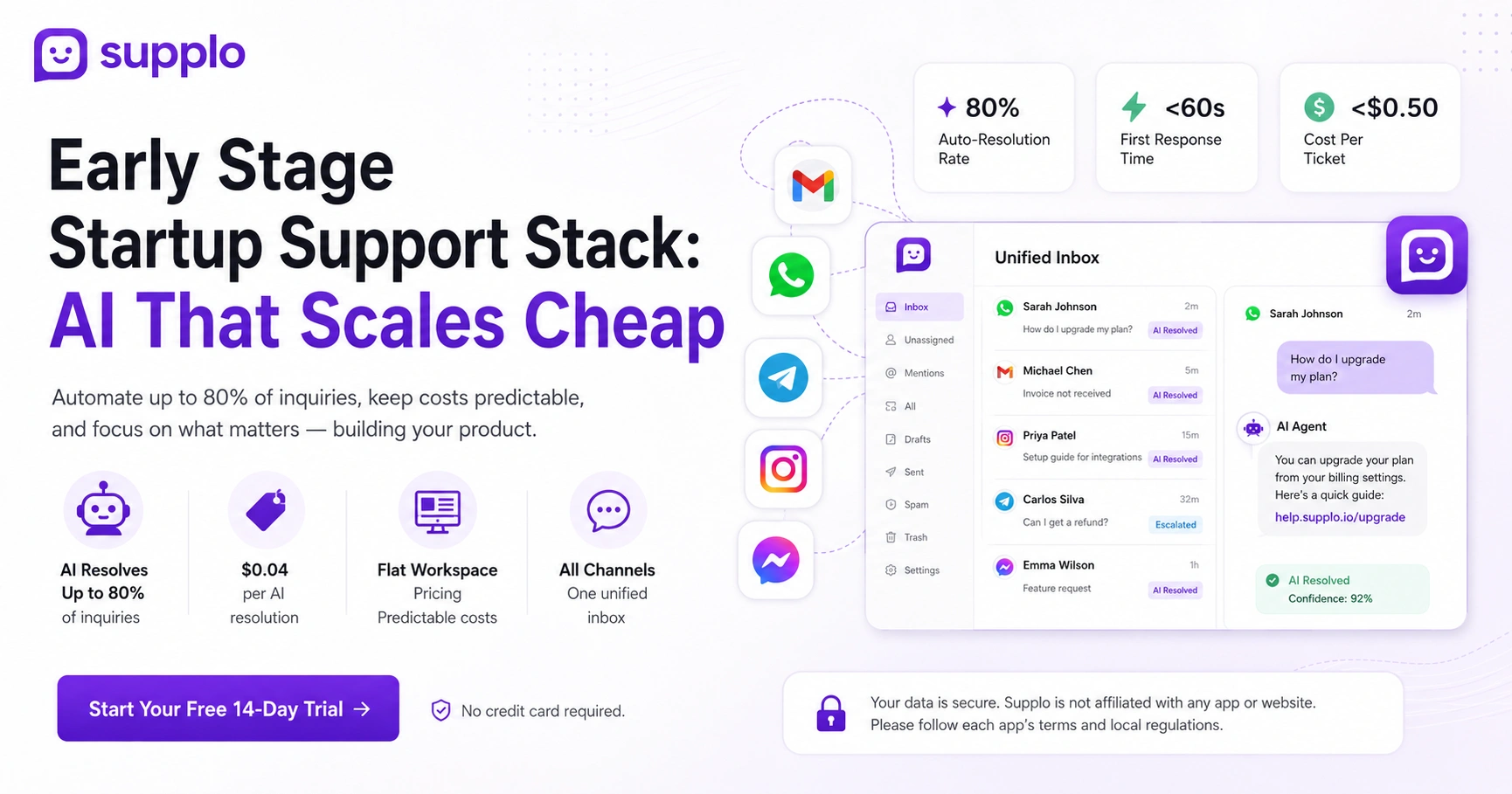
- AI agents resolve up to 80% of inquiries automatically.
- Flat workspace pricing keeps costs predictable, with AI resolutions at $0.04 each.
- Start with 20 FAQs, shadow the AI for the first week and scale as confidence grows.
Why Your Early-Stage Startup Needs a Cost-Effective Support Stack from Day One
Here's a truth most founders learn the hard way: bad support kills startups faster than bad products. But spending your entire seed round on customer service tools isn't the solution either.
Early-stage startups can't afford bloated tools that charge per seat and hide setup fees in the fine print. A cost-effective support stack means you solve customer problems fast without burning the runway. Starting lean with automation lets you focus on product-market fit instead of inbox triage.
- Most legacy tools (the ones with seat-based pricing) actively punish you for hiring your first support agent. Crazy, right?
- Early adoption of automation future-proofs your team for when volume spikes and it will spike.
- A flat-rate stack gives you predictable costs, which is absolutely critical for seed-stage budgeting.
The Core Components of a Low-Cost Customer Service Stack for Startups
You really only need three things. That's it. A shared inbox that unifies all your channels, a knowledge base your AI can actually read and an AI agent that resolves tickets automatically.
Please don't buy separate tools for live chat, email and social DMs. One platform should handle it all.
- A thread-based inbox replaces five different logins (email, chat, WhatsApp, Telegram, Instagram). Your sanity will thank you.
- Your knowledge base should import from existing docs or scrape your site: no rewriting everything from scratch.
- The AI agent acts as your first-line support, handing off only complex issues to humans who can actually solve them.
How to Set Up Self-Learning AI for Startups to Automate Customer Inquiries
Start by connecting your knowledge base to articles, help docs and even old chat transcripts, if you have them. The AI learns from that data and gets smarter over time as it interacts with real customer questions.
You don't need engineers for this. Most modern tools, including Supplo's AI agent, let you train the AI through a simple dashboard.
- Feed the AI your top 20–30 FAQs first. It learns patterns from successful resolutions.
- Review the "unanswered" log weekly and update your knowledge base to close gaps.
- The best self-learning systems improve accuracy without manual retraining. Set it and forget it (mostly).
Choosing the Right AI Customer Service for Startups
Here's what matters: an AI that actually learns from your specific business, offers a flat workspace price (not per agent) and supports multiple channels from day one.
Avoid tools that charge per resolution; they punish you when you're successful. That's like your landlord charging more rent when you get a raise.
- Per-resolution pricing sounds cheap but balloons fast as you grow.
- Must have multilingual support without add-ons if you sell globally.
- Check whether the AI can cleanly hand off to a human without losing context. Nothing worse than a customer repeating themselves three times.
How to Automate Support for Early Stage Startups in Under 30 Minutes
Seriously, this takes less time than your morning coffee run. Sign up for Supplo, connect your email inbox and website chat widget, then upload your knowledge base or top 10 FAQs. Let the AI handle inbound messages while you shadow the first 20 conversations. Turn on WhatsApp and Telegram in two clicks, no API setup needed.
- Create your Supplo workspace (free for 14 days).
- Import your existing knowledge base or write 5–10 core answers.
Enable the website widget and link your email (Gmail, Outlook, or custom domain)
- Add WhatsApp and Telegram from the integrations panel.
- Let the AI auto-resolve simple questions; you approve complex ones.
Ready to see it in action? Start your free 14-day trial at Supplo.io, no credit card needed. Test the AI with your own questions before you commit.
Breaking Down Low-Cost Customer Service for Startups vs. Seat-Based Pricing
Let's talk numbers because that's what keeps founders up at night.
Most traditional support tools charge $50–$99 per agent per month. For a 5-person team, that's $250–$495 monthly before AI add-ons. Platforms like Supplo charge a flat workspace fee (starting at free) and their AI resolves tickets at $0.04 per resolution, not the $0.99 per resolution legacy tools charge.
See the difference? You pay for outcomes, not seats.
- Seat-based pricing punishes you for scaling your team.
- Per-resolution AI pricing is a trap; it rewards the vendor, not you.
- Flat workspace pricing means your bill stays predictable as you add channels and agents.
Check out Supplo's pricing page to see exactly what you'd pay.
How to Keep Your Startup Customer Service Automation Reliable When Volume Spikes
Your AI should handle up to 80% of tickets on its own so your team only touches complex issues. But that reliability depends on good training data and clear escalation rules.
Set up automatic handoff triggers: if the AI's confidence score dips below 70%, route the ticket to a human with full conversation history.
- Test your AI with high-volume scenarios during setup; don't wait for a real spike.
- Ensure your platform has zero-downtime scaling (cloud-native tools handle this).
- Keep an eye on the auto-resolved vs. escalated ratio; adjust your knowledge base as needed.
Integrating Multichannel Communication into Your Customer Support Stack
Your customers live everywhere: email, WhatsApp, your website chat, Instagram DMs. A real support stack unifies all of those into a single thread-based inbox, so your team sees the full conversation history without switching tabs.
Supplo natively supports WhatsApp, Telegram, Instagram DMs, Facebook Messenger, email and your website widget.
- One inbox means no missed messages across channels.
- The AI works across all channels, not just one.
- Translation is built-in so that you can reply in your language and the customer reads in theirs.
Supplo is not affiliated with any app or website. Please follow each app's terms and local regulations.
How to Train Your Self-Learning AI for Startups Without a Data Scientist
Start with your top 20 FAQs and write the answers in plain language, as if you're explaining to a friend. Upload past chat transcripts (anonymized) if you have them. The AI will learn from resolved conversations and get smarter over time.
Most platforms, including Supplo, have a train on the fly feature that lets you correct the AI's response and learn immediately.
- Don't overwhelm the AI with all your docs at once; feed it in batches.
- Use the unanswered report to see where the AI struggles and fill gaps.
- Your team can teach the AI by editing its responses in the inbox.
The Hidden Pitfalls of Startup Customer Service Automation
The biggest trap? Trusting the AI unquestioningly without reviewing its first 50 responses. Don't do that. Another common mistake is buying a tool that doesn't hand off to humans smoothly; you end up with angry customers stuck in a chatbot loop.
Also, avoid per-resolution pricing that nickel-and-dimes you. Start small, shadow the AI and scale after confidence builds.
- Always maintain a human-review mode during the first week.
- Ensure your tool supports clean escalation (no lost context).
- Don't automate sensitive issues like account security or payment disputes initially.
If your AI fails on a tricky question, that's okay; Supplo's handoff is seamless. Your team sees the full conversation. Start free and find out where your knowledge base needs work.
KPIs for Your Early Stage Support Stack
Track these three numbers: auto-resolution rate (AI resolves what percentage of tickets), first response time (how fast customers hear back) and cost per ticket.
For the early stage, aim for an auto-resolution rate above 60% and a first response time under 60 seconds. If your cost per ticket drops below $0.50, you're winning.
- AI auto-resolution rate tells you if your knowledge base is strong enough.
- Customer satisfaction (CSAT) scores should stay stable even as automation increases.
- Monitor how many tickets the AI escalates; too many means weak training data.
Key Takeaways
- Build a cost-effective support stack using a single platform.
- AI agents resolve up to 80% of inquiries automatically.
- Flat workspace pricing keeps costs predictable, with AI resolutions at $0.04 each.
- Start with 20 FAQs, shadow the AI for the first week and scale as confidence grows.
Supplo is not affiliated with any app or website. Please follow each app's terms and local regulations.
FAQ
Is it safe to fully automate customer support for my startup?
Yes, as long as you keep a human in the loop for sensitive issues like billing disputes, account security and escalations. The AI handles routine questions; your team handles the rest.
Why does some AI support software fail to answer accurately?
Usually because the knowledge base it's trained on is incomplete or poorly written. Feed it clear, specific answers and review the "unanswered" log weekly to fix gaps.
Can I use a single platform for email, chat and social DMs?
Yes. Supplo unifies email, website chat, WhatsApp, Telegram, Instagram DMs and Facebook Messenger into one thread-based inbox. You don't need five separate tools.
How much should I expect to pay for startup customer support automation?
Most flat-rate platforms start free and scale predictably. Avoid per-seat or per-resolution pricing; it rewards the vendor when you're successful.
What should I NOT automate for my startup?
Never fully automate password resets, payment disputes, or legal inquiries without human review. Use the AI to gather context, but let a person make the final call.
My AI's answers sound robotic. How do I fix that?
Rewrite your knowledge base in a conversational tone, use contractions, full sentences and first-person language. The AI mirrors what you give it.
How long does it take to train a self-learning AI?
Most tools show good accuracy within 50–100 real customer questions. Start with your top 20 FAQs and the AI improves rapidly based on interaction data.
Compliance line: Supplo is not affiliated with any app or website. Please follow each app's terms and local regulations.