On this page
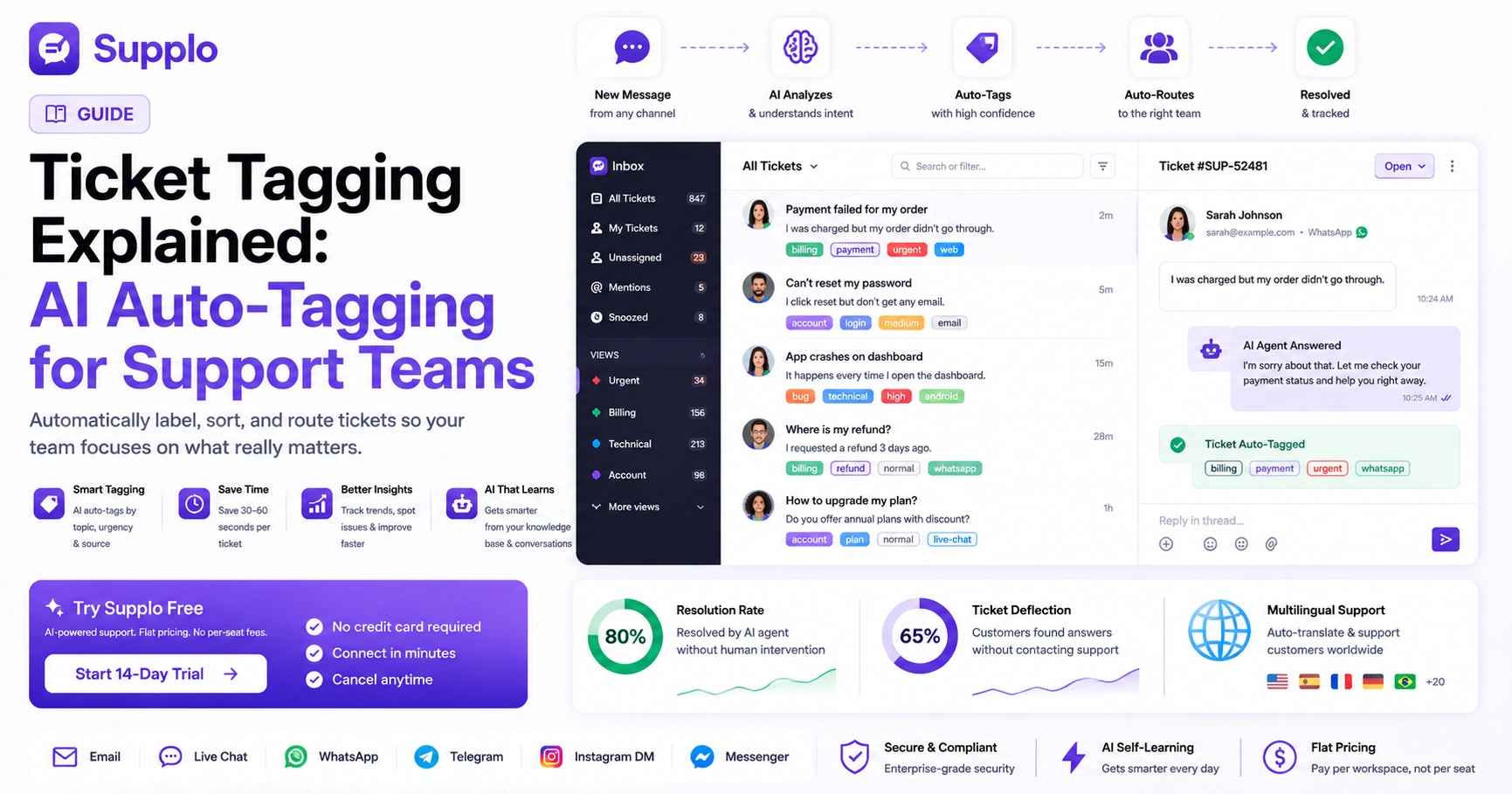
If you've ever stared at a support inbox with 847 unread tickets and zero idea what's urgent, you already know the pain that ticket tagging in customer support solves. It's simple: you slap labels on incoming tickets that tell you what they're about- billing, bug, account recovery, whatever matters to your team. Done right, it transforms chaos into something you can actually sort through. The best part? You should be able to answer "How many payment issues came in today?" in about five seconds flat. If you can't, tagging is your missing piece.
Quick Answer
- Ticket tagging = labelling support tickets by topic, urgency and source.
- Automated and AI-driven tagging eliminates human error, saves roughly 30–60 seconds per ticket and scales without increasing your team size.
- Best practice: keep your tag list under 30, review it every quarter and let AI do the boring categorization work.
- Supplo's AI actually gets smarter over time; it learns from your knowledge base and past conversations to tag more accurately as it goes.
What Is Ticket Tagging in Customer Support? and Why It Matters
Think of tags like folders, but way more flexible. One ticket can carry multiple tags, urgent plus refund, for example. That's where the magic happens. When you look at historical tagging data, patterns emerge. Suddenly you notice a spike in questions every time you push a product update. Without tags, you're guessing blind. With tags, you're looking at real numbers. Smart teams treat tagging as a shared language everyone speaks, not just one person's weird organizational obsession.
Manual Tagging Is Dying, Here's Why Automated Ticket Tagging Wins
Here's the thing nobody tells you about manual tagging: it eats 30 to 60 seconds per ticket. Doesn't sound painful until you're dealing with hundreds of tickets daily. Then it's hours gone, poof, vanished. Automated ticket tagging uses rules or AI to assign tags the second a ticket lands. Zero overhead. No human error.
Think about it. Tired agents miscategorize stuff. It happens. Automation fixes that. A security tag can trigger an automatic route to a senior agent. Manual tagging needs more people as you grow; automation needs better software. Even your best human taggers won't tag the same ticket identically; I've seen it a hundred times. Automation is your first real step toward an inbox that sorts itself. Supplo's AI can handle this before your team even wakes up.
How AI Ticket Tagging Actually Works
Let's cut through the buzzwords. AI ticket tagging combines natural language processing (NLP) with pattern matching. The system studies your already-tagged tickets and knowledge base, figures out the intent behind new messages and assigns tags with a confidence score. It's not some magical brain in the cloud. It's a very fast pattern-matching machine that never gets sleepy.
The AI looks at keywords, sentence structure and context. It knows the difference between "I lost my password" (account issue) and "I lost my package" (shipping problem). When human agents review and correct AI-assigned tags, the model gets better. Confidence thresholds matter too; if the AI is only 60% sure, it flags the ticket for a human rather than tagging it unthinkingly. Supplo's self-learning AI improves over time as it processes more conversations. And here's the neat part: it works across languages because it translates intent, not just words.
The Real Benefits of Ticket Tagging: Data You Can Actually Trust
Tagging isn't just about staying organized. It's the foundation for every meaningful support metric you'll ever want. Tagged data shows you which channels generate the most refund requests, which topics your AI agent resolves without human help and where your team spends the most time.
Here's what you can actually do with that data:
- Identify your top five ticket categories each week, then optimize your knowledge base for them.
- Measure resolution time per tag type; you might find technical setup takes three times longer than billing
- Spot seasonal patterns: gift card tags spike in December like clockwork
- Prove ROI to leadership by showing exactly which issues AI resolves without escalation.
Less repetitive work for your team. Fewer manual clicks equals less burnout, simple math.
Why Use Ticket Tagging? The Hidden Advantage for Busy Teams
If you're a team of three handling a thousand tickets a week, tagging is the difference between feeling in control and absolutely drowning. Tags mean any agent can glance at the queue and instantly know what's urgent, what's a repeat issue and what can wait until tomorrow.
New hires onboard faster, too; they filter by simple tags instead of reading through random backlogs to figure things out. Tagging enables SLA enforcement: if a critical tag isn't answered in 15 minutes, trigger an alert. Beyond SLAs, tagging routes tickets to the right person without anyone asking, "Does anyone know about this?" It creates transparency. Managers can see, "Sarah resolved 40 billing tickets today. Good work." It turns support from a reaction center into a proactive analytics hub.
Ticket Tagging Best Practices That Don't Slow You Down
The golden rule? Have fewer than 30 tags and make sure anyone on your team can define each one in a single sentence. If you need a tag for every minor variation, you've already lost. Keep it lean. Let your AI handle the nuance. Only tag what you'll actually track.
Start with three mandatory categories:
- Issue Type (billing, login, shipping)
- Urgency (critical, normal, low)
- Source (WhatsApp, email, widget)
Use prefixes for clarity: issue_billing, issue_login, urgent_critical. Avoid redundant tags; if feedback and suggestion mean the same thing, pick one. Review your tag list every quarter. Delete anything unused. Train your team on tag definitions once. Then let automated tagging take over.
How to Set Up Auto-Tagging in Your Support Stack
Setting up auto-tagging usually means feeding your existing tagged tickets into an AI model or defining keyword-based rules. In Supplo, you connect your channels, upload or sync your knowledge base and the AI agent begins categorizing incoming messages immediately. Tags appear in your shared inbox, ready to filter, route, or report on.
Quick setup checklist:
- Start with your most common three ticket types
- Train the AI on 50+ examples per type for accuracy
- Define what happens when a tag is applied: route to a specific team, auto-respond, or flag for review
- Monitor confidence scores early on
- Correct any mis-tags to improve the model
- Test with a small batch of real tickets before turning on full automation
Supplo's setup takes minutes, not weeks, because we believe in fast iteration.
Try it on your real tickets. Set up a free Supplo account and connect one channel. You'll see AI auto-tagging in action within minutes, no credit card needed. Start your 14-day trial now.
Avoiding the Tag Sprawl Trap: Common Pitfalls to Skip
Tag sprawl is real. It happens when teams create a new tag for every edge case. Suddenly you have 200 tags nobody uses and your queue is as noisy as if you had none at all. The fix is discipline: only add a tag when you have a clear reporting or routing need and delete unused tags quarterly.
Watch out for the meeting problem: tags that only one person understands are useless. Make definitions visible in your knowledge base. Don't let agents create ad-hoc tags. Lock tag creation to managers or the admin role. Watch for tag synonyms: bug, glitch and error should probably collapse into one. If your average ticket has five or more tags, you're over-tagging. Aim for two to three. Regular audits keep your system clean. Schedule 30 minutes each month.
Already dealing with a messy tag system? Migrate to a setup that keeps your queue clean. Supplo's flat pricing means you won't get penalized for adding more tags or team members. Start free.
The Role of Your Knowledge Base in Smarter Auto-Tagging
Your knowledge base is the single most powerful input for training your AI to tag accurately. When the AI can read your help articles, policy documents and previous conversation archives, it understands context, not just keywords. A well-written knowledge base directly improves tagging precision.
The AI cross-references ticket content with knowledge base articles to determine the right tag. If a ticket matches a KB article on password reset, the AI tags it account with high confidence. But outdated KB articles confuse the AI. Keep your content fresh. Supplo's AI self-learns from both your knowledge base and historical conversations, doubling the training data. A strong KB means fewer escalations and more accurate auto-tagging from day one.
Ready to Clean Up Your Inbox? Try a Smarter Way to Tag
You don't need to overhaul your entire support flow to benefit from ticket tagging. Start today with a simple rule: tag every ticket this week for just one category you care about, billing, for example. Then try automating that with AI and watch your team reclaim hours.
No credit card required to start. Hook up one channel and tag 100 tickets for free. You'll see how AI tagging fits your workflow before committing to anything. Supplo handles email, website widget, WhatsApp, Telegram, Instagram and Facebook Messenger, all in one inbox. Pricing is flat per workspace, not per agent. Your tag system scales without a price hike. Supported payment methods include Crypto, Binance Pay, Payeer, GCash and more.
You've got the playbook. Now get the tool. Auto-tagging, multichannel inbox, AI agent and transparent pricing, all in one workspace. Supports Crypto, Binance Pay, Payeer, GCash and more. Start your free trial today.
Supplo is not affiliated with any app or website. Please follow each app's terms and local regulations.
Key Takeaways
- Ticket tagging turns chaos into a clean, filterable queue.
- AI auto-tagging removes human error and saves time.
- Keep your tag list lean and review it regularly.
- A well-maintained knowledge base improves tagging accuracy.
- Supplo's AI agent and flat pricing offer scalable support.
FAQ
What is ticket tagging in customer support?
Ticket tagging is the practice of labelling customer inquiries with keywords that categorize their topics, urgency, or sources. It helps teams sort, filter and report on tickets efficiently.
Can AI really tag tickets accurately?
Yes, modern AI models achieve high accuracy by analyzing intent, language and context, not just keywords. Accuracy improves over time as the model learns from corrections and your knowledge base.
Will auto-tagging replace human agents?
No. Auto-tagging handles the grunt work of categorization, so human agents can focus on solving the actual problem. It's a team multiplier, not a replacement.
How many tags should my support team use?
Aim for 15–30 active tags at most. Any more than that and you risk tag sprawl, which defeats the purpose. Review and prune your list quarterly.
Does Supplo support multichannel tagging?
Yes. Supplo unifies email, website widget, WhatsApp, Telegram, Instagram DMs and Facebook Messenger into a single inbox and tags apply across all channels.
Is ticket tagging secure?
When used correctly, tagging adds metadata without exposing sensitive information. Ensure your support platform has proper access controls and follows data privacy regulations.
Can I test auto-tagging before committing to a tool?
Supplo offers a 14-day free trial with no credit card required. You can connect a live channel and see how AI tagging performs on your actual tickets.
Compliance line: Supplo is not affiliated with any app or website. Please follow each app's terms and local regulations.