On this page
You know that feeling when you're trying to find an answer and you just can't? Maybe you're stuck in a support queue listening to elevator music. Or you've sent three emails and gotten back the same generic response.
A help center fixes that.
What is a help center and how do you build one that doesn't just sit there collecting dust? Let's break it down.
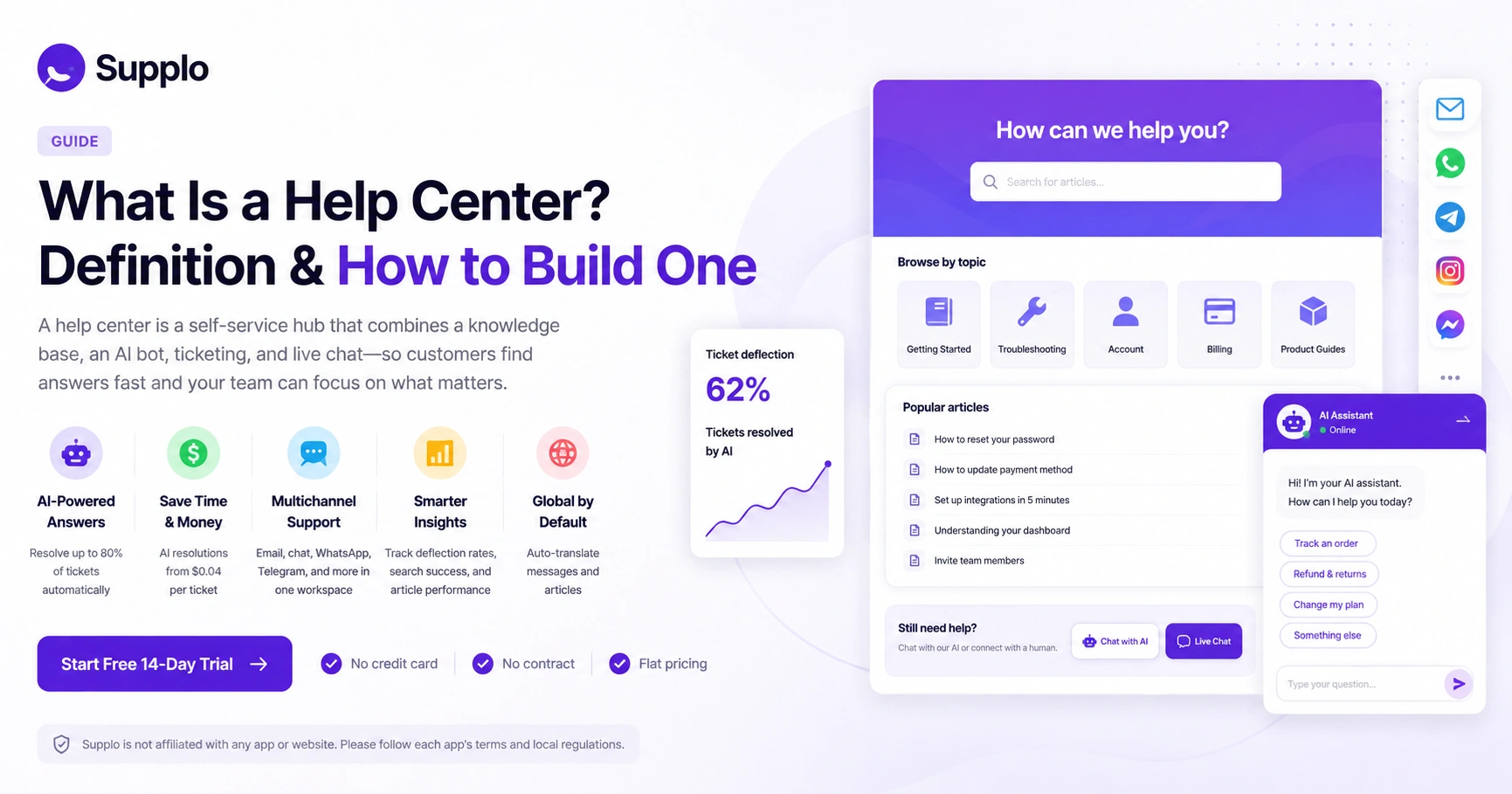
A help center is really just a central spot where your customers can help themselves. Think of it as the intersection of your knowledge base, FAQ section, ticketing system and maybe an AI bot or live chat. The whole point? Let people find answers fast so your support team isn't drowning in "how do I reset my password?" tickets.
Quick Answer
- A help center is a self-service hub that combines a knowledge base, an AI bot, ticketing and live chat.
- It deflects common questions so your team handles only complex issues, reducing costs and response times.
- Best practices: keep articles scannable, integrate with live support channels, measure deflection rate and update content quarterly.
- Tools like Supplo unify help center content, AI agent, multichannel inbox and automation into a single workspace with flat pricing.
What Is a Help Center? Definition & Core Purpose
Let's get specific. A help center is a centralized support hub where customers find answers without ever talking to your team. It typically includes a knowledge base, FAQ, ticketing system and often live chat or an AI bot.
The real job here is to cut down on support volume. When customers can self-serve, your team spends less time answering the same five questions and more time on stuff that actually needs a human brain.
- Help centers combine static content (articles, guides) with dynamic tools (search, AI chat, ticketing).
- They serve as the first line of defence, handling common issues so your team can focus on complex cases.
- A well-defined help center is structured around user intent: troubleshooting, account management, billing and product guidance.
- Modern help centers can be multilingual, mobile-responsive and brand-customized.
- They're not just for support; they also drive product adoption and reduce churn.
Key Components of a Modern Help Center
A help center isn't just a page full of articles. You need a searchable knowledge base, a ticketing system or live chat for escalations and ideally, an AI agent that resolves tickets automatically. Supplo, for example, brings self-learning AI, a shared inbox and multichannel support into a single workspace.
- Knowledge base with categorized articles, tags and a smart search bar.
- AI agent or chatbot that learns from articles and past conversations to resolve tickets.
- Live chat and ticketing system for when customers need a human.
- Integration with channels like email, WhatsApp, Telegram, Instagram and Facebook Messenger.
- Analytics to track resolution rates, search queries and article performance.
- Custom branding and language translation support.
Why a Help Center Matters for Customer Support
Here's the thing nobody tells you: a help center pays for itself. Every ticket your AI handles at $0.04 instead of a human at.. well, significantly more. That's money back in your pocket.
Customers actually prefer self-service most of the time. They don't want to talk to someone. They want a quick answer and to get back to their day. A good help center gives them that.
- Every self-resolved ticket saves your team time and money, especially if your AI handles it at $0.04 per resolution.
- Customers prefer self-service; a help center reduces wait times and frustration.
- It creates a single source of truth, reducing inconsistent answers across your team.
- A help center scales with your business without adding headcount.
- It also improves SEO and GEO visibility, attracting potential customers via organic search.
How to Build a Help Center
Building a help center isn't rocket science. Start by figuring out what your customers actually ask about, organizing those answers, picking the right tool and keeping it improving.
Steps:
- Identify Your Most Common Customer Questions: Open up your support tickets and chat logs. Find the top 20 questions that keep coming up. These are your core content. Everything else is just a bonus.
- Choose the Right Help Center Software: You need something that includes a knowledge base, AI bot, ticketing and multichannel support. Supplo's AI agent resolves tickets automatically and integrates seamlessly with multiple channels.
- Structure Your Content for Self-Service: Write short articles with clear headings, screenshots and steps of instructions. Make it scannable. Nobody reads a wall of text when they're frustrated.
- Integrate Your Help Center with Live Chat & AI: Set up automation. Let the AI handle common ticket types and hand off to humans when needed. Make sure your email ticketing system connects smoothly too.
Help Center vs. Knowledge Base vs. FAQ: What's the Difference?
This confuses a lot of people, so let's clear it up.
- FAQ: Short Q&A format. Great for simple, static questions. Think "What are your business hours?"
- Knowledge base: Deeper stuff. Articles, tutorials, guides, organized and searchable.
- Help center: The whole package. FAQ + knowledge base + live support channels + analytics.
Most businesses should start with an FAQ, evolve to a knowledge base and then build a full help center. Don't skip steps.
Help Center Best Practices for High Resolution Rates
Here's what actually works:
- Write in plain language. Your customers aren't support engineers.
- Use consistent formatting with short paragraphs and bullet lists.
- Embed screenshots or short videos where helpful.
- Optimize for search by using the words your customers actually use.
- Always include a clear escalation path: "Still stuck? Chat with us."
- Keep articles under 500 words for simple topics. For complex ones, add a summary at the top.
- Track search terms that get zero results; those are your content gaps.
- Update articles quarterly or right after product changes.
- Add a "Was this helpful?" widget to surface stale content.
- Integrate an AI agent of Supplo that learns from your articles. Supplo does this automatically.
How to Measure If Your Help Center Is Actually Working
Numbers don't lie. Track your ticket deflection rate- that's the percentage of customers who found an answer without contacting support. A healthy help center deflects 50–70% of common questions.
- Deflection rate: Tickets avoided ÷ total tickets. Higher is better.
- Search success rate: How often a search leads to a clicked article.
- Article feedback: Positive vs. negative ratings and comments.
- Average time to resolution for remaining tickets (should drop as your help center improves).
- Most-viewed articles help identify gaps needing better content or AI training.
Common Help Center Pitfalls and How to Avoid Them
The biggest mistake? Building a help center and forgetting about it. Outdated articles, broken links and missing escalation paths frustrate customers. Another common one is making the help center hard to find, either by hiding it behind a login or by using jargon-heavy language.
- "Set and forget" mentality: Articles go stale. Schedule quarterly reviews.
- Poor search: Optimize for natural language. "How to reset password" not "password reset function."
- No integration with live support: Users who can't find an answer need a clear next step.
- Over-engineering: 20 great articles that cover 80% of tickets beat 50 mediocre ones.
- Ignoring mobile: More than half of your traffic is on phones. Make sure your help center works there.
Why Supplo Is a Strong Foundation for Your Help Center
Supplo brings everything together. Your help center content, AI agent, shared inbox and multichannel support, all in one place. No more juggling separate tools for knowledge base setup, WhatsApp customer support, email and social DMs.
The AI learns from your help center articles and past conversations, reaching up to 80% automated ticket resolution. At a flat $0.04 per resolution, not the legacy $0.99.
- Your help center articles automatically train the AI agent, so it answers accurately without manual setup.
- Customers get answers in any language; Supplo translates messages so you support a global audience.
- Support includes email, website chat widget, WhatsApp, Telegram, Instagram DMs and Facebook Messenger in one place.
- Pricing is flat per workspace, not per seat, so your team grows without surprise bills.
- Start free with a 14-day trial. No contract, no credit card required.
Key Takeaways
- A help center is a self-service hub that combines a knowledge base, an AI bot, ticketing and live chat.
- It deflects common questions so your team handles only complex issues, reducing costs and response times.
- Best practices: keep articles scannable, integrate with live support channels, measure deflection rate and update content quarterly.
- Tools like Supplo unify help center content, AI agent, multichannel inbox and automation into a single workspace with flat pricing.
FAQ
What is a help center exactly?
A help center is a centralized support hub where customers can find articles, FAQs and contact information for your team. It typically includes a knowledge base, ticketing system and often live chat or an AI bot.
Do I need coding skills to build a help center?
No. Modern help center tools like Supplo offer a drag-and-drop interface and pre-built templates. You can set up a fully functional help center in less than an hour without writing a line of code.
Can a help center replace my support team entirely?
Not completely. A help center can deflect 50–80% of common questions, but complex or sensitive issues still need a human. The goal is to reduce volume, not eliminate your team.
How often should I update my help center content?
Quarterly is the minimum for stable products. Update immediately after any product change, feature launch, or pricing update. Check article feedback and search queries monthly to spot stale content.
What's the difference between a help center and an FAQ page?
An FAQ is a short list of common questions. A help center is a broader system that includes an FAQ, a full knowledge base, live chat, ticketing and often an AI agent to resolve tickets automatically.
Can I use a help center for multiple products or brands?
Yes. Most help center software supports multiple categories or separate brands. You can organize by product line, customer type, or geography; just be careful to keep navigation simple.
How do I get customers actually to use my help center?
Place help links inside your product, in transactional emails and on your support contact page. Use a proactive chat prompt like "Looking for something? Try our help center." Make it the easiest path, not a walled garden.
Compliance line: Supplo is not affiliated with any app or website. Please follow each app's terms and local regulations.