On this page
Quick Answer
Let's cut straight to it. First response time (FRT) is the single biggest predictor of whether your customers walk away happy or frustrated. Faster FRT means they stick around. Period.
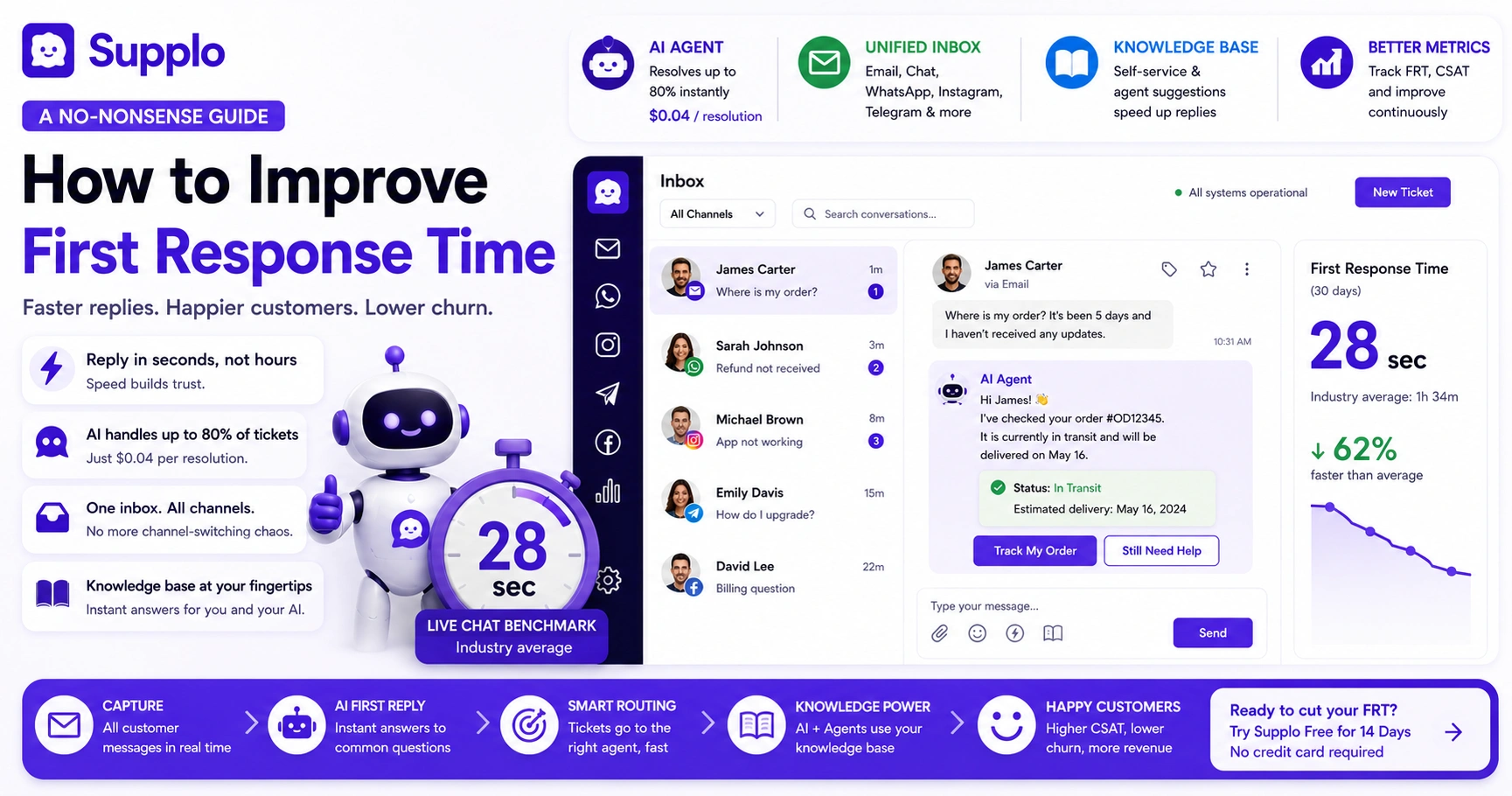
The most practical fix? Deploy an AI agent that handles up to 80% of those first-touch tickets instantly, for a flat $0.04 per resolution. Combine that with a unified multi-channel inbox (email, chat, WhatsApp, Instagram, Telegram), and you've just killed the number one cause of slow replies: channel-switching chaos. And while you're at it, let a knowledge base do the heavy lifting; fewer tickets land on your agents' desks, and when they do, they already have the answers.
Why First Response Time (FRT) Is the Metric That Actually Matters
Here's the thing about first response time: it sets the emotional tone for the entire support interaction. When a customer fires off a question and gets a reply in minutes, they feel heard. When they wait hours? They start hunting for your competitor's number.
FRT correlates directly with CSAT scores and churn rates; ignore it, and you're bleeding revenue you didn't even know you were losing.
- Fast equals "we care." It's that simple. The customer's brain makes that connection in seconds.
- Benchmarks vary, but most people expect a reply within an hour during business hours, less if it's live chat.
- Slow FRT creates more work. Customers send follow-ups, escalate to managers, or open duplicate tickets. Fix the speed, and your volume drops.
- You can't fix what you don't measure. Start tracking FRT today; most modern support tools do it automatically.
The 5 Root Causes of Slow First Response Times and How to Fix Them
Slow FRT isn't random. It almost always traces back to one of five issues, and none of them require rebuilding your entire support operation from scratch.
- Manual triage: Your agents are wasting time sorting tickets instead of replying. Fix: automate categorization. Let the AI figure out whether it's a billing question or a feature request before a human ever sees it.
- Ticket overload: Too many tickets, not enough agents. But hiring isn't always the answer; routing intelligently is. Send the right ticket to the right person the first time.
- Fragmented channels: Your team has one tab for email, another for chat, another for Instagram DMs. That's not multitasking, that's chaos. Fix: one inbox, every channel.
- Missing context: Nothing slows a response like an agent hunting through old emails to figure out who this customer is. Pre-populate conversation threads so every reply starts from an informed place.
- Outdated workflows: Approval chains, rigid SLA rules, unnecessary steps. Strip them. Every extra click is a delay your customer feels.
Compare Supplo with other platforms.
How to Reduce First Response Time with an AI Agent
The fastest way to improve first-response time is to stop making customers wait for a human to handle the easy stuff. Modern AI agents handle the first touch, FAQs, password resets, and ticket routing in seconds, not minutes.
With Supplo, that first reply costs a flat $0.04 per resolution. Compare that to legacy tools charging $0.99 or more. The savings add up fast when you're handling hundreds of tickets a day.
- AI doesn't sleep- no shifts, no lunch breaks, no context-switching lag.
- Up to 80% of incoming tickets can be resolved without a human ever touching them.
- When the AI can't handle it, the handoff is clean; it summarizes the issue so the human agent doesn't have to start from scratch.
- Pricing is per resolution, not per seat. Your cost grows with usage, not headcount. That's a huge difference for growing teams.
Learn more about Supplo's AI agent that learns from past conversations.
Supplo is not affiliated with any app or website. Please follow each app's terms and local regulations.
First Response Time Best Practices: Setting Up a Team Inbox That Moves
Let's be honest: a shared team inbox isn't optional anymore. Without it, tickets disappear into personal inboxes, duplicates pile up, and response times balloon. You need a single, thread-based inbox where every team member can see every ticket and claim or assign work instantly.
- Use clear statuses (open, pending, resolved) so nothing falls through the cracks.
- Implement round-robin or skill-based assignment to keep idle tickets from piling up.
- Enable collision detection; nothing is more embarrassing than two agents typing the same reply to the same customer.
- Set SLA timers with visible warnings for tickets that are aging out. Don't let them die in the queue.
Explore Supplo's unified thread-based inbox.
How to Answer Support Tickets Faster with a Unified Multi-Channel Inbox
Your customers reach out wherever they're comfortable: email, live chat, WhatsApp, Instagram, Telegram, Facebook Messenger. But if your team is juggling separate logins for each channel, your first response time suffers. Every switch costs seconds, and those seconds add up.
A unified inbox brings all channels into a single timeline. That means the first reply is fast, regardless of where the customer started.
- Email ticketing converts inbound emails into trackable tickets instantly—no more lost messages.
- WhatsApp and Telegram live in the same thread as email, zero context switching.
- Instagram DMs and Facebook Messenger integrate natively, preserving message history so agents don't ask "what were we talking about?"
- Built-in translation means non-English messages don't sit in a queue waiting for a bilingual agent.
Discover how Supplo handles email-to-ticket conversion.
Learn more about WhatsApp and Telegram support.
Explore Instagram DM and Facebook Messenger integration.
Supplo is not affiliated with any app or website. Please follow each app's terms and local regulations.
Speed Up Customer Service Response by Automating the First Touch
Here's the thing: the first response should be automated, but it shouldn't feel automated. A well-configured AI agent sends a human-sounding reply that actually answers the question or sets realistic expectations. It buys the human agent time to craft a thorough follow-up without leaving the customer hanging.
- Automate the common stuff: password resets, order status updates, shipping queries. The things that make up 80% of your ticket volume.
- Add a personal touch: the AI can use the customer's name and reference prior conversations. It's not rocket science, but it makes a huge difference.
- Set expectations: if the AI can't answer, it should say so, and give a realistic wait time for a human. Silence is worse than a delay.
- The AI learns over time. The more you use it, the smarter it gets about your specific customers and their common issues.
How to Decrease Ticket Response Time Using a Knowledge Base
Here's a truth that saves teams hours every week: not every question needs a human answer. A public or internal knowledge base lets customers solve their own problems, which dramatically reduces your ticket volume. But there's a second benefit many teams miss: when you integrate your knowledge base with your inbox, the AI can auto-suggest articles to agents while they type. That cuts reply time in half.
- Self-service reduces inbound tickets by up to 30%, according to industry surveys. That's a lot of tickets that never needed an agent.
- AI auto-suggests relevant KB articles while the agent types their reply. One click to insert the link.
- Agents love it because they don't have to hunt for the right article. It's right there.
- Keep it updated. Nothing frustrates a customer more than a knowledge base article that's clearly outdated.
Explore Supplo's integrated knowledge base.
The Best Customer Service Response Time: Benchmarks and What's Realistic
Let's get real about benchmarks. The "best" response time depends on your channel and your industry. Email under 1 hour? That's excellent. Live chat under 30 seconds? You're crushing it. Social DMs within the same day? That's above average for most brands.
But chasing an arbitrary number without fixing your process is a waste of energy. Aim for "as fast as possible with high accuracy." A fast wrong answer is worse than a slow correct one.
- Live chat benchmark: 28 seconds for first response (industry average). You can beat that with automation.
- Email benchmark: 2–4 hours is average. Under 1 hour puts you in the top tier.
- Social media: 4–5 hours is standard. Same-day is best, and customers notice.
- Don't sacrifice quality for speed. It's the first response that matters, not the fastest one. Make it good.
Learn how Supplo compares to Crisp.
How to Get Faster Customer Service from Your Own Team
Sometimes the bottleneck isn't the tool; it's the people. Agents slow down due to unclear ownership, constant context switching, or insufficient training. Fixing that doesn't require a massive overhaul.
- Reduce context switching: give your agents one inbox, not five tabs. It's the single biggest time-waster.
- Use saved replies (macros) for common issues, refunds, returns, and greeting templates. Don't let them retype the same thing twenty times a day.
- Train them on the tools. Speed comes from confidence. If your agents don't know how to use the AI or the knowledge base, they'll never be fast.
- Track individual FRT and coach underperformers privately. Public shaming doesn't work. Private coaching does.
First Response Time Tools: What to Look for in 2024 and Beyond
Honestly? The tool you choose matters less than whether it does three things well: unifies your channels, automates first responses, and integrates with your existing stack. Anything less is a band-aid.
Look for these features:
- Multi-channel inbox that handles email, chat, WhatsApp, Telegram, Instagram, and Facebook in one place.
- AI that learns from your knowledge base and past conversations, not a generic chatbot.
- Flat pricing per workspace, not per seat. You should scale without surprise bills.
- Clean human hand-off with context preservation. The AI shouldn't drop the ball when it passes a ticket to a human.
- Avoid tools that charge more than $0.50 per resolution or lock you into long contracts. That's 2023 thinking.
Explore Supplo's transparent pricing.
Supplo is not affiliated with any app or website. Please follow each app's terms and local regulations.
Key Takeaways
- First response time (FRT) is the #1 predictor of customer satisfaction. Faster FRT = higher retention. Period.
- Deploy an AI agent that handles up to 80% of tickets instantly for a flat $0.04 per resolution. It pays for itself in week one.
- A unified multi-channel inbox (email, chat, WhatsApp, Instagram, Telegram) eliminates channel-switching delays. One inbox, every channel.
- Combine automation with a knowledge base to reduce ticket volume and give agents instant answers. Less typing = faster replies.
See how Supplo stacks up against Zendesk.
FAQ
What is first response time (FRT) in customer support?
First response time is the average time between when a customer submits a ticket and when they receive the first reply. It's the most important metric for support efficiency and customer satisfaction.
How fast should my first response time be?
For live chat, aim for under 30 seconds. For email, under 1 hour is excellent. For social media DMs, same-day is standard. Benchmarks vary, but faster always wins.
Can an AI agent reduce first response time without sacrificing quality?
Yes, if it's trained well. A good AI agent answers common questions instantly and accurately, and hands off complex issues to a human with full context. It improves FRT without flooding customers with generic replies.
What's the biggest mistake teams make when trying to improve FRT?
Focusing on speed alone. If you push agents to reply faster without giving them a unified inbox, AI automation, or a knowledge base, you'll get faster bad answers. Fix the process first, then the speed.
Does using multiple support channels slow down first response time?
It can, if they're not unified. Managing email, chat, WhatsApp, and Instagram in separate tools inevitably leads to delays. A unified inbox makes FRT consistent across every touchpoint.
How do I calculate first response time?
Sum the time from ticket creation to first reply for all tickets, then divide by the total number of tickets. Most support tools, including Supplo, do this automatically.
What is a realistic first response time reduction target for a startup?
A 50% reduction within 30 days is realistic with automation and a unified inbox. Going from 2 hours to 1 hour, or from 10 minutes to 5 minutes, depending on your starting point.
What if I need to improve FRT quickly?
Implement an AI agent, unify your inbox, and automate common replies. These steps can significantly reduce FRT within days, not months.
Compliance line: Supplo is not affiliated with any app or website. Please follow each app's terms and local regulations.


