On this page
Setting up a support email inbox isn't the sexiest task on your to-do list. But get it wrong, and you're basically handing customers a reason to leave. A properly configured inbox means no message slips through the cracks, every query lands with the right person, and your team actually knows what they're supposed to be doing. This guide is for anyone tired of losing tickets, confusing customers, or explaining to their boss why that urgent email sat unread for three days.
Quick Answer
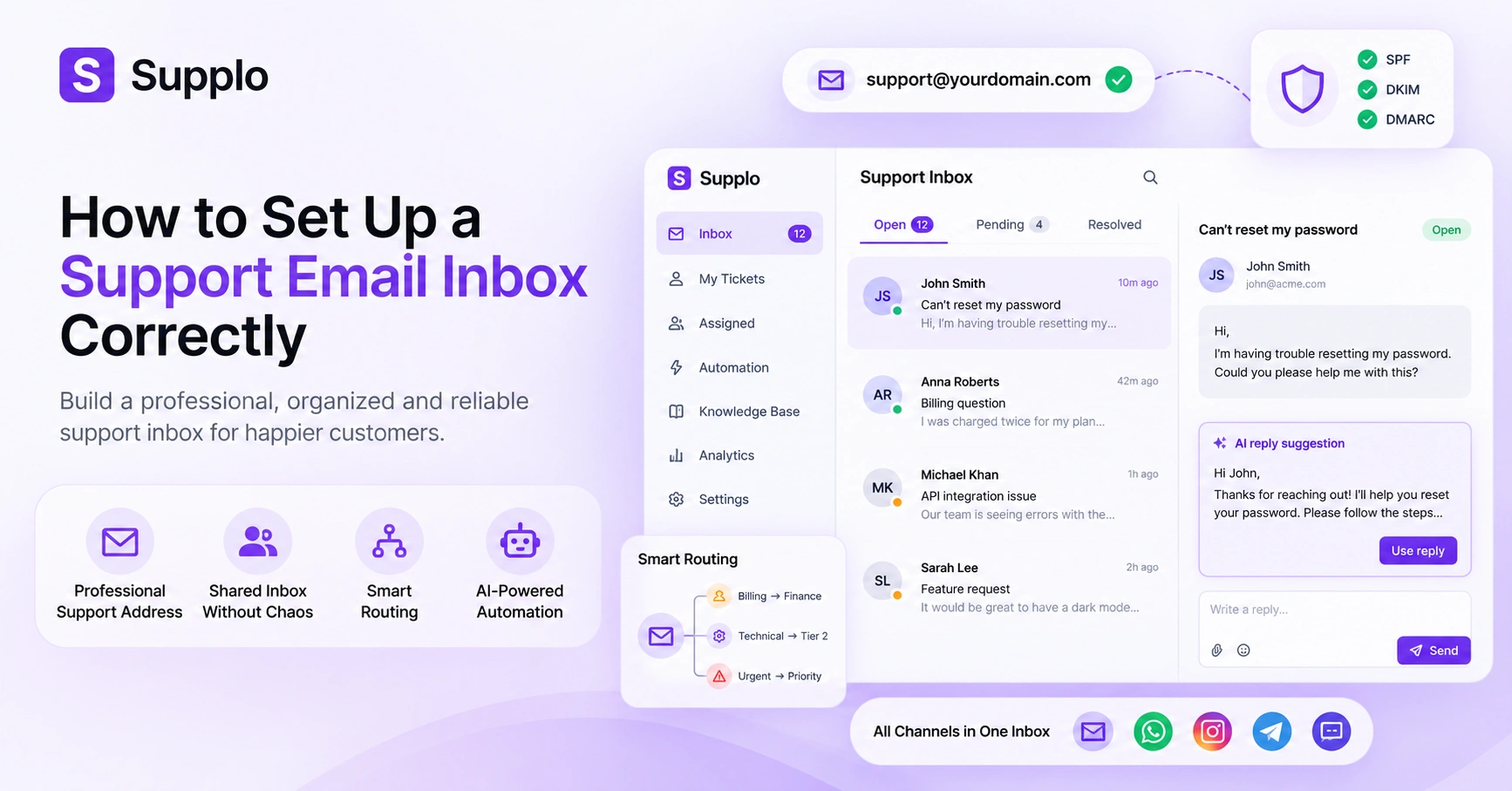
- Professional Address: Use [email protected] and ensure SPF, DKIM, and DMARC are configured. Otherwise, your emails vanish into spam purgatory.
- Shared Inbox: Ditch the shared Gmail password. Get a thread-based inbox with collision detection so two agents don't reply to the same ticket at the same time.
- Smart Routing: Build rules that send billing questions to finance, technical issues to tier 2, and urgent requests to the top of the queue.
- Strategic Automation: Let AI handle the repetitive stuff, but always keep a human in the loop for anything that gets complicated.
- Unified Channels: Pull email, chat, WhatsApp, Instagram DMs, and Telegram into one view. Your customers don't care about your internal channel preferences.
Why a Proper Support Inbox Setup Determines Your Team's Reliability
Here's the thing: your support inbox isn't just a place where emails land. It's the first impression customers get when something goes wrong. If your setup is sloppy, emails bouncing, threads getting lost, nobody knowing who owns what, you're telling customers they don't matter. And they'll act accordingly.
The hidden cost of a single shared Gmail password
We've all seen it. A team of five sharing one Gmail login, tagging each other in forwarded threads, hoping nobody replies to the wrong email. It's chaos dressed up as collaboration. Without collision detection, two agents can spend twenty minutes crafting individual responses to the same customer. The customer gets two replies, gets confused, and your brand looks amateur. Plus, you can't track individual performance, measure response times, or even know who actually resolved what.
How an unorganised inbox creates blind spots in customer trust
When a customer has to repeat their problem three times because your team can't see the full thread, you've already lost them. A messy inbox creates blind spots, tickets that fall through the cracks, follow-ups that go unanswered, and context that evaporates between shifts. Trust is fragile. One missed urgent email can cost you a contract. And honestly? Most of these problems aren't about the software. They're about how you set things up from the start.
How to Create a Professional Support Email Address That Customers Trust
Stop using [email protected] for support. Just stop. Info@ is the junk drawer of email addresses. Nobody knows what to do with it. Instead, pick a prefix that immediately tells the customer they've reached the right place. Then make sure your domain authentication is locked down so your emails actually arrive.
Choosing your prefix wisely: support@ vs. help@ vs. hello@
Support@ and help@ are your safest bets. They're direct, clear, and customers instinctively know they've hit the right queue. Hello@ works fine for general inquiries, but if you're using it for urgent support requests, you're asking for trouble. And info@? That's for marketing inquiries and random vendor spam. Don't make your customers guess where to send their problems.
Why a generic info@ inbox is killing your response times
Info@ is the wild west. It collects everything: customer complaints, partnership offers, press inquiries, spam, and the occasional "can you reset my password" email. Your support team ends up sifting through noise to find real tickets. Meanwhile, the customer who needs help right now is waiting. Response times tank. Customer satisfaction follows. It's a slow-motion disaster that's completely avoidable.
Supplo is not affiliated with any app or website. Please follow each app's terms and local regulations.
How to Set Up a Shared Inbox for Customer Service Without Chaos
A shared inbox should feel like a team sport, not a game of telephone. Every agent sees every ticket. Internal notes stay internal. And nobody accidentally steps on someone else's reply. The trick is picking a platform that actually supports collaboration, not just shared logins.
The best practices for internal notes, collision detection, and assignment rules
Internal notes are your secret weapon. Agents can discuss the customer's issue, tag in a manager, or leave context without the customer ever seeing it. Meanwhile, collision detection prevents the awkward moment when two agents hit send on the same ticket simultaneously. Pair that with automated assignment rules, VIP customers go to senior agents, billing questions go to finance, and your team runs like a well-oiled machine.
Avoiding the reply-all nightmare with thread-based inboxes
Old-school email chains are a disaster waiting to happen. Someone hits reply-all, the thread explodes, customers get copied on internal chatter, and suddenly everyone's confused. A thread-based inbox keeps everything in one place. Every reply, every note, every status change lives on a single timeline. It's cleaner, faster, and way less embarrassing.
Best Practices for Support Email: Automating the Repetitive Without Breaking the Human Touch
Automation is amazing when it's done right. But customers can smell a generic bot from a mile away. The goal isn't to remove humans. It's to remove the boring, repetitive stuff so humans can focus on what actually matters.
Writing auto-replies that set clear expectations (and don't feel robotic)
A good auto-reply does two things: acknowledges the customer and sets a timeline. Hey [Name], thanks for reaching out. We'll get back to you within 4 hours. That's it. No pretending to solve everything instantly. No weird corporate jargon. And please, use the customer's Name. It takes two seconds and makes a massive difference.
When to escalate vs. when to let the AI finish the job
AI can handle maybe 70-80% of common questions, password resets, order status, and basic troubleshooting. But the moment the customer sounds frustrated, asks a nuanced question, or starts using words like "unacceptable" or "manager," hand it to a human. Smart automation recognises these signals and escalates gracefully. Never let the AI dig a deeper hole.
Want to test your automation setup before committing? Start a free 14-day trial at Supplo and see how many of your tickets can be resolved automatically.
Supplo is not affiliated with any app or website. Please follow each app's terms and local regulations.
Configuring a Help Desk Email That Routes Tickets Correctly Every Time
A help desk email isn't just an address; it's a brain. It reads the incoming request, figures out what it's about, and sends it to the right person. Without proper routing, every ticket starts as a vague please help and wastes your team's time sorting through the noise.
Setting up rules, filters, and routing logic that scales
Build rules based on keywords (refund, technical issue, urgent), sender domain, or subject line. Create custom addresses per department, billing@, enterprise@, press@, and map them to specific queues. The goal is simple: when a ticket arrives, it lands in exactly the right place, every single time. This is how you build accurate email ticketing and routing that actually scales.
The difference between a ticket system and a simple forwarded email
A forwarded email is a hand grenade with the pin pulled. No context, no history, no accountability. A ticket system assigns a unique ID, tracks every interaction, logs resolution times, and tells you exactly who handled what. One is chaos. The other is a professional support operation. Choose wisely.
How to Set Up a Unified Support Inbox Across Email, Chat, and Social
Your customers don't care about your internal channel hierarchy. They don't know that email goes to one team and Instagram DMs go to another. They want an answer. A unified inbox pulls everything into one chronological timeline so agents see the full picture, regardless of where the conversation started.
Integrating email with WhatsApp, Instagram, and Telegram without losing context
Native integrations matter. You want agents to respond to WhatsApp messages, Instagram DMs, or Telegram support requests from the same interface they use to handle email. No switching tabs. No copying and pasting. Just one view, full context, seamless responses. That's what WhatsApp customer support integration should feel like.
Why a multichannel support inbox needs a single source of truth (knowledge base)
A knowledge base is your team's brain. It stores answers, troubleshooting steps, and policies that both humans and AI can draw from. When your AI agent can pull from the same knowledge base that your human agents use, consistency follows. Customers get the same accurate answer whether they email, chat, or DM. That's the goal.
How to Automate Your Support Email Inbox Without Losing Context
Automation should feel like a helpful assistant, not a replacement. The best systems read the customer's intent, check for existing answers, and either draft a reply or resolve the ticket completely. But they always leave the door open for a human to step in.
AI for support inbox: what good automation looks like vs. glorified spam
Good AI automation is precise. It understands what the customer actually needs and offers a solution. Glorified spam is the opposite: generic, irrelevant replies that clearly weren't written for the recipient. The difference is intent recognition. A well-trained AI agent reads the message, understands the context, and responds appropriately. Anything less is just noise.
The real cost of per-ticket automation (and why flat-rate pricing wins)
Here's the dirty secret: some platforms charge per-resolution for AI automation. The more you automate, the more you pay. That's backwards. Flat-rate pricing, like what we offer at Supplo, means you can automate as many tickets as you want without watching your bill climb. Per-ticket pricing discourages automation. Flat pricing encourages it. Simple as that.
How to Consolidate Support Emails and Channels Into One Workspace
If your team is juggling a Gmail tab, a Facebook page, a WhatsApp business app, and a separate chat tool, you're not supporting customers, you're task-switching. Consolidation means bringing everything into one workspace where tickets are unified, searchable, and organised by customers. It's simpler than it sounds.
The process of migrating from 3 inboxes to 1 without losing data
Start by mapping all your active channels. Export current tickets and contact information. Set up forwarding rules from the old inboxes to your new centralised help desk. Match customer identities across channels, the same person might email, then DM on Instagram, then message on Telegram. A unified inbox preserves that context so your team never has to ask, "Have we talked before?"
What to do about orphaned tickets from legacy tools
Orphaned tickets happen when migration goes wrong. Old conversations get lost. Customers follow up, and nobody knows what they're talking about. Prevent this by importing historical data into your new system. Archive old conversations so they're searchable but don't clutter your active queue. This is especially important when consolidating channels such as Instagram DMs and Telegram support into a single workspace.
Common Pitfalls When Setting Up a Support Email and How to Avoid Them
Even the best tool fails with a sloppy setup. The most common mistakes? Missing SPF records (emails go to spam). No fallback routing (tickets disappear). Failing to archive after migrating (duplicate chaos). The fix is simple: test every channel before going live. Send test emails. Check spam folders. Keep a backup alias for 30 days. A single misconfigured SPF record can silently block thousands of incoming tickets, and you'd never know until customers start complaining.
If your current setup is dropping tickets or confusing your team, our workspace handles email, chat, and social in one place, with AI that resolves tickets at a flat $0.04 per resolution. Try it for free. Try Our Unified Inbox Free.
Choosing the Right Tool to Set Up Your Unified Support Inbox
You've got two paths: patch together free tools and hope nothing breaks, or use an all-in-one platform that handles everything natively. The first option feels cheaper until you factor in the hours spent maintaining integrations and troubleshooting broken workflows.
Comparing approaches: custom setup vs. all-in-one platform
A custom setup might save you money upfront, but you'll pay for it in maintenance headaches, integration drift, and lost productivity. An all-in-one platform gives you pre-built integrations, centralised data, and a unified workspace that works. When you compare the total cost, time, frustration, and missed tickets, the all-in-one approach almost always wins.
What to look for in omnichannel customer service inbox software
Look for: true shared inbox, collision detection, robust routing rules, custom auto-replies, and strong email authentication support. Make sure it integrates natively with your essential channels, not just email forwarding, but actual WhatsApp, Telegram, and Instagram integrations. And avoid per-ticket AI pricing. It's a trap. Compare our pricing structure transparently so you know exactly what you're paying for.
Whether you're upgrading from a shared Gmail inbox or migrating from another platform, Supplo sets up in minutes, not weeks. Start your free trial and see your unified inbox in action. Start Your Free Trial
Key Takeaways
- A professional support email setup builds customer trust and operational efficiency from day one.
- Use a shared, thread-based inbox with collision detection and clear assignment rules.
- Automate strategically, let AI handle repetitive tasks, but keep humans in the loop for complex issues.
- Consolidate all channels into one unified workspace for seamless customer context.
- Flat-rate AI pricing beats per-ticket pricing every time.
- Test everything before going live. SPF, DKIM, and DMARC are non-negotiable.
FAQ
Can I use a free Gmail account for customer support?
Not for reliable business support. Free Gmail lacks shared inbox features, collision detection, and SLAs. Emails will also land in spam more often due to missing domain authentication. Use a domain-based email with a proper help desk platform.
What is the best email format for professional customer support?
[email protected] or [email protected] are the most recognisable and least confusing. Avoid info@ or hello@ for support, as those are typically marketing addresses.
Do I need to set up SPF and DKIM for my support email?
Yes. Without SPF and DKIM records, your outgoing support emails may end up in spam folders, and incoming emails may be rejected. This is non-negotiable for reliability.
How do I stop support emails from going to spam?
Authenticate your domain with SPF, DKIM, and DMARC. Additionally, use a reputable sending domain, avoid spammy trigger words, and warm up your inbox if you're sending high volume immediately.
Can I integrate WhatsApp with my support email inbox?
Yes, if your help desk platform supports native WhatsApp integration. Supplo unifies WhatsApp, Telegram, Instagram DMs, and Facebook Messenger into the same thread-based inbox as your email.
What is the difference between a shared inbox and a ticketing system?
A shared inbox is typically a single mailbox accessed by multiple agents. A ticketing system (like a help desk) assigns unique IDs, tracks status, and provides reporting. For reliable support at scale, you want a ticketing system with a shared inbox interface.
How do I automate responses without sounding robotic?
Use AI to draft replies based on your knowledge base, but always include a human escalation path. Set auto-replies to acknowledge the message and state expected response time, rather than pretending to solve everything instantly.
Is AI support reliable enough for customer-facing emails?
Yes, when configured correctly. AI can handle up to 80% of common questions and troubleshooting. The key is handing off cleanly to a human when the AI isn't highly confident, and being transparent with the customer about when they're talking to AI.
Compliance line: Supplo is not affiliated with any app or website. Please follow each app's terms and local regulations.